9. Appendix System A - 100
doepfer
36
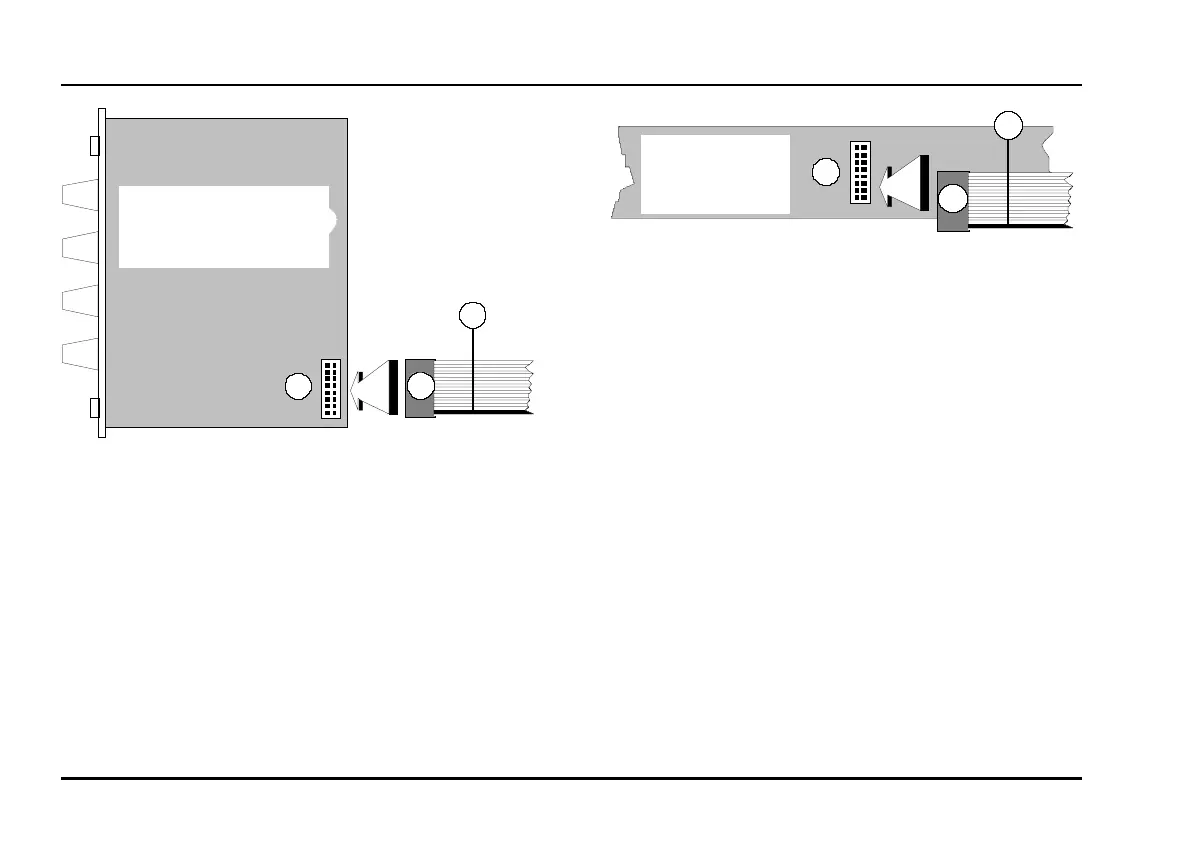
Fig. 1: Connecting the ribbon cable to the module
D Now join the free end of the ribbon cable (see
2
in
Fig. 2) to the nearest available position on the
system bus board (see
1
in Fig. 2).
A
Again ensure that the coloured marking on
the ribbon cable is at the bottom of the
module’s connector (see
3
in Fig. 1) and
that the connection is perfect, and pushed
fully home, not at a slight angle. Failure to
check this may again result in disaster.
Fig. 2: Connecting the ribbon cable to the bus
board.
D Now fix the module solidly in its case.
D Re-connect the A-100 MNT’s power supply, and
then switch on the mains again.
D Test out the newly installed module.
If it doesn’t seem to be working as expected, imme-
diately disconnect the system from the power sup-
ply again.
In this case, double-check the connections, making
completely sure that the ribbon cable is the right
way round where it connects to the module and to
the bus.
Best ückungsseite
1
3
2
3
2
1
Busplatine
components side
bus board



 To Next Page