6. Mode sub-menu 3
6.1 Sound recorder:
6.1.1 Tap the red dot to start recording: tap red pause button to pause
recording.
6.1.2 After pausing, select delete, save or continue recording.
6.1.3 Swipe screen right to left to listen to all saved audio recordings.
6.1.4 Tap and hold on recording to get options to play, adjust or delete.
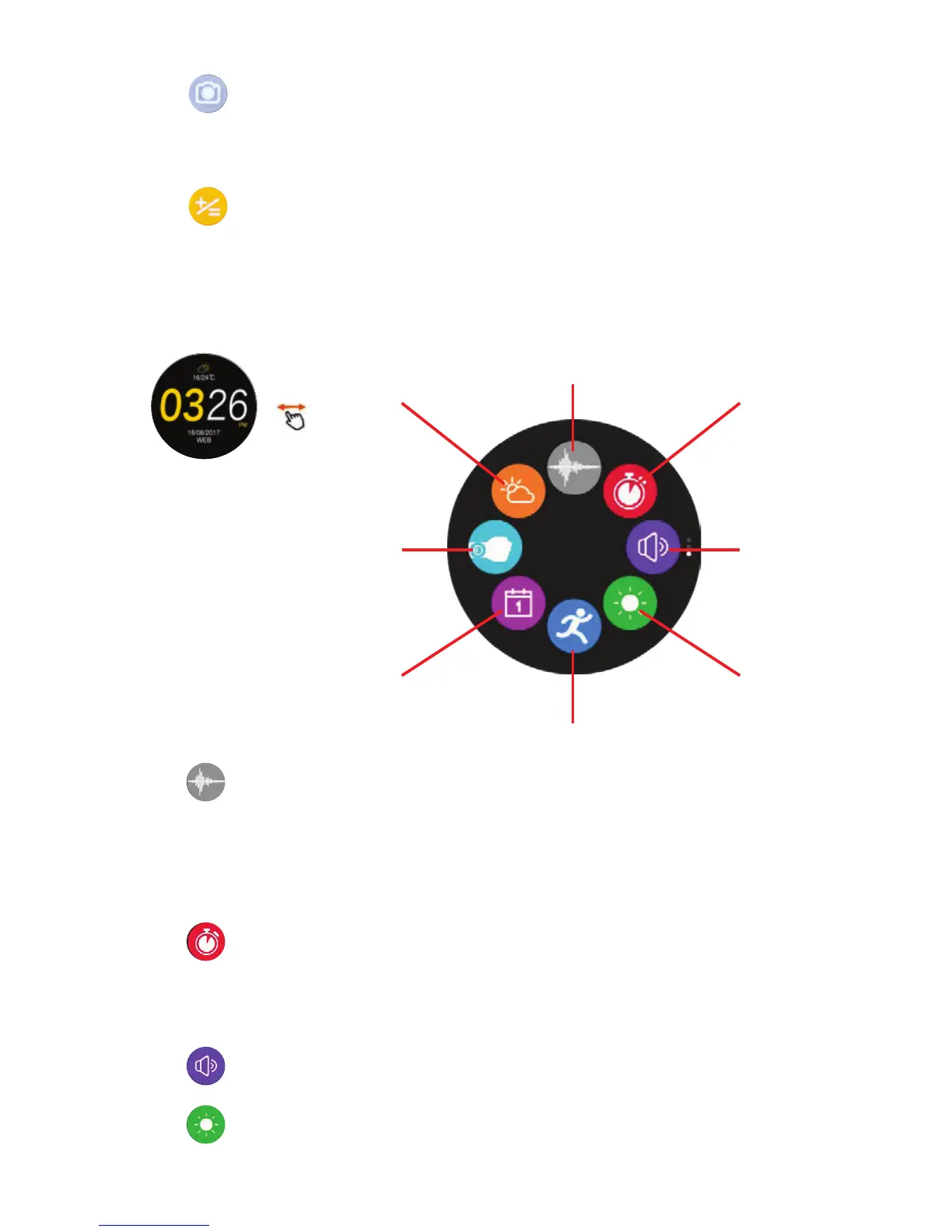
Sound recorder
(6.1)
Stopwatch
(6.2)
Volume
(6.3)
Brightness
(6.4)
Sport (6.5)
Weather
(6.8)
Gesture control
(6.7)
Calendar (6.6)
6.2 Stopwatch:
6.2.1 Tap play or pause button to stop/pause stopwatch.
6.2.2 Press blue button during timing: this will record the interval.
6.2.3 Press the blue button (when timing has stopped) to delete time
measured.
6.3 Volume:
Use “-/+” or the rotary to set the volume.
6.4 Brightness:
Use “-/+” or the rotary to set the brightness.
5.8 Calculator:
5.7.1 Perform basic mathematical functions.
5.7.2 Exiting calculator will cancel all previous calculations.
5.7 Camera Remote:
5.7.1 Take pictures remotely on your connected Smartphone.
5.7.2 Tap capture icon after ensuring your Smartphone camera function
is open.


 To Next Page
 Loading...