3.2 Weather: (see section 9)
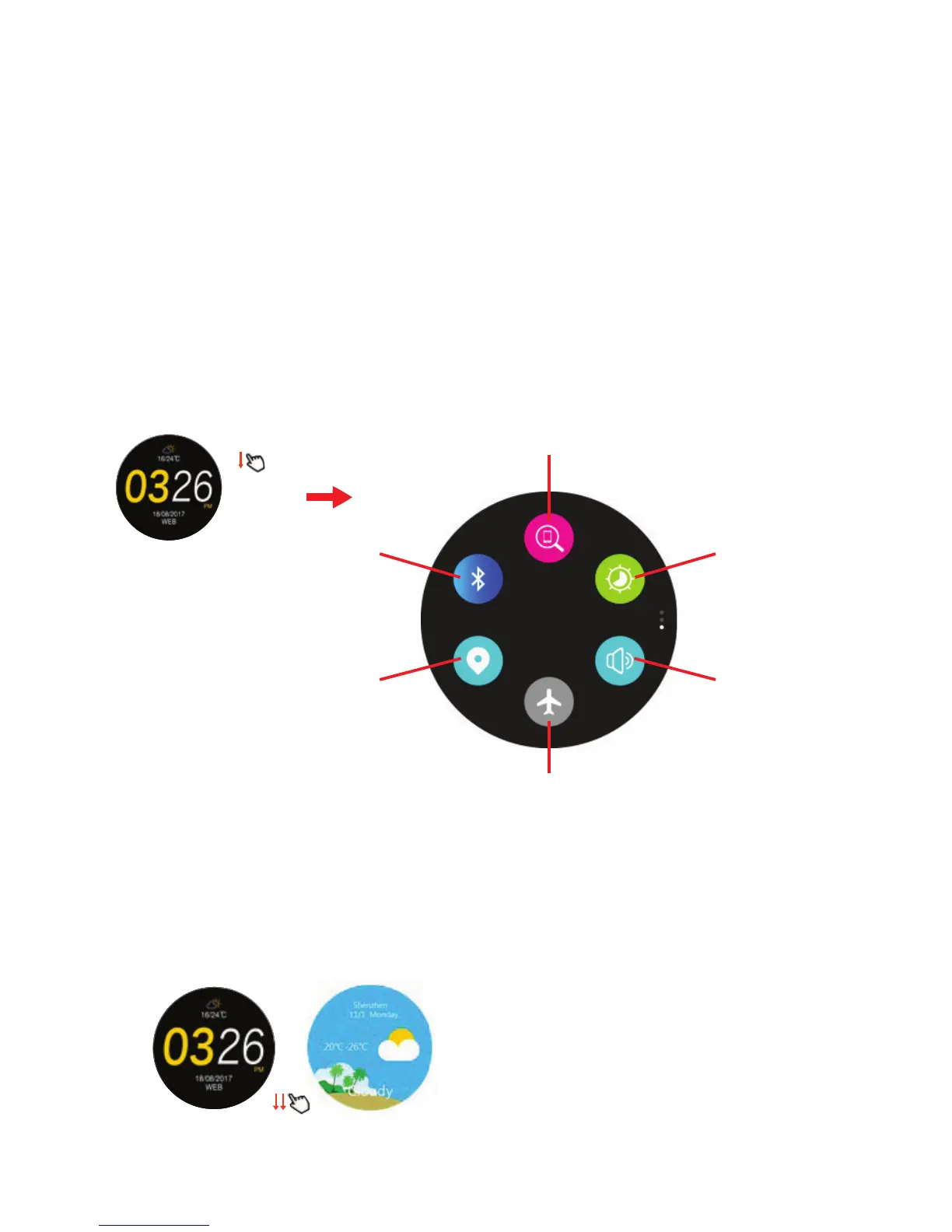
3.2.1 Swipe down twice for weather forecast.
3.2.2 This will reflect Smartphone information: function might not work on
some Smartphones.
Weather
Main screen
3.1.1 On the main screen (clock), swipe down once to access Essentials sub-
menu screen
3.1.2 Tap on icon to activate / de-activate / enter options.
3. Main screen - sub menu functions (Scroll up or down from main screen)
3.1 Essentials sub menu
Phone finder
Brightness
Sound
Bluetooth
Activate
GPS
Activate
Airplane mode
2.9.5 Smartphone will open Strava and ask you to log in – proceed and select
Remember Me.
2.9.6 Authorize HitFit to connect to Strava: confirm. “Opening DoFit GPS” will
appear: click to open.
2.9.7 You will now be linked to Strava and ready to share your exercise logs.
2.9.8 Select Weekly Exercise icon on home page: select date and tap on
activity to share with Strava (wait a few minutes for activity to come up).
2.9.9 Tap Share icon in top right hand corner to send to Strava.
Note: if Strava has already recorded the exercise, it will not override or repeat.
2.9.10


 To Next Page
 Loading...