Installation and Setup
The DOGTEK® Sonic Birdhouse should be placed facing the dog and within range of the dog. The
unit is designed with mounting areas for a more permanent installation and should be positioned
at a height of no more than 6 feet. The DOGTEK® Sonic Birdhouse can also be hung or stand
freely on its own. It can be placed in a tree, hanging from a pole, on a fence post, etc. For optimal
results, the area surrounding the DOGTEK® Sonic Birdhouse and the dog should be free of any
large obstacles.
Operating Instructions
Battery Installation
The DOGTEK® Sonic Birdhouse operates using a 9V battery (not included). Always use a
new battery. Do not use rechargeable batteries.
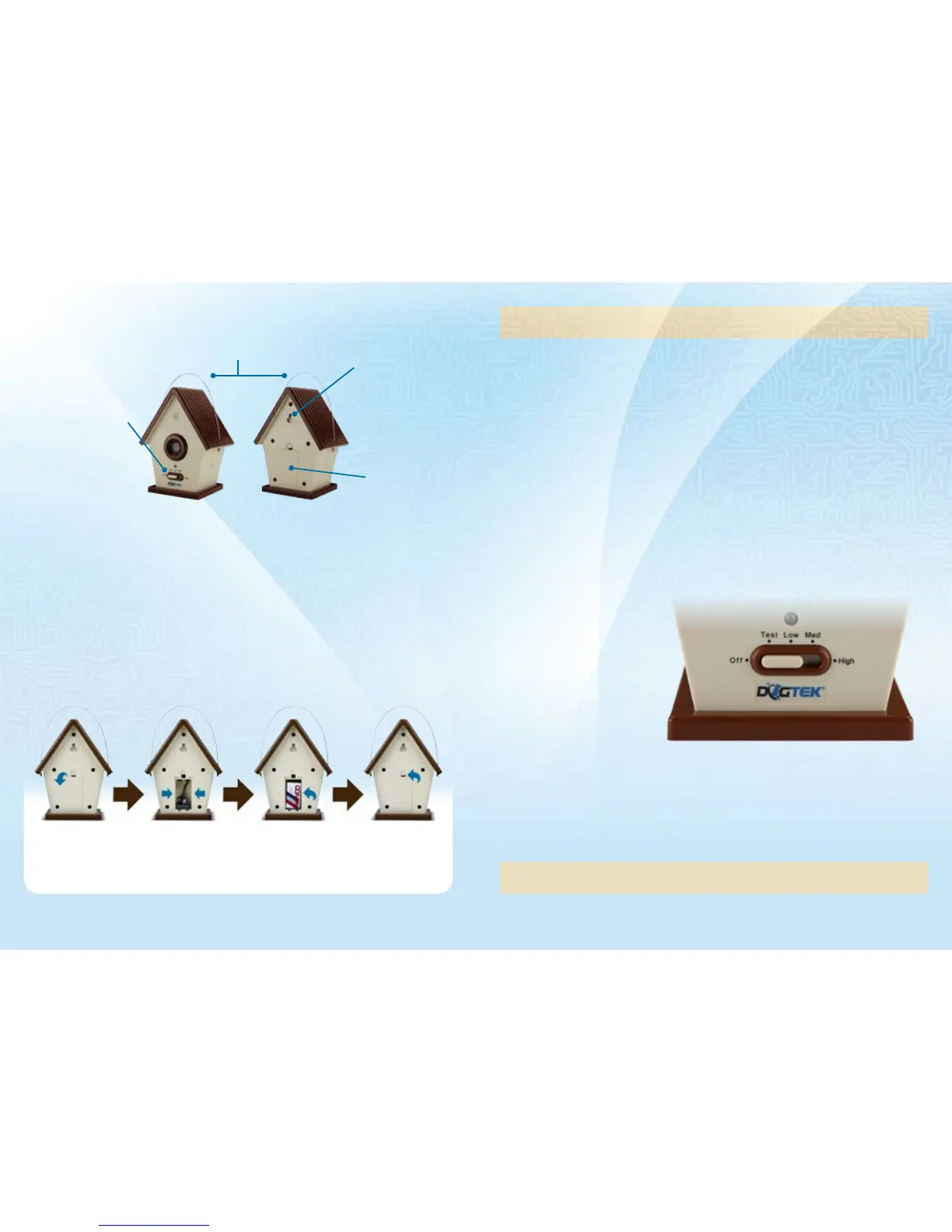
remove battery door
by pressing the lever
and pulling the door
From the slots.
the battery door is
located on the bacK
oF the unit.
maKe sure you insert
the 9v battery
according to the
positive and negative
terminal marKings.
insert into the slot
and push the battery
to place it inside the
birdhouse.
close the battery
door by positioning
the bottom edge in
place then pressing
the top edge.
Levels of Operation
Settings:
off - used to conserve
battery liFe
test - used to veriFy the
microphone and speaKer are
Functional
Low seNsitivity - short
range detection (up to
15 Feet)
MediuM seNsitivity - (up
to 30 Feet)
HigH seNsitivity - (up to
50 Feet)
Metal Hanger:
For hanging the DOGTEK® Sonic Birdhouse
Mounting Area:
Used to attach to
or x the Sonic
Birdhouse on a tree,
fence, post, etc.
Battery Door:
Used to enclose
the 9V Battery
Two Color LED
The two color LED indicator shows good or low battery. Good battery equals 1 ash every 5
seconds with the Green LED. Low battery equals 3 ashes every 5 seconds with the Red LED. If
there are no LED lights it is time to change the battery. When emitting the ultrasonic sound, the
Red LED is solid. When in test mode, the Red LED will ash if battery is low.
Operating Modes
• Choose between the Low, Medium and High Sensitivity settings.
• Turn to the TEST Mode to verify that your
DOGTEK®
Sonic Birdhouse is working properly.
Do not use this Mode for normal operation. See “Testing the Sonic Birdhouse.”
Note: sWitching the device to the oFF mode When the product is not needed Will extend the battery
liFe. average battery liFe is 2 months, depending on hoW oFten it is triggered.
Testing the Device
• Slide the mode switch to
the designated test mode.
• Hold the unit at an arm’s
length away from you.
• Sternly speak the word
“BARK” loudly.
• If the Indicator Light does not
ash and there is no audible
sound, ensure that the
battery is properly installed
and/or replace the battery.
• If a beep is NOT heard then
repeat Step 3 with a louder
voice.
• If the LED illuminates RED
then the battery is low.
• If the LED still does not ash check that the battery is installed correctly and the door is
securely closed. Also check that the battery has not expired.
• Return the Mode Switch to desired sensitivity level before you begin using the
DOGTEK®
Sonic
Birdhouse.
Note: the test mode is not intended For normal operation. iF the dogteK® sonic birdhouse is leFt in
test mode, it can send False signals and may reduce battery liFe.
Low:
Up to 15 feet
Medium:
Up to 30 feet
High:
Up to 50 feet
Sensitivity Distance
87


 To Next Page