14
COLLAR / RECEIVER
15
COLLAR / RECEIVER
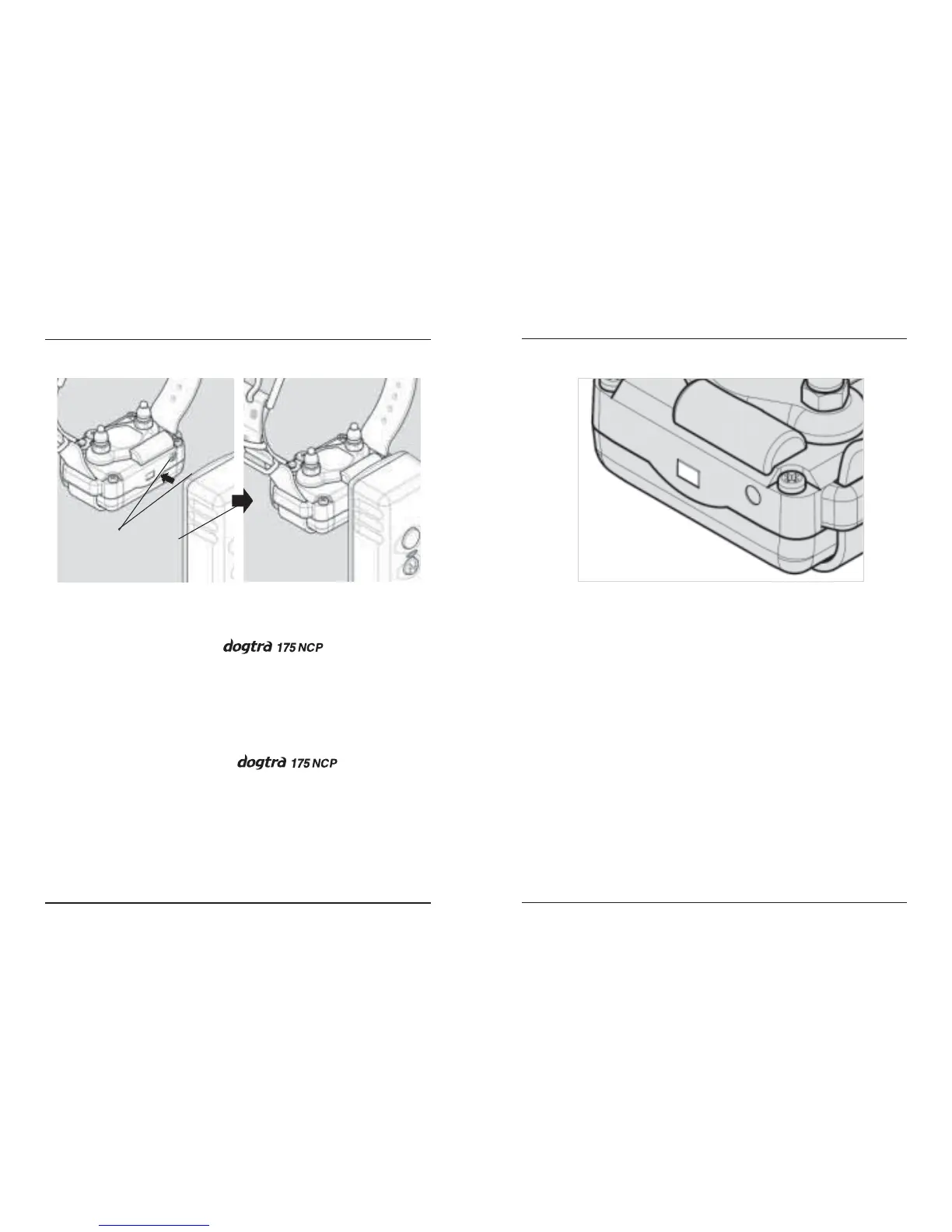
On/Off Magnetic Switch
To activate the , place the red
dot on the back of the transmitter to the red dot on
the collar receiver. Hold the two red dots together
for a moment until the LED indicator light comes
on.
To deactivate the repeat the
same procedure holding the two red dots together
momentarily. The LED light will stop blinking,
indicating that the unit is now shut off. To attain
maximum battery life, deactivate the unit when
not in use.
On/Off
Magnetic Switch
Receiver Indicator Light (LED window)
Located on the front of the collar, the
indicator light comes on and blinks once every 2
seconds after the collar is turned on. The color of
the LED indicates the battery life of the receiver.
(green = full charge, amber = medium charge,
red = needs charge)
When the “Constant” button on the
transmitter is pushed, the collar indicator light
will glow steadily as long as you hold the button
down, for up to twelve seconds. When the
“Nick” button is pushed, the light comes on for a
fraction of a second.






 To Next Page