1918
4-2. TOOLS TAB
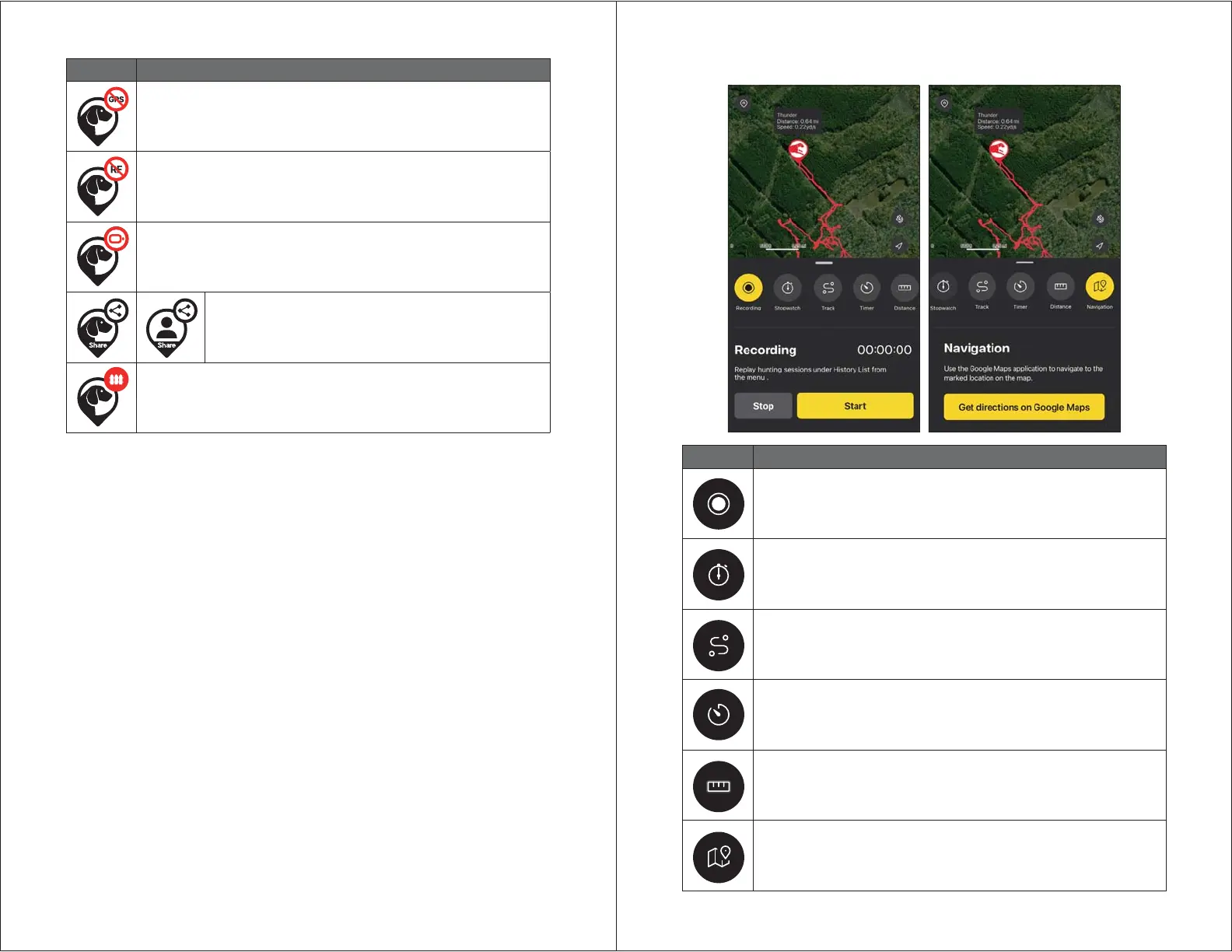
Icon Description
Recording:
Record sessions for location and statuses. Replay sessions from
the History List on the menu.
Stopwatch:
Measure the amount of time that has elapsed, which will be visible
on the map.
Track:
View track lines on the map for past 5 hours and reset any track
information.
Timer:
Set a timer that will alarm at the end of a time interval, which will
be visible on the map.
Distance:
Measure the distance between two points on the map.
Navigation:
Use Google Maps to navigate to the marked location. Google Maps
must be installed.
Icon Description
No GPS:
Receiver cannot connect to GPS and cannot send location.
No RF:
Devices are far apart. Move the GPS connector to a higher area to
receive signal.
Recharge Battery:
Less than 20% battery life remains.
Share:
Appears when another user’s devices are shared.
Cannot use e-collar functions on shared devices.
E-Fence On:
Receiver has been synced with the E-Fence.


 To Next Page