2322
4-5. FENCE TAB
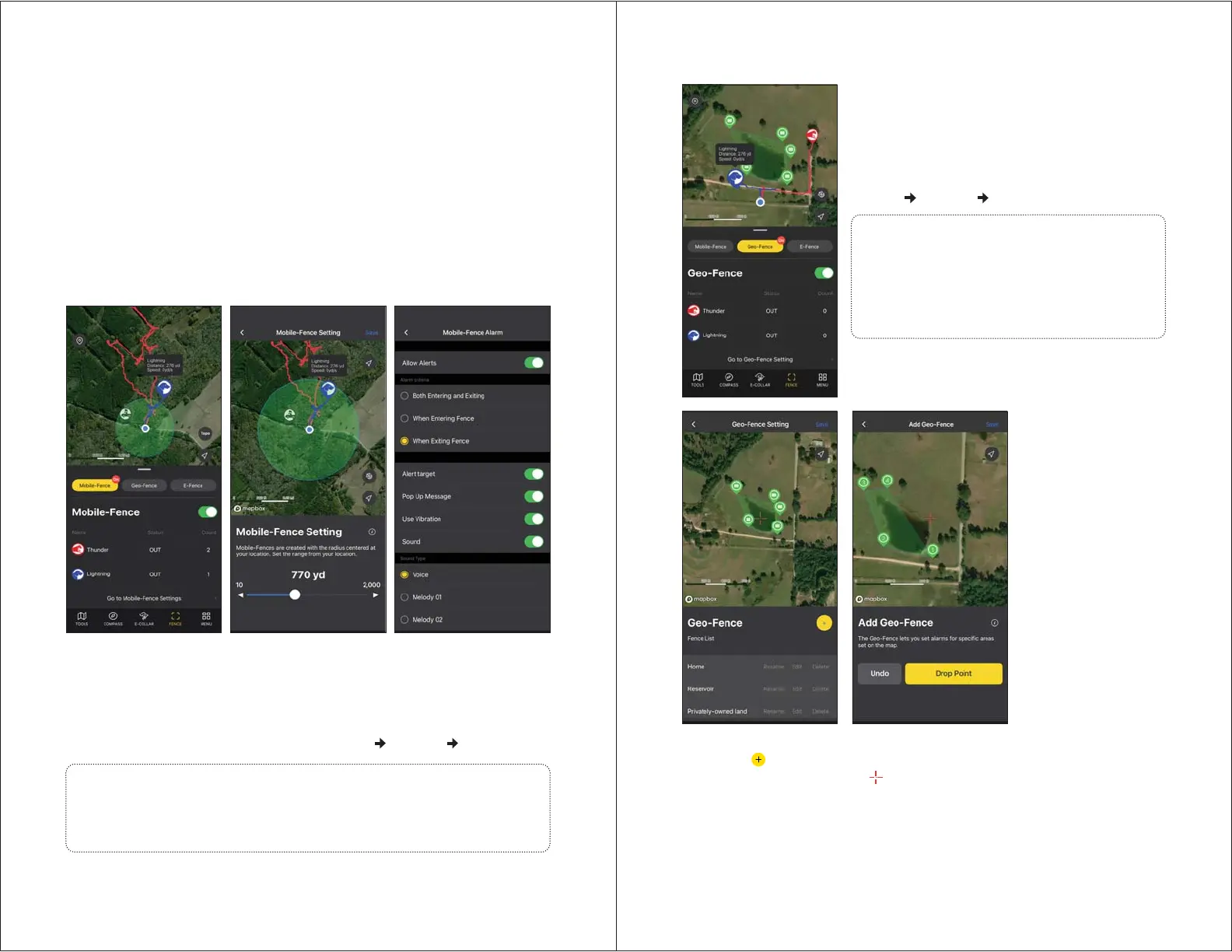
- Mobile-Fence is created with a radius centered around your smartphone
(the blue point on the map).
- Status: Indication of receiver in or out of the fence.
- Count: Number of times the receiver has crossed the fence.
- Set the radius from 10 to 2,000 yards.
- Set the Mobile-Fence settings by going to MENU
SETTING MOBILE-FENCE.
The PATHFINDER2 offers three types of fences for you to either receive a
notification of your dog crossing boundaries or to auto-correct your dog.
The types of fences included are:
1. Mobile-Fence: a fence setup that moves based upon your smartphone location
and will send you a notification.
2. Geo-Fence: a static fence setup that will send you a notification.
3. E-Fence: a static fence setup that will send your dog an auto-correction and
send you a notification.
1) Mobile-Fence (Notification Only)
Notes:
• The Mobile-Fence gives a notification on the smartphone, but does not
auto-correct the e-collar.
• The automatic e-collar correction will only work on the E-Fence.
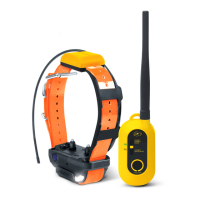
- Create Geo-Fences for specific areas to get alerts
on your device.
- Status: Indication of receiver in or out of the fence.
- Count: Number of times the receiver has crossed
the fence.
- Set the Geo-Fence settings by going to
MENU
SETTING GEO-FENCE.
2) Geo-Fence (Notification Only)
Setting up a Geo-Fence
1. Press the
button.
2. Move the map and place the
on the desired area.
3. Click 'Drop Point' to create a point for the fence boundary.
4. Press Undo to delete the last point.
5. Click the save button on the top right.
- You can create up to 15 Drop Points and up to 15 Geo-Fences.
- Edit and delete file names and fence locations in the Fence List.
Notes:
• The Geo-Fence gives a notification on the
smartphone, but does not auto-correct the
e-collar.
• The automatic e-collar correction will only
work on the E-Fence.


 To Next Page