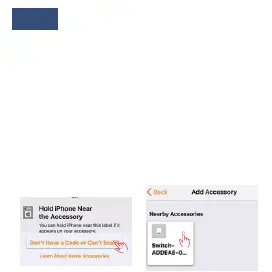
Note:
If the code is not recognized, please click
“Don’t have a code or cannot scan”, Click
the device, “Add anyway”, and input the
code “12345678”. After waiting for the
encryption check (about 50s).If Home APP
doesn’t show the device, please make sure
that the phone and the smart plug are in the
same local network. If you still cannot add
your device, please look over the Frequent
Problems.


 To Next Page