The ZVOX SB380 Soundbar is an audio system designed to enhance the sound experience of televisions and other audio sources. It offers various setup and operation options to accommodate different TV configurations and user preferences.
Function Description:
The ZVOX SB380 Soundbar serves as an external speaker system for televisions, cable/satellite set-top boxes, and other audio devices. Its primary function is to deliver improved sound quality, including clearer vocals and a more immersive audio experience, compared to built-in TV speakers. It supports both digital optical and analog audio inputs, providing flexibility for connecting to a wide range of devices. The soundbar also features AccuVoice technology for enhanced voice clarity and multiple surround sound settings to customize the audio output. It can be controlled via its own remote control or programmed to respond to a preferred TV/cable/satellite remote.
Important Technical Specifications:
- Dimensions:
- Length: 902 mm (35.5")
- Width (input panel area): 743 mm (29 1/4")
- Depth: 84.5 mm (3 5/16")
- Height: 144.5 mm (5 11/16")
- Weight: Between 15 and 20 pounds.
- Power: 15 VDC (via DC power input).
- Audio Inputs:
- Optical Digital Input (two ports: OPTICAL 1, OPTICAL 2)
- Analog Input (LEFT, RIGHT)
- Remote Control: Uses AAA batteries.
- Power Consumption (Standby): Less than 0.5 watt.
Usage Features:
- Placement Options: The soundbar can be placed in three main configurations:
- Face Front: On a flat surface, facing forward, ideal for a shelf below, above, or near the TV.
- Face Up: On a flat surface, facing upwards, often in front of the TV, with the bottom facing the listening area. Care should be taken to ensure it does not block the TV's infrared remote sensor.
- Wall Mount: Utilizes two keyhole-shaped hanger mounts on the back panel for secure attachment to a vertical surface.
- Audio Input Flexibility: The SB380 includes two analog signal cables and one optical digital signal cable, allowing connection to most TVs or cable/satellite set-top boxes. It supports direct connection to a TV's optical digital audio output (SPDIF or TOSLINK), headphone audio out minijack, or red/white RCA analog audio outputs. It also features a second optical input for connecting an additional audio source like a Blu-ray/DVD player or portable audio player.
- Remote Control Functions:
- Power: Turns the soundbar ON/OFF. A brief press mutes/unmutes, while a long press turns it off.
- Volume Up/Down: Adjusts the audio volume.
- Input Selection: Cycles through input modes (Optical Digital IN1d, Optical Digital IN2d, RCA Analog IN3A, and "both" for voice assistant integration).
- Mute: Silences the soundbar.
- AccuVoice: Enhances voice clarity with six increasing levels. Pressing the Surround button removes this feature.
- Surround Settings: Offers three virtual surround effect levels (Sd 1 for strong vocals/low surround, Sd 2 for moderate vocals/surround, Sd 3 for strong surround/moderate vocals). Pressing the AccuVoice button disables surround sound.
- Other Settings (PS): Accesses Bass Adjustment (LO 4 to LO-6), Treble Adjustment (HI 4 to HI-4), and Output Leveling (OL/noOL). Output Leveling prevents large volume swings and reduces differences between TV channels.
- Tonal Profile Setting (PS Menu): Allows users to match the soundbar's acoustics to its room position (PS16 for Face Front, PS17 for Face Up, PS18 for Wall Mount). This is accessed by pressing and holding the OTHER SETTINGS button for 5 seconds.
- Auto On/Off Operation: The soundbar can automatically turn ON/OFF in response to an audio signal from the TV. This feature can be disabled by pressing and holding the power button on the ZVOX remote for 5 seconds until "NoAs" appears.
- Preferred Remote Control Learning: The SB380 can be programmed to respond to a TV or cable/satellite remote control for basic functions like volume and mute. This involves entering a universal learn mode ("Lrn") and following a sequence of button presses on both remotes.
- Voice Assistant System Integration: Supports integration with Amazon® Echo®, Echo Dot, or Echo Input devices. When connected to Input 2 and the input is set to "both," the soundbar will automatically lower TV sound when the voice assistant speaks and raise it when finished.
- Input Panel Infrared Sensor: Allows a wired infrared emitter to control the SB380's operation, useful if the soundbar's placement obstructs its direct line of sight to the remote.
Maintenance Features:
- Cleaning: Clean the apparatus only with a dry cloth.
- Battery Replacement: The remote control battery should be replaced with the same or equivalent type to avoid the danger of explosion.
- Servicing: Refer all servicing to qualified service personnel if the apparatus is damaged (e.g., power-supply cord or plug damaged, liquid spilled, objects fallen into, exposed to rain/moisture, abnormal operation, dropped).
- Disposal: Electric and electronic appliances should not be disposed of with household waste. They should be taken to a local community waste or recycling center, or the retailer should be contacted for advice.
- Stable Placement: Ensure the soundbar is placed on a stable surface or securely mounted to prevent falls, which could cause injury or damage. For wall mounting, the installer is responsible for ensuring screws are securely installed and can support at least twice the soundbar's weight.
- Ventilation: Do not block ventilation openings. Ensure proper ventilation if placed in a built-in installation.
- Power Cord Protection: Protect the power cord from being walked on or pinched.
- Unswitched AC Outlet: Use an unswitched AC outlet to provide power. The soundbar's Auto Standby feature ensures low power consumption (less than 0.5 watt) during inactivity. Using a switched AC outlet is not recommended as it delays subsequent turn-on.

 Need help?
 General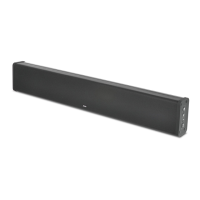

 To Next Page