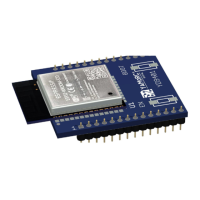
The document describes the YaMoRC YD9401 Upgrade Module, designed to transform a Digikeijs DR5000 Command Station into a YaMoRC YD7001 Command Station. This upgrade involves replacing the existing WiFi module of the DR5000 with the YD9401 module and updating the associated firmware and software.
Function Description
The YD9401 Upgrade Module serves as a hardware and software enhancement for the DR5000, enabling it to function as a YD7001 Command Station. This transformation provides a full-featured YaMoRC power station with advanced capabilities for controlling model railways. The upgrade process includes:
- Hardware Replacement: Physically replacing the DR5000's original WiFi module with the YD9401 module.
- Software Installation: Installing the YaMoRC YD7001 Configuration software on a Windows PC.
- Firmware Update: Updating the DR5000's firmware to the YD7001 version (8.1.x).
- Activation: Activating both the software and firmware using license keys provided by YaMoRC.
- Configuration: Setting up WiFi and LAN network parameters for optimal operation.
Once upgraded, the YD7001 Command Station offers a comprehensive set of features for model railway control, including various bus systems (LocoNet, XpressNet, R-Bus, B-Bus, RS Bus), USB connectivity, LAN, and enhanced WiFi capabilities. It acts as a central hub for managing locomotives, accessories, and track layouts, integrating with mobile apps (e.g., Z21, JMRI) and manual controllers.
Important Technical Specifications
While specific detailed technical specifications for the YD9401 module itself are not explicitly listed, the document highlights the transformation of the DR5000 into a YD7001, implying the following characteristics of the upgraded system:
- Module Type: ESP32-WROOM-32D based module (as seen on the YD9401 module itself).
- Firmware Version: YaMoRC YD7001 firmware 8.1.x.
- Power Supply: Requires a good and safe Meanwell desktop- or plug-in power supply, 18VDC or 15VDC (as per YD7001 manual).
- Connectivity:
- LAN: 100BASET Ethernet for network connection.
- USB: USB 2.0 port for PC connection and firmware updates.
- WiFi: Integrated WiFi module (YD9401) with configurable SSID, password, and IP settings (AP mode or client mode).
- Bus Systems: Supports multiple bus protocols including LocoNet (B and T), XpressNet, R-Bus, B-Bus, and RS Bus.
- External Inputs: EXT88N IN.
- Track Outputs: Dedicated track output for main track and program track.
- IR Remote: Infrared remote control capability.
- Software: YaMoRC YD7001 Configuration software for Windows 10 or 11.
- Network Configuration: Configurable IP Address, Subnet Mask, Default Gateway, Primary/Secondary DNS Server, DHCP settings (enabled/disabled), mDNS Name, and Hostname.
- MAC Address: Ethernet MAC Address (e.g., CC:DB:A7:4F:E5:DB).
- Firmware Version (WiFi Module): V1.0.5 (example given).
- Temperature Monitoring: Displays internal temperature (e.g., 80.0 °C).
The YD7001 Command Station is designed for robust performance, handling various digital command control (DCC) tasks and network communications efficiently.
Usage Features
The YD9401 upgrade enables several usage features for the YD7001 Command Station:
- Multi-Protocol Support: Operates with various model railway protocols, allowing compatibility with a wide range of existing equipment and systems.
- Network Integration: Seamless integration into a home network via LAN or WiFi, enabling control from multiple devices (PC, tablet, mobile phone).
- Web Server Interface: Access to a web server for configuration and control, as detailed in the YD7001 manual.
- Mobile App Control: Compatibility with popular model railway control applications like Z21 and JMRI.
- USB Connectivity: Direct connection to a PC for configuration, firmware updates, and potentially other control software.
- Dedicated Program Track: Separate output for programming decoders, ensuring safe and isolated programming operations.
- Status Indicators: LEDs for power, track status, network activity (LAN, WiFi), and bus activity (LocoNet, X-Bus, USB) provide visual feedback on the system's operational state.
- User-Friendly Configuration Software: The YaMoRC YD7001 Configuration software provides a graphical interface for managing all settings, including network parameters, bus configurations, and firmware updates.
- Activation System: A license key system ensures authorized use of the YaMoRC software and firmware, with a process for requesting and entering activation codes.
- Upgrade Path: Provides a clear upgrade path for existing DR5000 users to enhance their command station with modern features and improved performance.
- Remote Control: Supports IR remote control for convenient operation.
Maintenance Features
The document outlines several maintenance-related features and considerations:
- Firmware Updates: The YaMoRC YD7001 Configuration software facilitates easy firmware updates for both the main command station and the WiFi module. This ensures the system can be kept up-to-date with the latest features and bug fixes.
- Software Updates: The configuration software itself can be updated, ensuring compatibility and access to new functionalities.
- Factory Defaults Reset: Options within the software allow for resetting WiFi settings and other parameters to factory defaults, useful for troubleshooting or reconfiguring the device.
- Diagnostic Information: The software provides detailed information about the device, including serial numbers, firmware versions, MAC addresses, and network status, which is crucial for diagnostics and support.
- Helpdesk and User Group Support: YaMoRC and Domburg Train Support offer a helpdesk and a user group forum (www.modelspoorforum.nl) for assistance, troubleshooting, and community support.
- Physical Module Replacement: The design allows for relatively straightforward physical replacement of the WiFi module, as demonstrated in the installation guide.
- Cleaning: The guide suggests using a degreaser to remove adhesive residue during the initial preparation, indicating a focus on maintaining the physical integrity of the device.
- Warranty Disclaimer: It's important to note that the warranty on the original DR5000 from Digikeijs is canceled upon upgrading, highlighting the user's responsibility for the upgraded system. YaMoRC and DTS are responsible only for the YD9401 module and supplied firmware.
Overall, the YD9401 upgrade module provides a robust and feature-rich solution for enhancing a DR5000 command station, with clear instructions for installation, configuration, and ongoing maintenance.

 Need help?
 General

 To Next Page