MF6W Technical description
7
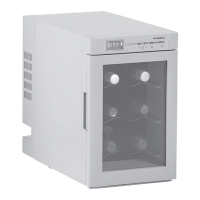
The refrigerator has the following buttons:
I
No. in
fig. 1,
page 6
Explanation
1 Electrical power connection
2Display
3Buttons
No. in
fig. 2,
page 7
Description Explanation
1 POWER Switches the refrigerator on or off.
2 LIGHT Switches the interior light on or off.
3 TEMP – Decreases the desired cooling temperature by 1 °C (2 °F).
4 TEMP + Increases the desired cooling temperature by 1 °C (2 °F).
NOTE
You can switch the temperature display between Celsius and
Fahrenheit. To do this, press the TEMP + and TEMP – buttons
simultaneously for three seconds.
MF6W-O-AU.book Seite 7 Freitag, 14. Oktober 2016 6:18 18



 To Next Page