HiPro Technical description
13
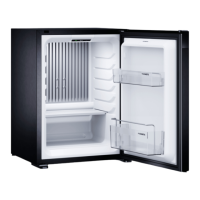
Operating elements of the minibar
Operating panel
No. in
fig. 1, page 3
Explanation
1 Interior light and control element
21 Shelf
2 Shelves (A40S2, A40P2, A40G2, C40S2, C40P2, C40G2,
N40S2, N40P2, N40G2)
3 Upper door rack (for A40S1, A40S2, A40P1, A40P2, C40S1,
C40S2, C40P1, C40P2, N40S1, N40S2, N40P1, N40P2)
4 Lower door rack
5 Bottle holder door (optional)
6 Glass door (optional)
– Bottom interior light (optional)
No. in
fig. 2, page 4
Explanation
1 Indicator LED
LED illuminates green = minibar is cooling
LED illuminates orange = minibar stops cooling (temperature reached
or auto-defrost function active)
LED does not illuminate = minibar is switched off or in silent mode
LED flashes orange = an error occured
2 Infrared door sensor
3
button
Switching the minibar on and off
Entering the temperature setting
Entering the silent mode (only for C40 with compressor cooling)



 To Next Page
