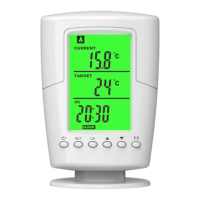
Power button( )
Pairing button( )
CD
CLOCKSET
HEAT
TARGET
CURRENT
COOL
SET OK
This new innovation Programmable Wireless Thermostat is
intended for automatic control elctrical heating in winter/cold area
or control electrical cooling devices in summer/hot area.
It consisted of 2 componets: a Remote Control unit with integrated
tempreature sensor and a Plug in Socket unit.
(One remote thermostat control can be with multiple plug in sockets)
It will automatically turn on/off heating devices as your preset target
temperature or preset time range,to maintain a stable room
temperature in order to provide confort and save energy.
Temperature range.................. 0~60 °C/32~140 °F
Temperature accuracy......................± 1 °C/±1.8 °F
Current Temp. Resolution........................0.1 °C/°F
TARGET Temp. Resolution.........................1 °C/°F
Power supply.............................3V(2pcs* AA 1.5V)
Max.Range..........................20 meters in open land
Transmission Frequency.......................433.92Mhz
Remote unit demension...................124x82x42mm
Remote unit Net weight...................................121g
New design........Wall mount holder & Table stand
Max.current/Load...............230V/16A/3680W (EU)
.................230V/13A/3250W (UK)
.................120V/15A/1800W (US)
Plug in socket dimension................132x62x76mm
Plug in socket Net weight................................127g
LED indicator
Remote thermostat control
Plug in Socket
4. Specification
ON/OFF
Remark:
* After pairing successfully, don’t need to do this pairing when you connect
power next time or even the mains is cut off. The plug in socket will
memorize the pairing code.
* If you want to change new remote thermostat control, repeat the above
steps using other remote thermostat control.
* If need to add more plug in sockets in this system,repeat the above steps,
one remote thermostat control can control unlimited plug in sockets.
2. Pairing code
W
TS2000 User Manual
Programmable Wireless Thermostat
LCD: Indicate working status
LCD: CURRENT temperature
LCD: TARGET temperature
LCD: Display CLOCK/HEAT/
COOL programs
Down button( )
UP button( )
OK button( )
OK
SET button( )
SET
ON/OFF button
Socket/Plug
Rating label
SET OK
CLOCK
CURRENT
TARGET
HEAT
ON/OFF
1
1
Connect the plug in socket into home socket,
and press ON/OFF button for 3 seconds.
the LED indicator will be flashing, it is in pairing mode now.
6
2
Press Power button to turn on this device,
enter into standard heating mode.
3
Remove the battery cover, and load into 2pcs*AA batteries
observing the battery polarity, replace cover.
3
Press Pairing button to send the pairing code at once.
The LED indicator will be stop flash and firm lighting.
It means the pairing is successful.
4
5
2
Plug in your heating devices or cooling devices.
SET OK
CLOCK
CURRENT
4
Now, the remote thermostat control is in standby mode.
Only dispaly current temperature and CLOCK.
5
6
1.Product description
3. CLOCK Setting
For example, we set CLOCK as 20:07 at Monday(see Pic.1).
SET OK
CLOCK
CURRENT
TARGET
HEAT
SET OK
CLOCK
CURRENT
TARGET
HEAT
1
3
5
7 9 10
Press SET for 3 seconds,enter into setting mode
Press UP/DOWN,set weekday (MO-SU)
Press OK
Press UP/DOWN,choose 12/24HR
Press OK
Press UP/DOWN,set the hour
Press OK
Press UP/DOWN,set the minute
Press OK,second set to 0
Press UP/DOWN,set temperature unit °C/°F
Press OK
2
4
6 8
10
1
2
3
4
5
6
7
8
9
10
11
Pic.1
Press ON/OFF button to turn off plug in socket,then the remote
thermosat control can’t control it, you have to manually turn on
plug in socket once again when you want to use it next time,
then remote thermostat can control it.
8
8
EU UK US
Standby mode
7
Press UP/DOWN button to adjust the TARGET temperature
7

 Need help?
 General

 To Next Page