Need help?
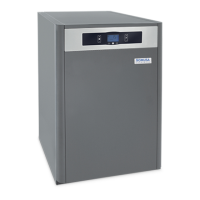
Do you have a question about the DOMUSA TEKNIK BIOCLASS HC and is the answer not in the manual?
Accesses and browses the User Menu.
Main boiler functioning display for information, settings, and values.
Restores operation after lockout or exits menus without saving.
Switches the boiler on and off.
Selects boiler set point temperature or navigates parameters.
Sets different parameters of the boiler.
Accesses and browses the Setup menu.
Specifies the required ventilation and space for boiler installation.
Guidance on connecting the boiler to the heating and DHW systems.
Details on controlling the cascade circuit with an external controller.
Step-by-step guide for installing the pellet hopper.
Details on connecting the boiler to the electrical power supply.
Specifies the type and quality of fuel required for the boiler.
Instructions for installing the flue and managing combustion gases.
Important safety and operational precautions before commissioning.
Specific electrical connection requirements for commissioning.
Procedure for filling the boiler and heating system with water.
Procedure for initial calibration of the feed auger for correct operation.
Detailed steps and checks required for boiler commissioning.
Information provided to the user upon boiler installation completion.
Icons indicating the current operational status of the boiler.
Numerical display for settings, values, and time.
Icons indicating warnings and boiler lock-out situations.
Icons for special functions like anti-frost.
Icons indicating technical menu parameters are displayed or modified.
Icons related to temperature and pressure readings.
Icons representing heating circuits, fan, fuel, ash, etc.
How the boiler activates and modulates heat output.
Setting the desired boiler temperature for heating.
Monitors and warns about the ashtray fill level and status.
Process for setting boiler and fuel suction system timers.
Adjusts the switching on and off periods of the boiler.
Enables or disables periods for the pellet suction system operation.
Sets the current time on the boiler's control system.
Configures alerts for when the ash box needs emptying.
Manually sets the weight obtained in the feed auger calibration.
Adjusts the contrast of the digital display.
Fills the feed auger with fuel, required for correct boiler functioning.
Adjusts fuel amount for optimal heat output and combustion.
Manually sets the weight obtained in the feed auger calibration procedure.
Manually activates the burner ash cleaning device.
Manually switches on the circulation pumps for a set period.
Procedure to access and set the technical menu access code.
Displays the model of the boiler set at DIP-switch.
Sets the minimum and maximum burner heat output.
Adjusts fan speed percentage for combustion air quantity.
Sets the amount of fuel for the burner ignition procedure.
Sets the amount of fuel consumed by the boiler per hour.
Specifies the fuel type; parameter not valid for this model.
Parameter for fuel selection; not valid for this model.
Manages boiler temperature modes, maintaining minimum temperature.
Sets the time the heating pump runs after heating service deactivation.
Selects between standard and continuous operating modes for the pump.
Sets the minimum pressure to prevent boiler lockout.
Sets the maximum heating flow temperature for mixed circuits.
Adjusts the activation cycle time of the fuel suction system.
Resets all parameters to original factory default values.
Prevents circulating pumps from locking due to long periods of inactivity.
Protects the boiler from freezing during cold weather periods.
Prevents failure due to low or high water pressure levels.
Provides an external signal for boiler error or alarm codes.
Activates an automatic water filling system based on pressure.
Shuts down the boiler if water temperature exceeds safety limits.
Shuts down the burner if the fuel entrance tube overheats.
Shuts down the boiler if water pressure drops below the minimum set point.
Schedule for checking and maintaining the boiler and chimney.
Step-by-step guide for cleaning the boiler's burner.
Step-by-step guide for cleaning the boiler's heat exchanger.
Instructions for draining condensate water from the chimney.
Information on water hardness and the use of treated water.
Diagram showing electrical connections for the boiler unit.
Describes pump adjustment modes and performance curves.
 General
| Brand | DOMUSA TEKNIK |
|---|---|
| Model | BIOCLASS HC |
| Category | Boiler |
| Language | English |

 To Next Page