1 2 3 4 5 6 7 8 9 10 11 12 13 14 15 16
1 2 3 4 5 6 7 8 9 10 11 12 13 14 15 16
1 2 3 4 5 6 7 8 9 10 11 12 13 14 15 16
1 2 3 4 5 6 7 8 9 10 11 12 13 14 15 16
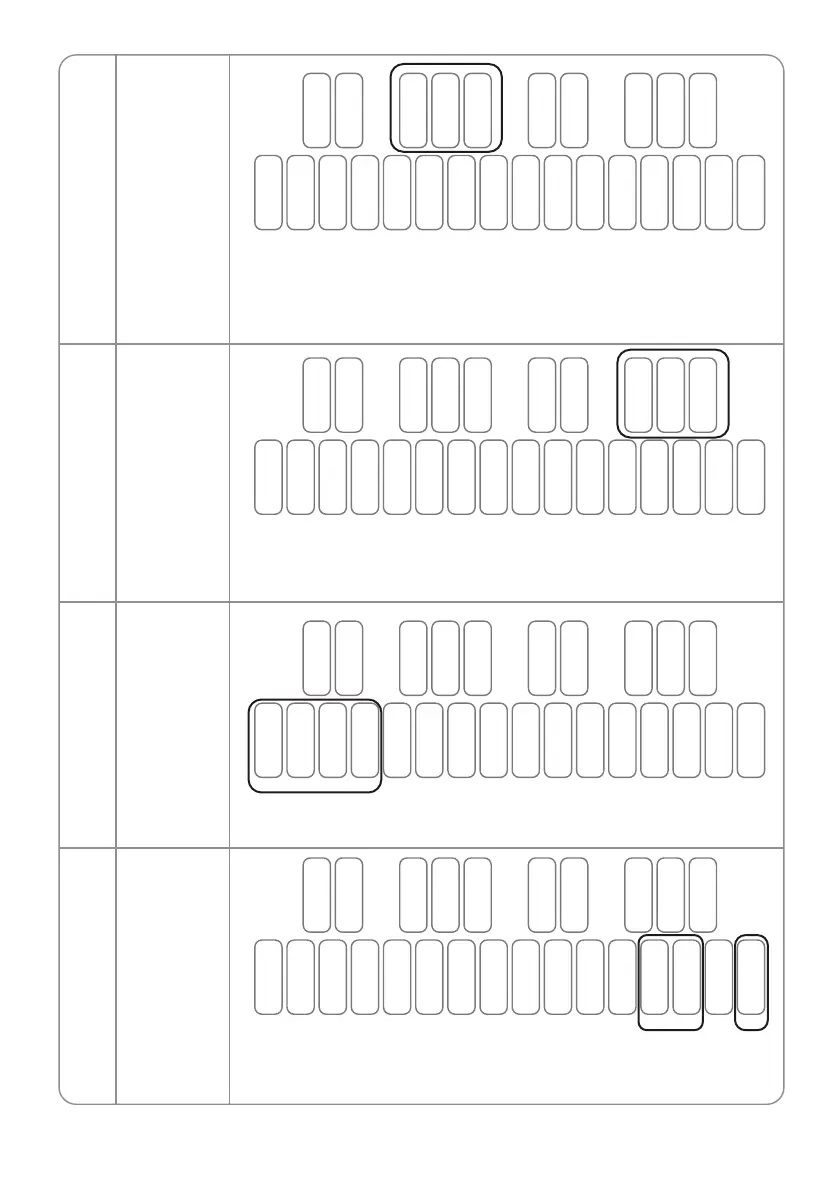
Press and hold any of F#2, G#2, A#2 to boot to set the multi-trigger option
corresponding to:
F#2 -- Slide (multi trigger off) G#2 -- multi trigger on
A#2 -- Legato (multi trigger off)
Multi Trigger
Key Priority
3
4
B1 C2 D2 E2 F2 G2 A2 B2 C3 D3 E3 F3 G3 A3 B3 C4
C#2 D#2 F#2 G#2 A#2 C#3 D#3 F#3 G#3 A#3
Press and hold any of F#3, G#3, A#3 to boot to set the Key priority option
corresponding to:
F#3 -- Low G#3 -- High A#3 -- Last
B1 C2 D2 E2 F2 G2 A2 B2 C3 D3 E3 F3 G3 A3 B3 C4
C#2 D#2 F#2 G#2 A#2 C#3 D#3 F#3 G#3 A#3
Press and hold the B1, C2, D2 and E2 buttons simultaneously to boot the
device to reset all device parameters (but not the saved pattern).
Factory Reset
Factory Reset
and erase all
patterns
5
6
B1 C2 D2 E2 F2 G2 A2 B2 C3 D3 E3 F3 G3 A3 B3 C4
C#2 D#2 F#2 G#2 A#2 C#3 D#3 F#3 G#3 A#3
Press and hold the G3, A3 and C4 buttons simultaneously to boot the device
to reset all device parameters and stored Patterns. (Please use this function
with caution as it cannot be restored after performing.)
B1 C2 D2 E2 F2 G2 A2 B2 C3 D3 E3 F3 G3 A3 B3 C4
C#2 D#2 F#2 G#2 A#2 C#3 D#3 F#3 G#3 A#3
01 02 03 04 05 06 07
08 09 10 11 12 13 14 15
16 17 18
19 20 21 22 23 24 25
26 27 28 29 30 31 32 33
34 35 36
37 38 39 40 41 42 43
44 45 46 47 48 49 50 51
52 53 54
55 56 57 58 59 60 61
62 63 64 65 66 67 68 69
70 71 72
73 74 75 76 77 78 79
80 81 82 83 84 85 86 87
88 89 90
91 92 93 94 95 96 97
98 99 100 101 102 103 104 105
106 107 108 109


 To Next Page
 Loading...


