1 2 3 4 5 6 7 8 9 10 11 12 13 14 15 16
1 2 3 4 5 6 7 8 9 10 11 12 13 14 15 16
POWER ON COMMANDS
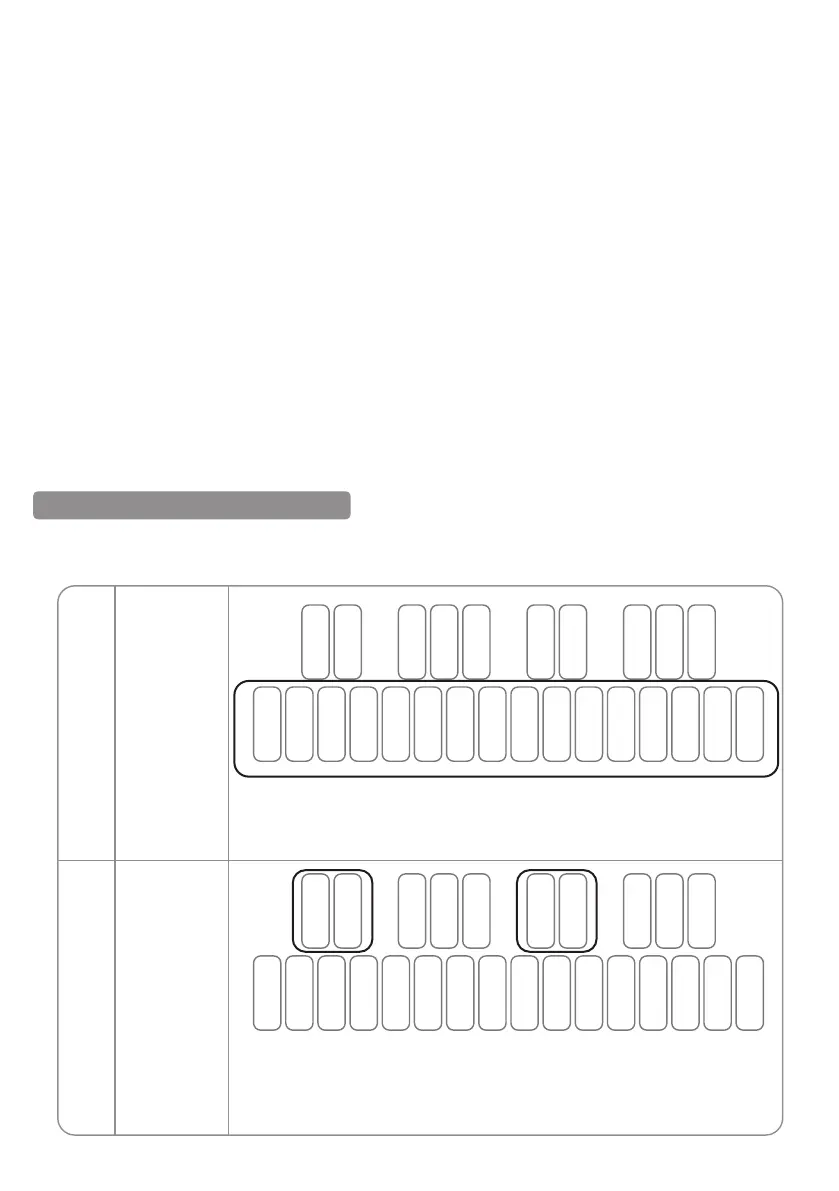
Pressing specific buttons before booting the device can change the MIDI channel, clock source,
multi-trigger, button priority and other parameters. The following is a detailed description:
Press and hold any of the step buttons from 1 to 16 to boot and set the MIDI
channel value 1 to 16:
Note: This will change both the MIDI input and MIDI output channels.
MIDI channel
Clock source
1
2
SYNC RATE
- When in SYNC IN, this setting determines how much the sequencer or arpeggiator advances when
the pulse signal is received.
- When in SYNC OUT, this setting determines how much of the sequencer or arpeggiator is advanced
before outputting the pulse signal.
- This setting can be changed on the APP.
SYNC IN
1PPS – Play 1 step per pulse.
2PPQ - Play 1/4 note every 2 pulses (KORG mode).
24PPQ - Play 1/4 note every 24 pulses.
48PPQ - Play 1/4 note every 48 pulses.
SYNC OUT
1PPS – Output 1 pulse per step.
2PPQ - Output 2 pulses per 1/4 note (KORG mode).
24PPQ - Output 24 pulses per 1/4 note.
48PPQ - Output 48 pulses per 1/4 note.
B1 C2 D2 E2 F2 G2 A2 B2 C3 D3 E3 F3 G3 A3 B3 C4
C#2 D#2 F#2 G#2 A#2 C#3 D#3 F#3 G#3 A#3
Press and hold any of C#2, D#2, C#3, D#3 to boot to set the synchronized
clock source corresponding to:
C#2 -- Internal D#2 - DIN C#3 -- USB D#3 - TRG
B1 C2 D2 E2 F2 G2 A2 B2 C3 D3 E3 F3 G3 A3 B3 C4
C#2 D#2 F#2 G#2 A#2 C#3 D#3 F#3 G#3 A#3
01 02 03 04 05 06 07
08 09 10 11 12 13 14 15
16 17 18
19 20 21 22 23 24 25
26 27 28 29 30 31 32 33
34 35 36
37 38 39 40 41 42 43
44 45 46 47 48 49 50 51
52 53 54
55 56 57 58 59 60 61
62 63 64 65 66 67 68 69
70 71 72
73 74 75 76 77 78 79
80 81 82 83 84 85 86 87
88 89 90
91 92 93 94 95 96 97
98 99 100 101 102 103 104 105
106 107 108 109


 To Next Page
 Loading...


