The Donner DKM-100 Rock-Bus Multipurpose Speaker System is a versatile audio device designed for various applications, including music playback, microphone use, and guitar amplification. It offers a rich and delicate frequency response thanks to its multi-speaker configuration and includes features for radio, Bluetooth connectivity, and portable use.
Function Description
The DKM-100 Rock-Bus Multipurpose Speaker System serves as a comprehensive audio solution. Its primary functions include:
- Music Playback: Supports playback via USB interface, AUX input, and Bluetooth connectivity from mobile phones or other external audio devices.
- Radio Functionality: Features FM/AM radio with automatic station search and the ability to save up to 15 preset radio stations across FM1, FM2, and AM groups.
- Microphone Input: Allows for connection of wired microphones, with independent controls for microphone volume and echo effects. It also includes 6 voice effects (Female voice, Male voice, Kid voice, Robot Voice, Auto tune, Reverb) to enhance singing experiences.
- Guitar Input: Provides an independent channel for acoustic guitar input, complete with high-frequency and low-frequency EQ adjustment, as well as volume and gain controls.
- Portable Design: Equipped with a telescopic handle and wheels, making it convenient for outdoor use.
- Charging Capability: Features a USB charger output (5V 1A) for charging mobile phones or pads.
Important Technical Specifications
- Overall Frequency Response: 50-20kHz
- Power Amplifier: 80Watt (RMS)
- HF Driver: 3-inch, 4Ω, 10Watt
- MF Driver: 3-inch, 4Ω, 10Watt
- LF Driver: 8-inch, 4Ω, 60Watt
- Bluetooth: V5.0, A2DP, AVRCP
- USB Charger Output: 5V 1A Output
- Power: AC Adapter 100-240V 50/60Hz, 15V2.4A
- Weight: 7.69 KG
- Dimensions: W370mm*D233mm*H415.5mm
- Inputs: FM/AM, 2x Mic input, Aux Input, USB Charger, Bluetooth, 1/4" Acoustic guitar input.
- Accessories: Owner's Manual, 2x Wired Microphones, AC Adapter.
Usage Features
The DKM-100 offers a user-friendly interface with a clear LED display and intuitive controls:
- LED Display: Provides all necessary information, including battery power, Bluetooth mode, bass boost status, FM/AM preset group, and current radio station value/mode.
- Mode Button: Switches between AUX, BLUETOOTH, and FM/AM modes.
- Navigation Buttons: Skip back/forward buttons for track selection or searching radio stations.
- Play/Pause Button: Controls music playback.
- Preset Button: Quickly recalls stored radio stations.
- BASS BOOST Button: Enhances low-frequency performance.
- Voice FX Button: Activates and cycles through 6 voice effects for the microphone.
- POWER Button: Long press to turn the device ON/OFF.
- FM1/FM2/AM Button: Selects different preset storage groups for FM and AM radio.
- SAVE Button: Saves current radio stations to preset slots.
- EQUALIZR (BASS & TREBLE): Adjusts bass and treble for guitar input.
- VOL & GAIN: Adjusts guitar input volume and gain.
- MASTER: Controls the overall master volume.
- MIC VOL: Controls the volume of plug-in microphones.
- ECHO VOL: Adjusts the echo volume for microphones.
- Battery Charging: Connects to a standard indoor wall socket using the provided AC adapter. The screen displays charging status, and the system includes automatic shutdown protection upon full charge.
- Troubleshooting: The manual provides solutions for common issues such as no power, no sound from FM/AM, Bluetooth, AUX input, guitar input, or microphone.
Maintenance Features
To ensure the longevity and proper functioning of the DKM-100:
- Cleaning: Use a soft, dry, or damp cloth for cleaning. Avoid paint thinners, solvents, cleaning fluids, or chemically stained rags. Do not apply excessive force to switches or control buttons.
- Storage: When not in use for a long time, pull out the AC adapter and store it properly.
- Environmental Conditions: Optimal operating environment is a temperature range of 15°C to 35°C and humidity of 75%.
- Power Supply: Only use the specified AC adapter. Turn off the power supply when not in use.
- Connection Safety: Always turn off the power switch of all devices before connecting them to the DKM-100 to prevent damage.
- Heat Sources: Do not install the apparatus near heat sources like radiators, heat registers, stoves, or other heat-producing apparatus (including amplifiers).
- Cord Protection: Protect the AC adapter/power cord from being walked on or pinched, especially at plugs, convenience receptacles, and the point where they exit the apparatus.
- Lightning Storms/Long Periods of Disuse: Unplug the apparatus during lightning storms or when unused for long periods.
- Battery Care: Do not expose batteries to excessive heat such as sunshine, fire, or similar conditions.
- Hearing Protection: To prevent possible hearing damage, avoid listening at high volume levels for extended periods.
- Disposal: The product is classed as Electrical or Electronic Equipment and should not be disposed of with other household or commercial waste. Follow local authority recycling processes for disposal.

 Need help?
 General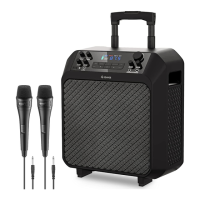

 To Next Page