ENGLISH
INTRODUCTION
Thank you for purchasing the Donner DMK-25 PRO Midi Keyboard!
The DMK-25 PRO is an extraordinarily compact midi keyboard that you can use to control software synthesizer or DAW software The portably
ve ocity-sensitive pads and keyboard with diversified functions make it easy to compose your unique music once the inspiration strikes. The
versatile and easy to-operate DMK-25 PRO will be a powerful partner for studio or stage performances
PRECAUTIONS
Please read the following in detail first before operation
Keep and follow these instructions
Do not store it in the fol owing environments: Direct sunlight, high temperature, excessive humidity, excessive dust, and strong vibration
Do not disassemble or modify this product to avoid the danger of fire and electric shock
DO not submerge in water or drop water onto or into it
Do not place this product on an uneven surface or any other unstable place
Before cleaning the instrument, always remove the USB cable. Do not clean the product with thinners, alcohol, or similar chemicals to avoid
disco oration
Do not insert small objects into the product.
Unplug this product during lightning storms and long-time disuse
FEATURES
25-key velocity-sensitive keyboard
16 scale modes provide more creative inspiration for players
Touch slider with light effect, control Pitch, and Modulation respectively.
The powerful NRIARP function provides more ways for music creation.
Multi-color backlit pads for creating beats and changing programs
4+4 Assignable knobs, sliders for freedom adjustment.
Plug and play functionality, no driver installation required.
6 assignable transport buttons
Standard 3.5mm sustain jack
Only need a USB cable that you can easily and quick y establish your own creation system
DMK-25 PRO Midi Keyboard
Standard USB TYPE-C
User Manual
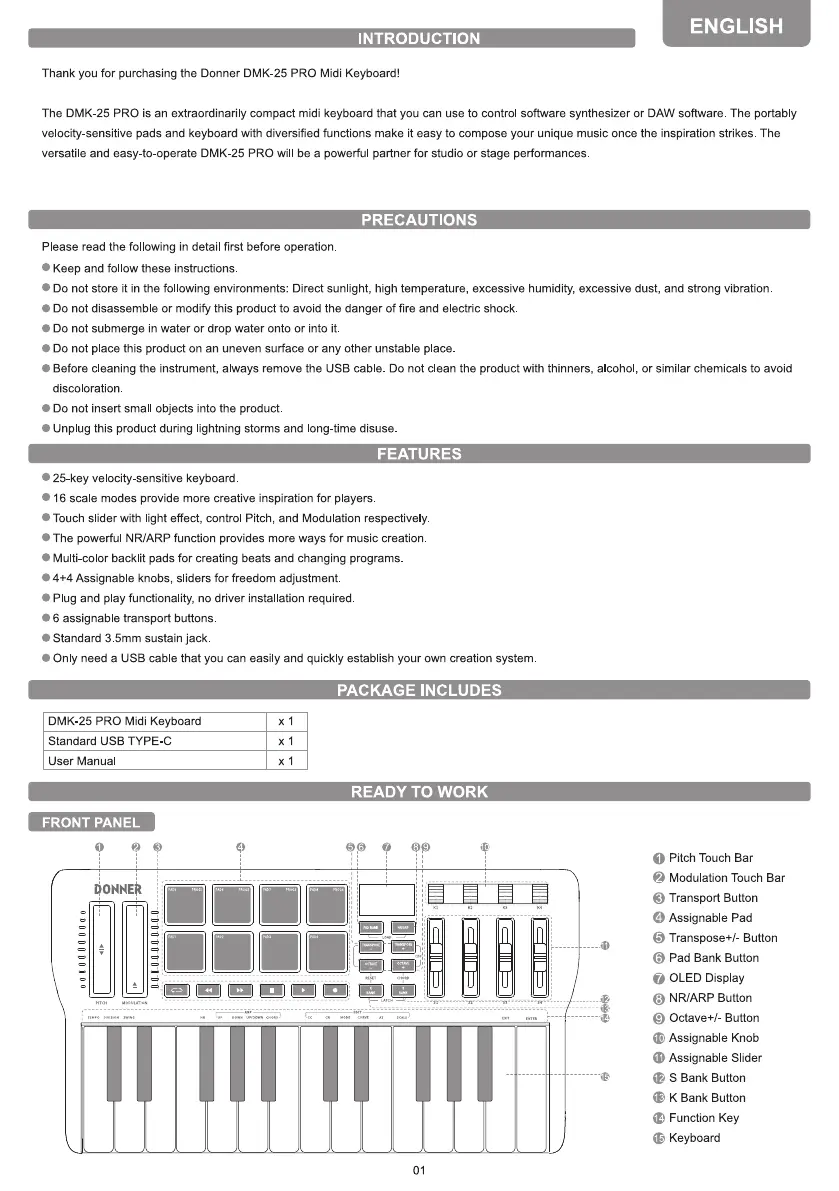
FRONT PANEL
xl
PACKAGE INCLUDES
READY TO WORK
OONNEÄ
01
O
Pitch Touch Bar
Modulation Touch Bar
O Transport Button
O
Assignable Pad
6
Transpose+/- Button
Pad Bank Button
O OLED Display
NR/ARP Button
O
9
Octave+/- Button
C
Assignable Knob
C) Assignable Slider
(E S Bank Button
K Bank Button
C) Function Key
C Keyboard


 To Next Page
 Loading...


