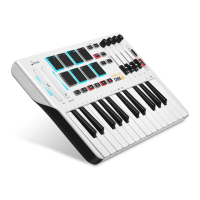
● When the transposition function is turned on, transposition value of the keyboard can be adjusted by pressing “+” and
“-” button.
● After turning it on, the button light will always be on. The “+” button or “-” button lights up when a semitone increased
or decreased.
● Press “+” and “-” buttons at the same time to return the initial state.
● You can play an entire chord by pressing【Chord】button on the keyboard. The chord will transpose automatically as you
play different notes. If you play a C2, and then play its component notes C2, G2, C3.
● Press the single note, the value is 1/8; When pressing the double notes, the value is 1/8.
(Double notes are playing in the order in which it is pressed).
● The default beat of the sequencer is 1/8 note.
● When the Sequencer is on, the digital tube directly displays the current speed, which can be adjusted by the encoder itself.
● The default is 120 Bpm and it can be adjusted by the encoder and the diode screen display, the value is 60 Bpm-240Bpm.
● The initial range is F1-C4. The highest range can reach C8, and the lowest range can reach F-2. A total of 5 octaves can be
added or subtracted from top to bottom.
07


 To Next Page
 Loading...