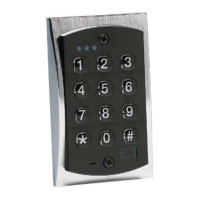
TESTING THE KEYPAD
1. 1. Connect the positive (+) lead of your power
supply to the terminal strip (TS1) +V input.
2.2.Connect the negative (-) lead of your power
supply to the terminal strip (TS1) -V input.
3. 3. Turn on your power supply.
4.4.Press 7890#123456
*
. If all 12 keypresses have
been verified, the keypad will enter self test mode.
Either the LED’s will flash or the sounder will beep 3
times,.then light or sound continuously for 3 sec
onds (except on the mullion). If these responses do
not happen, try the test mode again and then call
tech support. Note:Note:self test mode can be used
when troubleshooting a keypad in the field. If you do
not get the continuous light or sound then the mem
ory has been corrupt and should be re-programmed
with the 46 command (see option #19).
5. 5. Enterthe master code of 1234
*
. The relay will ener
gize. Refer to programming section to program your
keypad.
NOTE:NOTE:
The keypad may be programmed in your shop or at the
installation site. Programmed information is stored in non-
volatile memory so it will not be lost if power is removed.
PROGRAMMING
1. Enter programming mode Yellow LED
1
Press 99 # (master code)
**
Flashes slowly
2. To change master code
2
Press 1 # (new master code)
*
Flashes fast
Repeat (new master code)
*
Flashes slowly
If main relay time must be changed, substitute option 2
from PROGRAMMING OPTIONSCHARTfor step above.
3. To add/change second code
Press 2 # (new user code)
*
Flashes fast
Repeat (new user code)
*
Flashes slowly
4. To add/change third code
Press 3 # (new user code)
*
Flashes fast
Repeat (new user code)
*
Flashes slowly
5. Up to 120 codes may be added in this fashion
6. Exit programming mode
Press
**
Out
NOTES:
•User location represents one location in memory
where an individual code is stored. A user code is
stored in it’s own user location.
There are 120 user locations available.
•
1
Some Door•Gard products contain a sounder in
place of the yellow LED. In these products the
flashing is replaced by a beeping.
•
2
The master code is always in user location 1The master code is always in user location 1.
•The master code allows access to the
programming mode & activates the main relay.
•All codes must be followed by the
**
key
.
•Codes may be from 1-6 digits in length, and digits
may be repeated.
•If the master code is forgotten or does not seem toIf the master code is forgotten or does not seem to
be workingbe working, momentarily push SW1 on the circuit
board, (see wiring diagram for location) to enter pro-
gramming mode and follow step two from above to
program a new master code.
•If the yellow LED lights (or sounder sounds) solid while
in programming mode an error has occurred. Press
*
to clear (yellow LED should flash or sounder sound)
and start over from step 2 or 3 above.
COMMAND AND
CONTROL DEFAULTS
The Door-Gard Command and Control Series
keypads are designed for easy installation in a
minimum amount of time. The following defaults
have been factory programmed.
Master Code (user 1) 12341234
Main Relay will energize for 5 seconds5 seconds
Auxiliary Outputs will energize for 5 seconds5 seconds
Panic will energize Output 4Output 4
Keypad Active Output OffOff
Remote Triggering Input will energize Main RelayMain Relay
Keypress Feedback OnOn
Led on when powered up REDRED
Led on when relay is activated GREENGREEN
If defaults must be changed or additional functions
are desired, please refer to the PROGRAMMING
OPTIONSchart after you are familiar with the
PROGRAMMINGsection.
1 2


 To Next Page
 Loading...