1616
If you have problems adding the device to the App please check if the device
is online (www.doorbird.com/checkonline). If the device is not online, please
check the WiFi or network cable connection again.
DIAGNOSTIC-LED
You can see if the device is powered on by checking the Diagnostic-LED,
which lights up about 30 to 60 seconds after the power is connected.
DIAGNOSTIC-SOUNDS
The device emits brief diagnostic sounds about 30 to 60 seconds after it has
been connected to power.
TECHNICAL SPECIFICATIONS
Dimensions
122 x 86 x 32 mm (L x W x H)
4.8 x 3.39 x 1.26 in (L x W x H)
Power supply 15 V DC or power over Ethernet (PoE 802.3af mode A)
Operating
conditions
-25 to 55°C / -13 to 131°F
Humidity 10 to 85 % RH
(non condensing)
Connectors
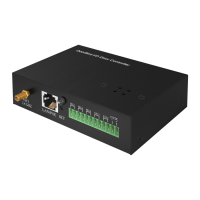
SMA, RJ45 (10/100 Base-T) for LAN/PoE, 12-pin screw
terminal for
• 15 V DC input (+, -)
• Bi-stable latching relay #1, max. 24 V DC / AC, 1 A
• Bi-stable latching relay #2, max. 24 V DC / AC, 1 A
• Bi-stable latching relay #3, max. 24 V DC / AC, 1 A
• External input 1 (potential-free)
• External input 2 (potential-free)
2.4 GHz, 802.11 b/g/n, external antenna
PoE IEEE 802.3 af/at (Mode-A)
System
requirements
Mobile end device: latest iOS on iPhone/iPad, latest
Android on smartphone/tablet
Internet: High-speed landline broadband Internet
connection, DSL, cable or fiber, no socks or proxy server
Network: 802.11 b/g/n 2.4 GHz or Ethernet Network, with
DHCP
Compatible with all DoorBird IP Video Door Stations.


 To Next Page
 Loading...