Dorman Products, Inc. Corporate Oce and Customer Service: 1-800-523-2492.
Disclaimer: It is impossible in these instructions to account for all possible circumstances or situations that you may experience when at-
tempting to install this product. Please consult with a qualied auto technician before attempting to perform any work you are not qualied to
do. Automobiles can be hazardous to work on; be sure to take all necessary safety precautions. Failure to do so may result in property damage
or personal injury. Certain motor vehicle standards and performance requirements may apply to your motor vehicle (such as Federal Motor
Vehicle Safety Standards by the National Highway Trac Safety Administration). Be sure that your work is performed in accordance with such
standards and that you do not disable any motor vehicle safety feature.
T
E
C
H
N
I
C
A
L
N
O
T
E
PAGE 1 OF 3
BEFORE YOU BEGIN:
• Always wear proper safety
equipment when performing repairs.
• Ensure at your point of purchase
that this part ts your exact
vehicle conguration.
• Reference the appropriate service
manual for your vehicle. If you do
not have a service manual, and do
not have the training or experience
to perform the necessary
procedures correctly, seek the
services of a qualied technician.
NEED HELP?
Please call our Technical Support
team for assistance from our team of
certied automotive experts.
1-866-933-2911
© 2023 No reproduction in whole or in part without prior written approval.
601-037_Tech-Note
601037
STEERING COLUMN
LOCK ACTUATOR
Programming requires one functioning
remote. Program all remotes together.
PROGRAMMING
PROCEDURE
STEP 1:
Turn vehicle o.
STEP 2:
Install electronic steering lock.
STEP 3:
Insert programmer into OBD-II port. Red
LED will illuminate. Programmer will
beep once.
STEP 4:
Press unlock on remote ve times with one-
second interval between each button press.
After this sequence, the programmer will
beep once.
STEP 5:
Insert remote key into key slot.
STEP 6:
Push start/stop button to ON position, then
wait ve seconds. Programmer LED light will
turn green.
STEP 7:
Push start/stop button to OFF position, then
wait ve seconds.
STEP 8:
Push start/stop button to ON position.
Vehicle security light will ash ve times on
instrument cluster/dashboard.
STEP 9:
Push start/stop button to OFF position.
NOTE: Programmer may beep at this
point. If so, you can ignore it and
proceed to next step.
NOTE: If you have more than
one remote, continue to Step 10.
Otherwise proceed to Step 14.
STEP 10:
Remove remote from key slot. Insert next
remote to program.
STEP 11:
Push start/stop button to ON position,
Vehicle security light will ash ve times on
instrument cluster/dashboard.
STEP 12:
Push start/stop button to OFF position.
STEP 13:
Repeat Steps 10 to 12 for all additional
remotes. When all remotes are
programmed, proceed to Step 14.
STEP 14:
Push start/stop button to ON, then wait
one second. Push start/stop button to
OFF position. Repeat cycle until you hear
locking/unlocking sound from newly
installed steering column lock module.
STEP 15:
Depress brake pedal and push start/stop
button to ON position. Engine should start.
STEP 16:
Push start/stop button to OFF position.
Remove programmer from OBD-II port and
remote from key slot.
VERIFICATION
PROCEDURE
STEP 1:
Lock steering using remote. Verify steering
column is locked.
STEP 2:
Press unlock button using remote. Push
start/stop button to ACC position. Ensure
steering column is unlocked and you are
able to start engine.
STEP 3:
If the steering lock is not functioning, repeat
the programming procedure.

 Need help?
 General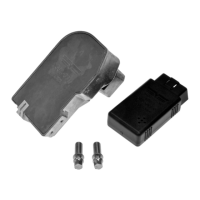

 To Next Page