Settings
Connection
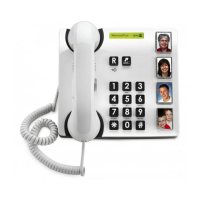
1. Connect the telephone cord to a network wall socket
and to the
T
socket on the back of the telephone.
2. Connect the spiral cord to the handset and to the
q
socket on the base of the telephone.
3. You will hear a click when the modular plug is
correctly in place.
4. Lift the handset and listen for the dial tone.
Memories
Saving speed dial numbers
1. Make sure that theMake sure that the FLASH/STORE switch on the base
of the telephone is set to STORE.
2. Lift the receiver and pressLift the receiver and press FLASH on the front (ignore (ignore(ignore
anything you hear in the earpiece).
3. Enter the phone number (up to 16 digits) using theEnter the phone number (up to 16 digits) using the
keypad. Press PressPress FLASH.
4. Select memory position by pressing theSelect memory position by pressing the
corresponding button.
5. Replace the handset. The number has now been saved.Replace the handset. The number has now been saved. The number has now been saved.The number has now been saved.
Remember to return the FLASH/STORE switch on the
base of the telephone to the FLASH position when all
the telephone numbers have been saved.
Press
REDIAL if you want a pause in the telephone
number.



 To Next Page