EasyManua.ls Logo

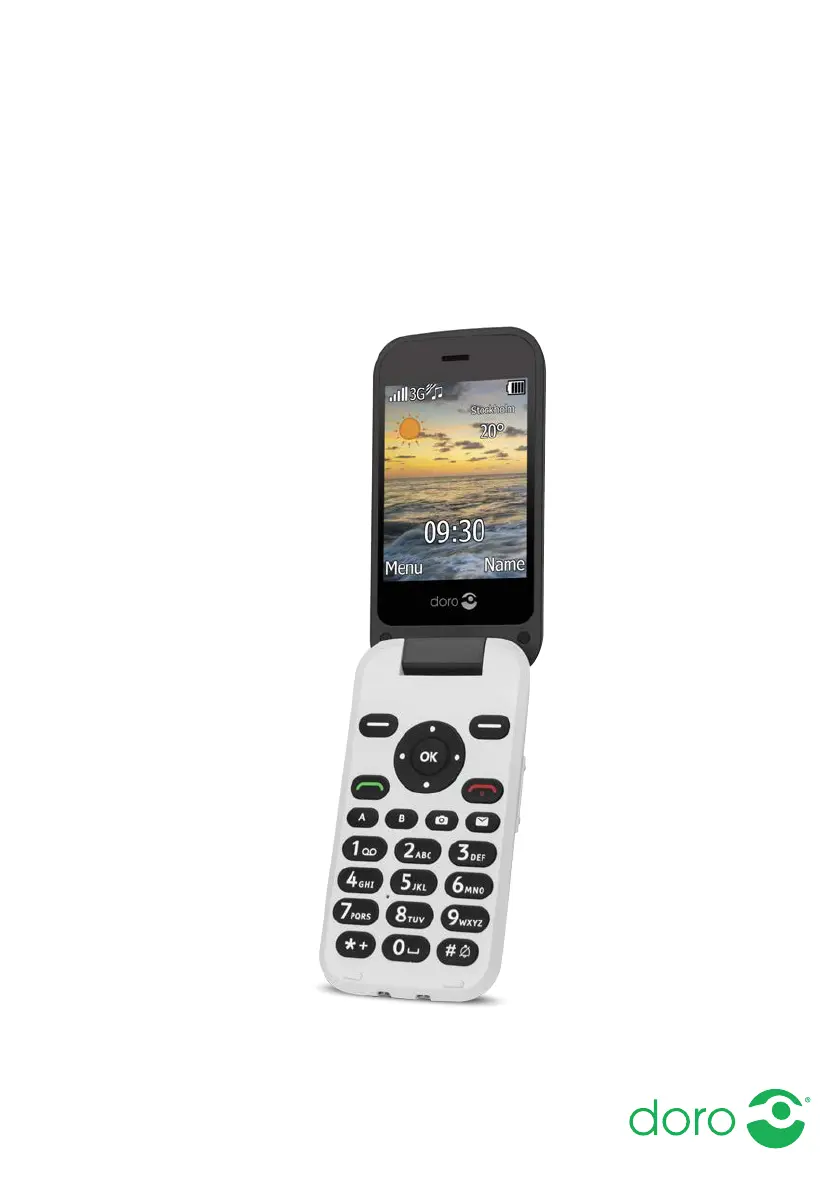
Doro 6620 - User Manual

Doro 6620
70 pages
Print Icon
To Next Page IconTo Next Page
Loading...
English
Doro 6620

Table of Contents

Other manuals for Doro 6620

Questions and Answers

  • M
    Melissa AtkinsAug 18, 2025
    Why won't my Doro 6620 Telephone turn on?
    • C
      Christy RandolphAug 18, 2025
      If your Doro Telephone won't switch on, it could be due to a low battery charge or the battery being incorrectly installed. Connect the power adapter and charge the battery for 3 hours. Full battery capacity is reached after the battery has been charged 3–4 times. Also, check the installation of the battery.
  • J
    janesheltonAug 20, 2025
    What to do if I can't place or receive calls on my Doro 6620 Telephone?
    • E
      Emily KaiserAug 20, 2025
      If you are unable to place or receive calls on your Doro Telephone, call barring might be activated. Deactivate call barring. If this does not solve the problem, contact your service provider.
  • T
    Taylor LynchAug 23, 2025
    Why is my Doro 6620 Telephone failing to charge?
    • M
      Michael GillespieAug 23, 2025
      If your Doro Telephone is failing to charge, the battery or charger may be damaged, the charging environment may not be suitable, or the charger may be incorrectly connected. Check the battery and charger. Improve the charging environment, ensuring the temperature is between 0 °C and 40 °C. Also, check the charger connections.
  • H
    Haley HerreraAug 26, 2025
    What to do if my Doro 6620 SIM card shows an error?
    • T
      thawkinsAug 26, 2025
      If your Doro Telephone displays a SIM card error, it could be due to several reasons. The SIM card might be damaged, incorrectly installed, or dirty/damp. Check the condition and installation of the SIM card. Remove the card and reinstall it. Also, wipe the contact surfaces of the SIM card with a clean cloth. If the card is damaged, contact your service provider.
  • S
    sarah93Aug 28, 2025
    What to do if my Doro Telephone PIN code is not accepted?
    • K
      Kyle WilliamsAug 28, 2025
      If your Doro Telephone is not accepting the PIN code, it's likely that the wrong PIN code was entered too many times. Enter the PUK code to change the PIN code, or contact your service provider.
  • R
    Robert BrownAug 30, 2025
    Why is my Doro 6620 battery draining so fast?
    • R
      Robert WestAug 30, 2025
      The standby time decreases on your Doro Telephone because either the battery charge capacity is too low, or your phone is too far from the base station and is constantly searching for a signal. To solve this, install a new battery or find a place with a stronger signal. You can also temporarily turn off the phone.
  • S
    Shawn HernandezSep 2, 2025
    Why can't others hear me clearly on my Doro Telephone?
    • M
      Michael TaylorSep 2, 2025
      If others can't hear you clearly on your Doro Telephone, make sure that you are not covering the built-in microphone. If you are using a headset, ensure that it is properly connected.
  • Q
    qleSep 4, 2025
    How to fix a weak signal on my Doro Telephone?
    • J
      Jessica McintyreSep 5, 2025
      A weak signal on your Doro Telephone can be caused by being too far from the base station or network congestion. Try again from another location or try calling at a later time.
  • R
    Ronald AndrewsSep 7, 2025
    Why is there an echo on my Doro Telephone calls?
    • R
      Rebecca PatelSep 7, 2025
      Echo or noise during calls on your Doro Telephone can be due to a regional problem from a bad network relay. Hang up and redial. This may switch to another network relay.
  • M
    Matthew WalshSep 9, 2025
    How do I fix failure to send or download MMS on Doro 6620 Telephone?
    • R
      ryankatelynSep 9, 2025
      If your Doro Telephone is failing to send or download MMS, it could be due to a full phone memory or an incorrect MMS profile. Delete received MMS or select to set the default storage for MMS to be saved on a memory card (not included). For some service providers the MMS profile has to be selected manually.

Summary

Get started

Insert SIM card, memory card and the battery

Learn how to insert the SIM card, memory card, and battery into the phone.

Charge the phone

Instructions on how to connect the phone to a power source for charging.

Get to know your phone

How to navigate the phone

Understand the phone's standby mode and navigation keys for basic operation.

Calls

Make a call

Step-by-step guide to initiating a phone call.

SOS calls

How to make an emergency call using the SOS function.

Phonebook

Add contact

Instructions for adding new contacts to the phonebook.

Assistance button

Details on how to set up and use the dedicated assistance button.

Messages

Create and send text message (SMS)

Guide to composing and sending SMS messages.

Message settings

Configure various settings related to SMS and MMS messages.

Camera

Camera

How to take photos using the phone's camera.

Camera settings

Adjust settings for the camera, like image size and quality.

Connectivity

Bluetooth

Instructions for activating and using Bluetooth connectivity.

Network setup

Configure network settings for GSM and 3G services.

Sound & Display

Audio setup

Adjust audio settings for normal hearing or hearing aid compatibility.

Tone setup (ringtone)

Select and customize ringtones for your phone.

Main menu

Choose different display styles for the main menu.

Text size

Adjust the text size for menus and messages.

File manager

Organiser

Access calendar, alarms, and notes through the Organiser menu.

Organiser

Alarm

Set and manage alarms for single or repeated occurrences.

Calendar

Add and manage tasks in the phone's calendar.

More

FM radio

Instructions for tuning into and using the FM radio feature.

Calculator

Perform basic mathematical calculations using the phone.

Status

Weather

Weather settings

Configure city and display options for weather information.

Additional functions

Display status symbols

Explanation of various status symbols shown on the display.

Reset settings

Reset all

Restore phone settings and content to default.

Troubleshooting

Phone cannot be switched on

Solutions for when the phone fails to power on.

Troubleshooting

Failure to charge the battery

Steps to resolve issues with the phone not charging.

Standby time decreases

Troubleshooting tips for reduced battery standby time.

Failure to place or receive calls

Solutions for problems making or receiving phone calls.

PIN code not accepted

What to do if the PIN code is rejected or too many attempts are made.

SIM card error

Guidance for resolving issues related to the SIM card.

Troubleshooting

Weak signal

Tips for improving phone reception and signal strength.

Echo or noise

Resolving issues with echo or background noise during calls.

Sound

Troubleshooting audio problems like not being heard clearly.

Failure to add a contact

Solutions for problems adding new contacts to the phonebook.

Unable to send or receive Picture Messages; MMS with the SIM card

Troubleshooting MMS issues related to SIM card and profile.

Safety instructions

Areas with explosion risk

Precautions for using the phone in areas with explosion hazards.

Protect your hearing

Warning about potential hearing damage from loud sounds.

Emergency calls

Important information regarding the reliability of emergency calls.

Safety instructions

Li-ion battery

Information and warnings about the phone's Li-ion battery.

GPS;Location based functions

Protect your personal data

Malware and viruses

Care and maintenance

Warranty

Specifications

Copyright and other notices

Open source licenses

Hearing aid compatibility

Strålingsverdi (SAR)

Correct disposal of this product

Declaration of Conformity

Doro 6620 Specifications

General IconGeneral
Display diagonal4.5 \
Display resolution940 x 560 pixels
Processor family-
Processor frequency- GHz
Compatible memory cardsMicroSD (TransFlash), MicroSDHC
Maximum memory card size32 GB
Internal storage capacity8 GB
Digital zoom4 x
Front camera typeSingle camera
Video capture resolution (max)720 x 480 pixels
Rear camera resolution (numeric)8 MP
2G standardsGPRS, GSM
3G standardsHSDPA, HSUPA, UMTS, WCDMA
SIM card typeMicroSIM
Wi-Fi standards802.11b, 802.11g, Wi-Fi 4 (802.11n)
Bluetooth version4.0
3G bands supported900, 2100 MHz
2G bands (primary SIM)900, 1800, 1900 MHz
Mobile network generation3G
HDMI ports quantity0
Headphone connectivity3.5 mm
Form factorBar
Product colorWhite
PlatformAndroid
Google applicationsGoogle Play
Operating system installedAndroid 4.4.2
Personal info management (PIM)Alarm clock, Calculator, Calendar, Events reminder
Audio formats supportedAAC, AAC+, AMR, MIDI, MP3, WAV
Image formats supportedBMP, GIF, JPG, PNG
Video formats supported3GPP, AVI, MP4
Multimedia Messaging Service (MMS)Multimedia Messaging Service (MMS) is a standard way to send messages that include multimedia content to and from a mobile phone over a cellular network
Talk time (2G)16 h
Talk time (3G)- h
Battery capacity1900 mAh
Standby time (2G)400 h
Head SAR (EU)- W/kg
Specific absorption rate (SAR) value (EU)0.178 W/kg
Storage temperature (T-T)-20 - 60 °C
Operating temperature (T-T)0 - 40 °C
Cables includedUSB
Weight and Dimensions IconWeight and Dimensions
Depth11 mm
Width71 mm
Height132 mm
Weight132 g

Related product manuals