23
22
CONTENTS
Banknote counter DORS 820 Banknote counter DORS 820
1.2 «I» or «II» key is used to start the counting in manual mode. Touch the
key of the active user to start.
2 Counting mode key
There are four counting modes: «COUNT», «MIX», «MULTI» and «DEN».
A mode is selected by a repetitive touching of the mode key. At the same
time this key displays the selected operation mode.
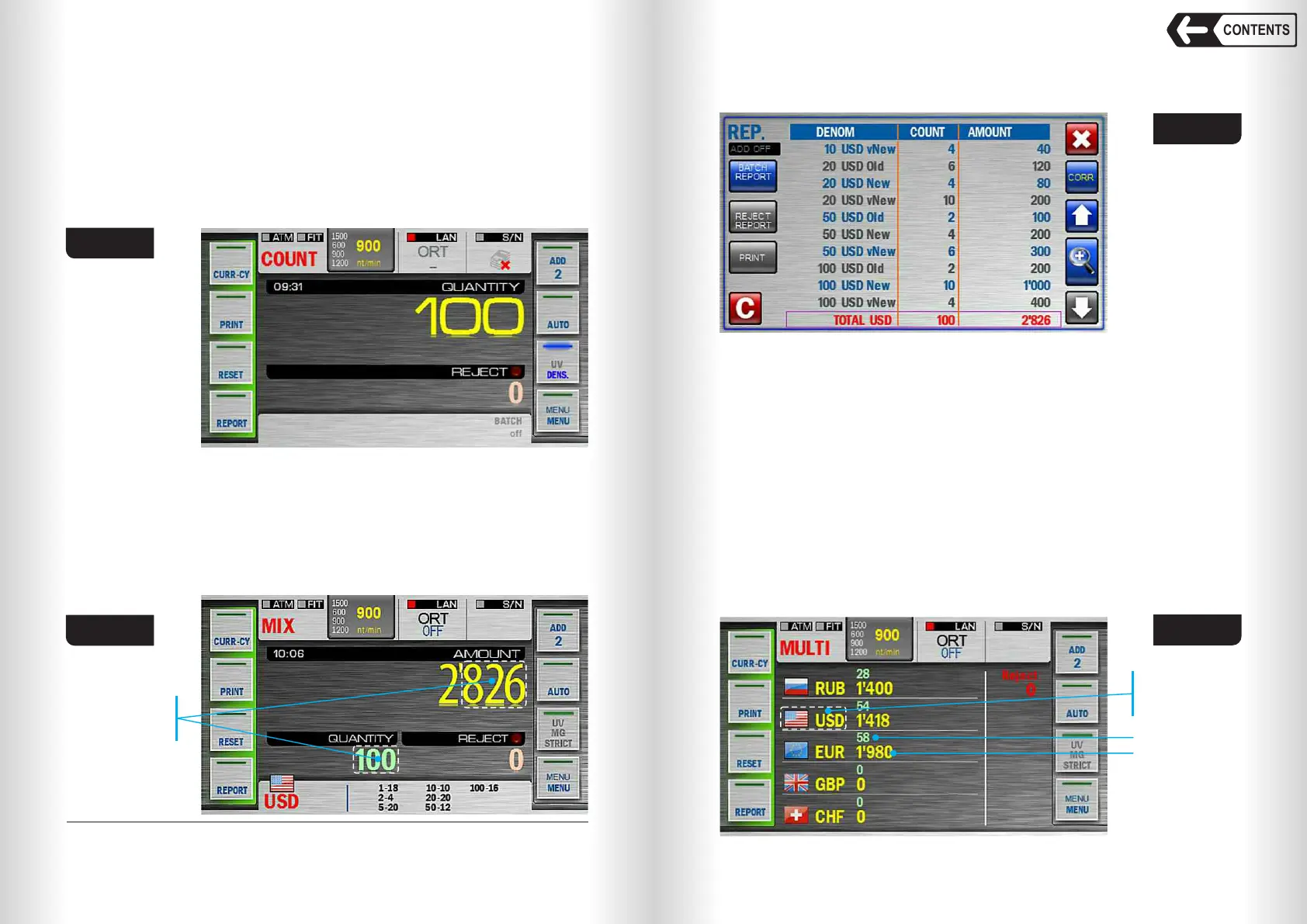
2.1 «COUNT» is a piece counting mode. The notes are counted without
detecting their denominations and counterfeit detection; the display
3
shows the quantity of the counted and rejected banknotes (Fig. 32).
Fig. 32
2.2 «MIX» is the counting mode for mixed denominations of certain
currency with their authentication, calculation of the total amount, the
quantity of the counted banknotes and amounts of each denomination.
The counter will display total amount of the counted banknotes, the
quantity of rejected and accepted banknotes (see Fig. 33).
The detailed report on each denomination's number and amount is
available by touching the key «REPORT» (submenu «Batch Report»,
Fig. 34) or by touching the area shown in Fig. 33).
3
Rejected banknotes displayed quantity is for reference and may differ from actual.
Touch here to
open the
detailed report
Fig. 33
For more details on submenu «REPORT», see subsection Operation
Keys (Key «REPORT»).
Fig. 34
Fig. 35
2.3 «MULTI» is a mode for counting a mixture of banknotes of several
currencies and denominations, with authentication, determining the
quantity and amount of counted banknotes for each denomination of
each currency. For conversion, the currencies selected for auto-
determination are available (1…5 currencies, see Currency key). If the
«Full auto» mode is selected then the list of currencies on the main
screen is empty by default and will be filled as more currencies are
detected. After detecting more than 5 currencies the buttons will appear
to scroll through the list. The display shows the quantity and amount of
counted banknotes for each currency and the quantity of rejected
banknotes (see Fig. 35).
To go to the currency report, touch the flag zone or the name of the
currency (see Fig. 35a). The denomination, quantity and amount of all
counted banknotes are available by touching the «REPORT» key
(«BATCH REPORT» see Fig. 35b).
Touch here to
open currency
report
Amount
Quantity


 To Next Page
 Loading...


