25
24
CONTENTS
Banknote counter DORS 820 Banknote counter DORS 820
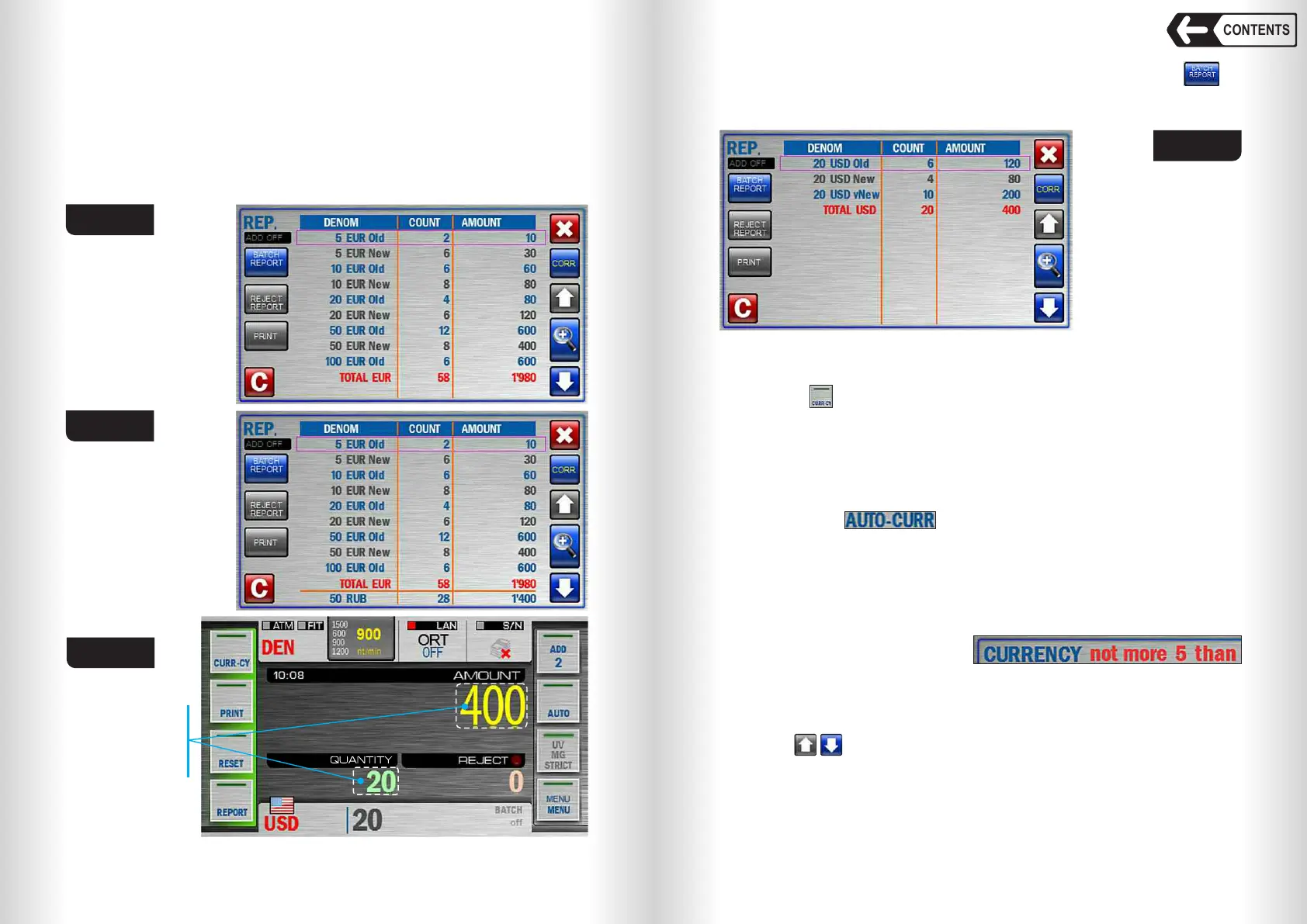
Fig. 35a
Fig. 35b
Fig. 36
Touch here to
open the report
about counted
banknotes
Touch REPORT key or the area shown in Fig. 36 and open to
check the denomination, quantity and amount for each denomination
(see Fig. 37).
Fig. 37
3 CURRENCY key
3.1 Touch key to open CURRENCY submenu (see Fig. 38), and select
the currency to be counted and denomination. The set of supported
currencies depends on firmware version. Currency selection is available
only for «MIX», «MULTI» and «DEN» modes; denomination selection is
available only for «DEN» mode. Automatic mode of currency detection is
on by default; the counted currency is set by the first banknote in the batch
(see Fig. 38). In the bottom left corner of the screen there is a list of auto
currencies ( ), i.e. those currencies that can be detected
automatically (if more than one currency is selected).
Fig.38 shows:
A – Currencies quantity available for auto detection by the first banknote
in the batch (selected by user). Touch any currency to delete it from auto
detection list.
B – All available auto currencies quantity (depends on firmware version).
If the user tries to exceed this
amount, a message
will appear in the upper part of the display.
C – All available currencies’ quantity (depends on firmware version). In the
middle of the screen there is a list of currencies. If the quantity of
currencies in this list (C) is more than 8, you can scroll through this list
with keys.
Touch the currency to add any currency to auto currencies list (A). A
colour of a box against is changed from grey to blue to confirm your
choice. Touch the currency again to delete a currency from the Auto
currencies list.
Touch and hold the currency for one second to select it as a single one.
2.4 «DEN» – is the counting mode for the banknotes of certain
denomination with their authentication, calculation of the total amount
and the quantity of counted banknotes, and the detection of
denomination and issue. The denomination and issue are set by the first
banknote in the batch. It's also possible to select the denomination
manually (see submenu «CURRENCY»). The display shows the total
amount of counted banknotes, the quantity of rejected and accepted
banknotes (see Fig. 36).


 To Next Page
 Loading...


