3.4 Singular currency.
Depending on a currency set of your counter, it can detect so-called
singular currencies. A singular currency is one which optical properties
differing from other currencies so that detecting it automatically along
with the other currencies is impossible.
If a singular currency is selected, then the other currencies can't be
added to the auto currency list. To cancel a choice of a singular
currency, just choose any other currency.
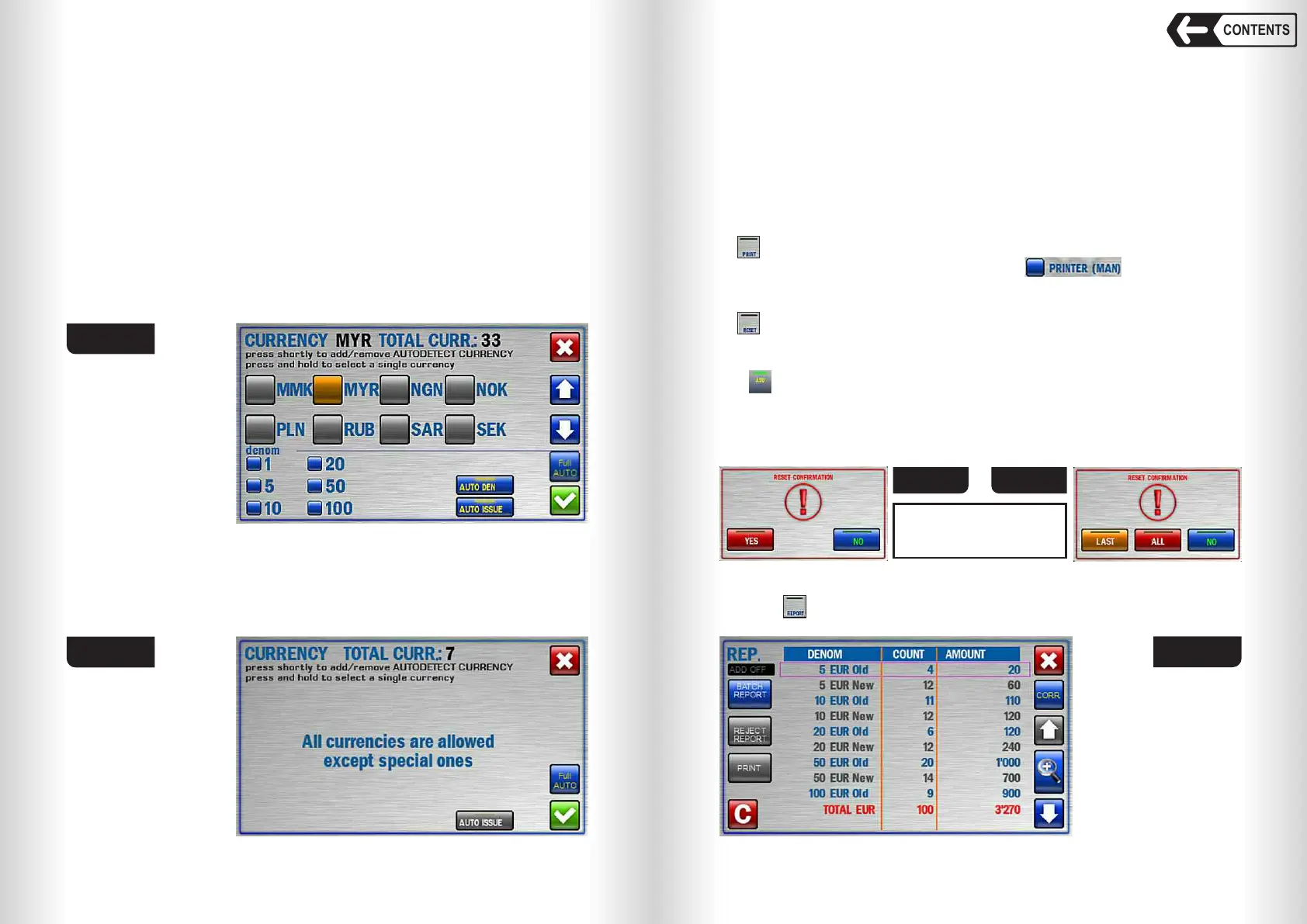
In currencies list a singular currency is marked by different colour (see
Fig. 43 where it is marked by yellow).
A symbol of selected currency (or AUTO mode symbol) is at the bottom
left corner of a main screen (see Fig. 37 and Fig. 43). This symbol is
also a hot key to get access to CURRENCY submenu (for instance
when Wide visual mode is active).
In MIX mode to the right of a currency symbol there is a list of
denominations of this currency with quantity of counted notes; counted
denominations are in black font (see Fig. 33).
28
29
CONTENTS
Banknote counter DORS 820 Banknote counter DORS 820
Fig. 43
ALL key will delete all the information about counted banknotes on the
main screen and amount report.
WARNING:
RESET acknowledgement
may be disabled in your
counter firmware version!
Fig. 45a
6 REPORT key
Touch key to call REPORT submenu (Fig. 46) showing the information
about counted and rejected banknotes.
Fig. 46
4 PRINT key
key will send the results of counting to the printer connected to the
counter if manual printing mode is selected (see Fig. 21).
5 RESET key
key will clear the counting results after the stacker has been emptied
(the reject pocket shall also be empty). To avoid an accidental data reset, an
acknowledgement is required (see Fig. 45).
If mode is on, then acknowledgement window will appear as in Fig. 45a.
LAST key will delete the result of the last count on the main screen and
amount report.
3.5 Full AUTO
Full automatic currency detection mode allows you to work with all
currencies stored in the counter's memory(except for special ones). To
activate the mode touch the button «Full AUTO» (see Fig. 38).
When this mode is activated, the list of all available currencies will be
replaced by the inscription «All currencies are allowed except
special ones» (see Fig. 44).
The Full AUTO mode has the following restrictions:
– Three banknote conversion speeds are available for selection - 600,
900, 1200 n/min.
– This mode is incompatible with the «S/N», «FITNESS», «ATM» modes.
If one of the above modes has been already selected, then the «Full
AUTO» key will be inactive (grey).
If the Full AUTO mode is enabled, then when you try to turn on any of
the «Serial Number Recognition», «FITNESS», «ATM» modes, the
message «UNAVAILABLE» appears on the screen.
Fig. 44
Fig. 45


 To Next Page
 Loading...


