14
15
CONTENTS
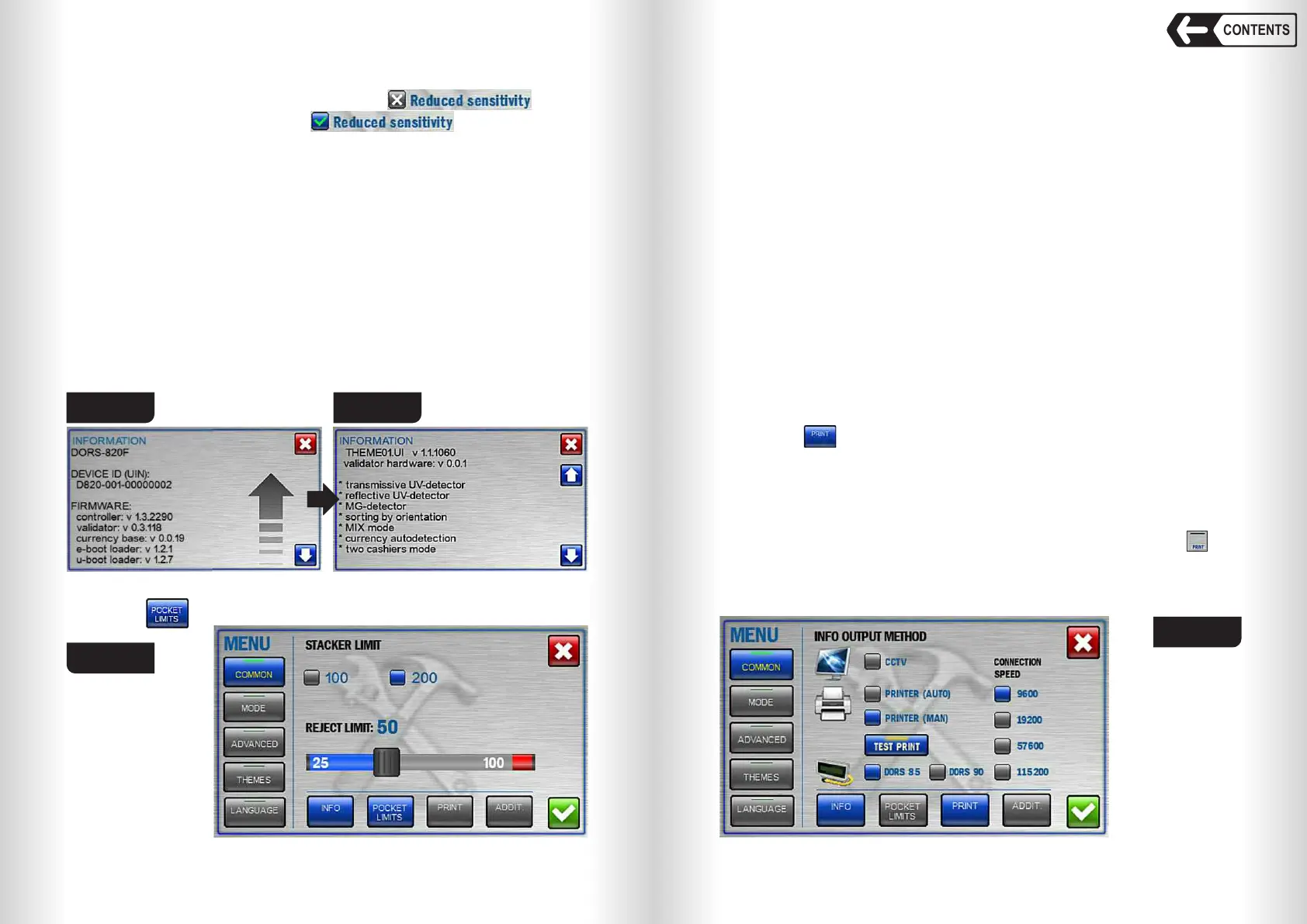
Fig. 18 Fig. 19
2
INFO
This screen contains the information about the device identifier (UIN), the
firmware versions, the supported languages, the supported currencies, and
the currency database version (see Fig. 18, Fig. 19). Touch the blue arrow to
scroll the screen up/down.
POCKET LIMITS
The icon (see Fig.17) will open pockets limit menu (see Fig. 20).
Fig. 20
1
2
Banknote counter DORS 820 Banknote counter DORS 820
Reduced sensitivity
Reduced sensitivity is switched off by default
Switching on Reduced sensitivity increases banknote
position detection but the banknotes with transparent inserts can’t be counted.
Density level
The setting allows adjusting the scanner to detect the banknotes with
different optical density in COUNT mode.
Light and dark banknotes can be best detected when the right setting is
selected:
1– For the new banknotes and the banknotes with the even optical density;
2– For moderate worn-out banknotes;
3– For the worn-out (dirty) banknotes and the banknotes with uneven optical
density (e.g. USD).
PRINT
The icon (see Fig.17) will open INFO OUTPUT METHOD submenu
(see Fig. 21)
Select information output device in this menu:
• CCTV.
• PRINTER (AUTO) – automatic output to the printer.
PRINTER (MAN) – manually send info to the printer by touching icon
(see Fig.13 pos.6).
• DORS 85 / DORS 90 – select external display.
Stacker limit is maximum banknotes quantity that will be stacked. The limit
has two values: 100 or 200 banknotes; having reached the selected value the
counter will stop and resume operation after emptying the stacker (and
touching «I» or «II» key in manual start mode).
Selected stacker limit is highlighted in blue. Touch the desired limit value to
select it.
The reject pocket has an adjustable limit value. As soon as the specified
limit is reached, the counter stops and resumes its operation after the
banknotes have been removed from the reject pocket (and touching «I» or «II»
key in manual start mode).
The default (optimal) value of the reject pocket limit is 50 banknotes. The
user can change the limit within the range of 25 to 100 banknotes. To change
the limit, move a slider to the required value. The slider moves by steps of 5
notes each.
Warning: For counting of worn notes we suggest the reject pocket limit
would not exceed 50 notes; otherwise it may cause unsmooth stacking or
notes jamming.
Note: Please mind that all the banknotes that do not match the counting /
sorting criteria get into the reject pocket, including the notes with tears and
other mechanical damages. To prevent further banknote damage please don’t
set reject pocket limit too high.
Fig. 21


 To Next Page
 Loading...


