17
16
CONTENTS
CONNECTION SPEED – select counter’s COM-port bit rate to establish
connection with external device.
icon will send test information to output device. If connection settings
are correct, you will receive a report about successful connection (CCTV OSD
message or printer receipt).
Banknote counter DORS 820 Banknote counter DORS 820
2 «MODE» Submenu
Accumulation Mode (ADD):
ADD lets the user select an optimal summation mode. A checkbox against
selected mode is highlighted with blue.
Warning: ADD mode selection is in the menu (see Fig.17). To turn ADD
mode on/off please use ADD key (Fig. 13 pos.9).
ADD 1
When is selected, the display will show the current batch amount.
Having the batch counted (the banknotes are in the stacker) the device will
display the last batch amount for a while and then will show total amount.
When the notes are taken out from the pockets and the new notes are
added to the hopper, the device will add the new count to total amount.
ADD2
When is selected, the display will show the current batch amount.
Having the batch counted (the banknotes are in the stacker) the device will
show total amount.
When the notes are taken out from the pockets and the new notes are
added to the hopper, the device will add the new count to total amount.
ADD3
When is selected, the display will show the current batch amount.
Having the batch counted (the banknotes are in the stacker) the device will
display the last batch amount for a while and then will show total amount.
When the notes are taken out from the pockets and the new notes are added to
the hopper, the device will reset total amount and start counting anew.
Warning:
If during the counting process (when the accumulation mode is on or the
stacker is not empty), the parameters affecting the count result (for example:
ADD mode, batch mode, currency, etc.) have been changed, a flashing
warning AMOUNT DATA WILL BE LOST will appear in the display. Touch
and take out the banknotes from all the pockets of the counter to confirm the
changes.
Or select the previous mode to disable the changes.
BATCH CONTINUE
Batch Сontinue is the counting mode which allows accumulating the
counting results while there are banknotes in the hopper.
BATCH CLEAR
Batch Clear is the function that lets the user to choose whether to add the
new batch amount to the previously counted banknotes or to reset the last
batch if the following conditions are met:
— ADD1 or ADD2 mode is on.
— Some amount has been reached while counting, and then both the
hopper and the stacker were emptied.
— An error occurred during further counting, requiring the user’s attention
(note jam or the pockets are empty etc).
Having the error fixed the user will receive a message offering to add the
last batch to previous amount or to reset the result to previous amount.
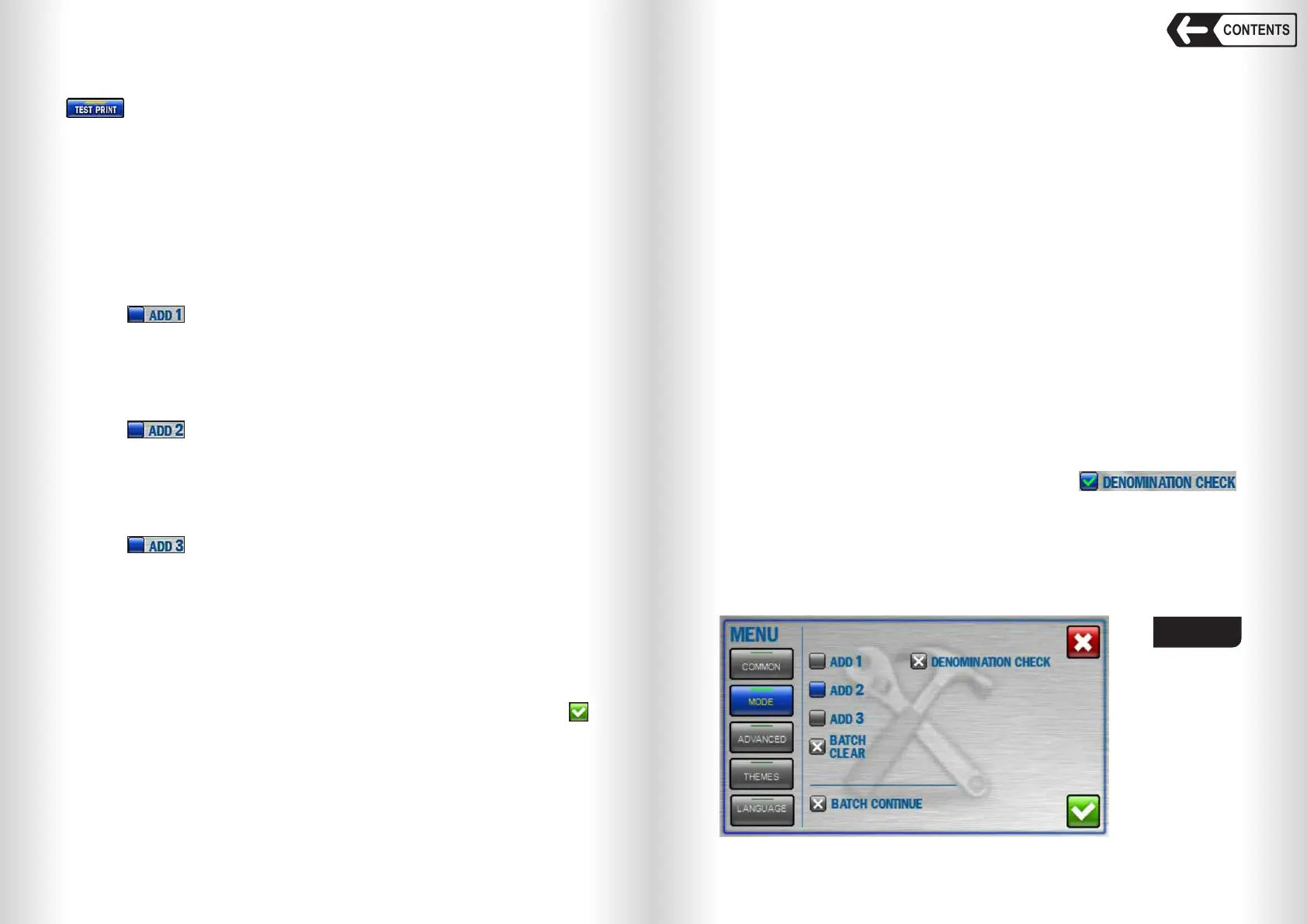
Touch Batch Clear icon to activate/deactivate the function (see Fig. 22).
Batch Clear is unavailable in MULTI mode.
When the hopper is empty, the next count will start from zero, not from
the previous amount.
Touch Batch Continue icon to activate/deactivate the mode (see Fig. 22).
DENOMINATION CHECK
DENOMINATION CHECK is to verify that a counted batch of banknotes
belongs to the same denomination, with the summation of the counted batches
of different denominations. To activate the mode, select ,
set the mode to «DEN» when ADD is turned on.
Then counting a batch of another denomination, it is not rejected and the
result is added to the existing one.
The denomination is determined by the first banknote in the bundle.
Note: The function is only available for automatic determination of the
denomination.
Fig. 22


 To Next Page
 Loading...


