EasyManua.ls Logo

Doss ZD-929C - User Manual

Doss ZD-929C
2 pages
Print Icon
To Next Page IconTo Next Page
Loading...
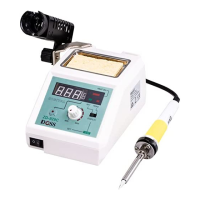
Temperature Controlled Soldering Station
ModelZD-929C
1. Features
The versatile soldering station is suitable for a wide range of soldering tasks, ideal for fine electronic work.
Heats up rapidly with long-life ceramic element.
• Electronically controlled temperature with LED display.
• The base, soldering iron, cable, built-in stand and sponge holder are included.
• 48W temperature controlled soldering station with adjustable range from 160˚C to 480˚C
2. Technical Specifications
Voltage: 220-240V 50Hz
Power: 48W
Temperature: 160˚C to 480˚C
Spare soldering iron
Voltage
Power
Model
Note
Spare Tips
24V
48W
88-201B
with 5 pins
N1 series
3. Operation
3.1 Place the soldering iron in the holder and connect the plug to the receptacle on the station and turn clockwise to
tighten the plug nut.
3.2 Check that the available power supply corresponds to the voltage specifications for the soldering station and the
power switch is in the OFF position.
3.3 Plug the control unit in to the power supply and switch on the power.
4. The display and temperature setting
With the display switch on SET, use the temperature control knob to select the required tip temperature.
Turn the display switch to READ and the LED readout will show the actual temperature of the tip. This will
change until the tip reaches the set temperature.
Switch the temperature display between to by pressing the "/" button.
When the actual temperature on the soldering tip is less than the set temperature, the red light which means
“HEAT ON” will flicker.
5. Safety
5.1 The manufacturer assumes no liability for uses other than those described in the operating instructions or for
unauthorized alterations.
5.2 The operating instructions and cautions should be read carefully and kept in an easily visible location near the
soldering station. Non-compliance to the cautions can result in accidents, injury or other health risks.
5.3 The power cord should only be plugged in to approved power sockets or adapters.
5.4 The temperature of the soldering tip can reach as high as 400℃(752℉) when powered on.
Question and Answer IconNeed help?

Do you have a question about the Doss ZD-929C and is the answer not in the manual?

Summary

Product Features

Technical Specifications

Operation Instructions

Connecting the Soldering Iron

Place the soldering iron in the holder and connect the plug to the receptacle on the station, tightening the plug nut.

Power Supply Verification

Check power supply voltage matches specifications and the power switch is OFF before plugging in the unit.

Powering On

Plug the control unit into the power supply and switch on the power.

Display and Temperature Control

Setting Tip Temperature

Use the control knob to select the required tip temperature when the display switch is on 'SET'.

Reading Actual Temperature

Turn the display switch to 'READ' to view the actual tip temperature, which updates until the set temperature is reached.

Temperature Unit Switching

Press the '°C/°F' button to switch the temperature display between Celsius and Fahrenheit.

Heating Indicator

The red 'HEAT ON' light flickers when the actual soldering tip temperature is below the set temperature.

Safety Precautions

General Safety Guidelines

Read and keep instructions visible. Non-compliance can lead to accidents or injury. Use only approved power sockets.

High Temperature Warning

The soldering tip can reach temperatures as high as 400°C (752°F) when powered on.

Handling and Usage Warnings

Do not touch hot parts, use near flammable items, or leave unattended. Always place iron in stand when not in use.

Maintenance and Caution

Turn off power before maintenance. Do not use for unintended applications or subject iron to shocks. Wipe tip, do not file.

Important Cautions

Pre-Use Inspection

Inspect for damage and ensure all connections are secure. Repair or replace damaged safety devices by a qualified technician.

Environmental Use

Do not use in moist or wet environments. Place the soldering iron in its holder after use.

Intended User Warning

This device is not for individuals with reduced capabilities unless supervised. Keep out of reach of children.

Doss ZD-929C Specifications

General IconGeneral
BrandDoss
ModelZD-929C
CategorySoldering Gun
LanguageEnglish