
 Need help?
Do you have a question about the Doss ZD99 and is the answer not in the manual?
Describes the soldering station as an entry-level hobbyist model with Mica heater and rotary temperature control.
Notes that initial smoke is normal due to manufacturing grease and lasts about 10 minutes.
Provides essential tips for soldering tip maintenance, including tinning, avoiding high temperatures, and cleaning methods.
Recommends cleaning the tip and barrel every twenty hours or weekly, and specifies flux types to use/avoid.
Emphasizes careful handling of the heated iron to prevent burns and fires, and warns against filing the plated tip.
Instructs to place the tool on its stand when not in use and replace damaged cords via qualified personnel.
Details unpacking, setup, power activation, and safe placement of the iron during heating or breaks.
Explains regulating temperature with the knob and lists color-coded temperature ranges for settings.
Outlines the process from heating the part, tinning the tip, adding solder, cooling, and cleaning the tip after use.
Covers returning the iron to the rack, turning off the station, and avoiding tip damage or immersion in water.
Guides on replacing the tip safely when the iron is cool, including cleaning the barrel and avoiding over-tightening.
Advises cleaning the outer case with a damp cloth and mild detergent, prohibiting submersion or solvent use.
Lists critical safety points: keep away from children, unplug before cleaning, supervision requirements, and cord safety.
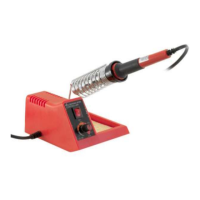
The DOSS Temperature Controlled Soldering Iron, Model ZD99, is an entry-level soldering station designed for hobbyists. Its primary function is to provide a controlled heat source for soldering tasks.
The soldering station is straightforward to operate. Upon first use, it's normal for the soldering iron to produce smoke for approximately 10 minutes as manufacturing grease burns off; this is not harmful.
To begin, unpack the station and check all parts for damage. The holding rack for the soldering iron should be placed sideways in the station, and the cleaning sponge in the sponge rack should be wetted with water. The soldering iron is then placed in its holding rack. The station should be positioned on a solid, dry surface.
Connect the mains plug and turn on the power switch (I=ON/0=OFF), which will illuminate when on. It is crucial to always place the soldering iron on the holding rack when it is heating up or during breaks from soldering. The workbench for soldering must be clean.
Only solder specifically designed for electronics should be used, as acidic solder can damage the tip or the workpiece. The desired temperature of the soldering iron is regulated using the adjusting knob. The color-coded areas on the knob correspond to specific temperature ranges:
Allow about 10 minutes for the soldering tip to reach the set temperature. The temperature can be tested by touching the tip with solder; if it melts easily, soldering can commence. Before soldering, tin the hot soldering tip with solder and wipe off any excessive solder on the wet cleaning sponge. Heat the part to be soldered with the tip and add solder, then allow the solder to cool down. After each soldering task, clean the tip on the wet sponge. Once soldering is complete, return the iron to the rack and turn off the station at the main switch.
Proper maintenance ensures a long service life for the soldering iron.
Tip replacement or cleaning should only be performed when the iron is at room temperature or below. The tip can be changed by unscrewing the knurled nut barrel assembly. The station must be switched off and allowed to cool before and during this operation. After removing the tip, clear any oxide dust from the tip retaining area of the barrel. Be careful to avoid getting dust in your eyes. Do not overtighten the nut, as this can damage the element.
The outer case of the iron or station can be cleaned with a damp cloth using small amounts of liquid detergent. Never submerge the unit in liquid or allow any liquid to enter the housing. Solvents should not be used to clean the case.
This instruction manual is also available for download from the distributor's website: www.doss.com.au.
 General
| Brand | Doss |
|---|---|
| Model | ZD99 |
| Category | Power Tool |
| Language | English |

 To Next Page