76
Safety Cautions:
EMC/RFI
• Protect the unit from EMI (Electro Magnetic
Interference) from induction heaters and
microwave ovens and Electro Static Discharge.
Readings may be aected if the unit is operated
within a radio frequency electromagnetic eld
strength of approximately 3 volts per meter, but the performance
of the instrument will not be permanently aected.
Attention
• Do not look directly into the laser beam – permanent eye damage
may result.
• Keep out of the reach of children
• Protect the unit from “thermal shock” (caused by large or abrupt
ambient temperature changes).
• Do not leave the unit on or near objects of high temperature.
• Not recommended for taking human temperature.
Battery:
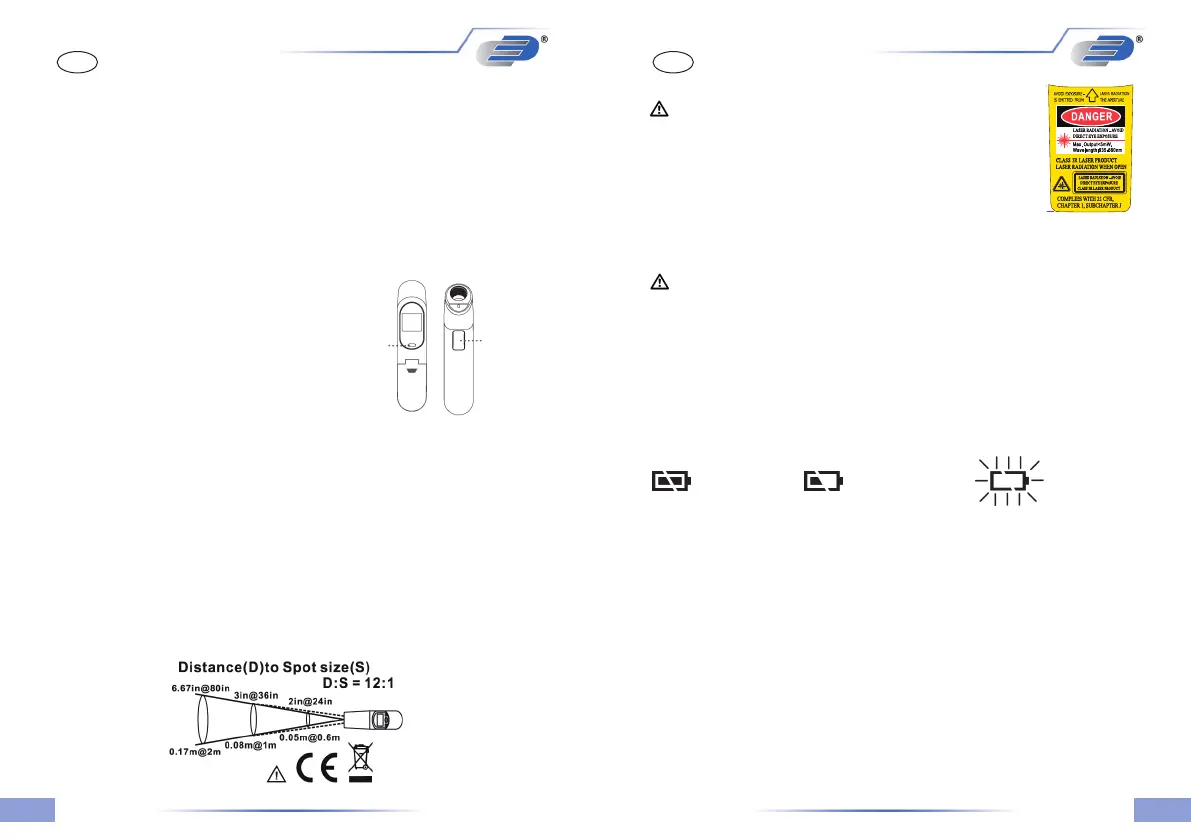
Battery OK Battery almost exhausted Battery exhausted
replace soon replace at once
• Change the battery when the middle or right battery power symbol
appears on the display (2 x 1,5 Volt AAA).
• Remove the battery compartment opening the cover in direction of
the arrow. Attention: Conrm the unit is power o before
changing battery.
• Attention: Please do not dispose of old electronic devices and
empty batteries in household waste. To protect the environment,
take them to your retail store or to appropriate collection sites
according to national or local regulations.
GBGB
ScanTemp 410 – Infrared Thermometer
Introduction:
We are condent you will nd many uses for your “ScanTemp 410”
non contact thermometer. It is compact and easy to use. Within
one second you can safely measure surface temperatures without
contact, even of hot, hazardous, or hard-to-reach objects. With the
laser pointer the measuring point can be focused exactly.
Features:
• 2 x 1.5 Volt batteries AAA included
• Large LCD-display with backlight
• Indication of measured value and
maximum value
• Auto power o after 15 seconds
• Switch °C/°F
• With laser pointer
Use:
• Just aim at the measuring object
and press the measure button
• Read the surface temperature
in a second.
Distance, Spot Size, and Field of View:
As the distance (D) from the object increases, the spot size (S) of the
area measured by the unit becomes larger at a ratio of D:S = 12:1.
To get the most accurate temperature reading, aim at the target as
near as possible.
°C/°F-Button
Measure-
Button
Font Color: Black
50#反銀龍
Pantone Yellow C
Pantone Red 032C
P1014500096(TN41ALCH_Dostmann)_Laser label Class 3R


 To Next Page
 Loading...