4. PARAMETER
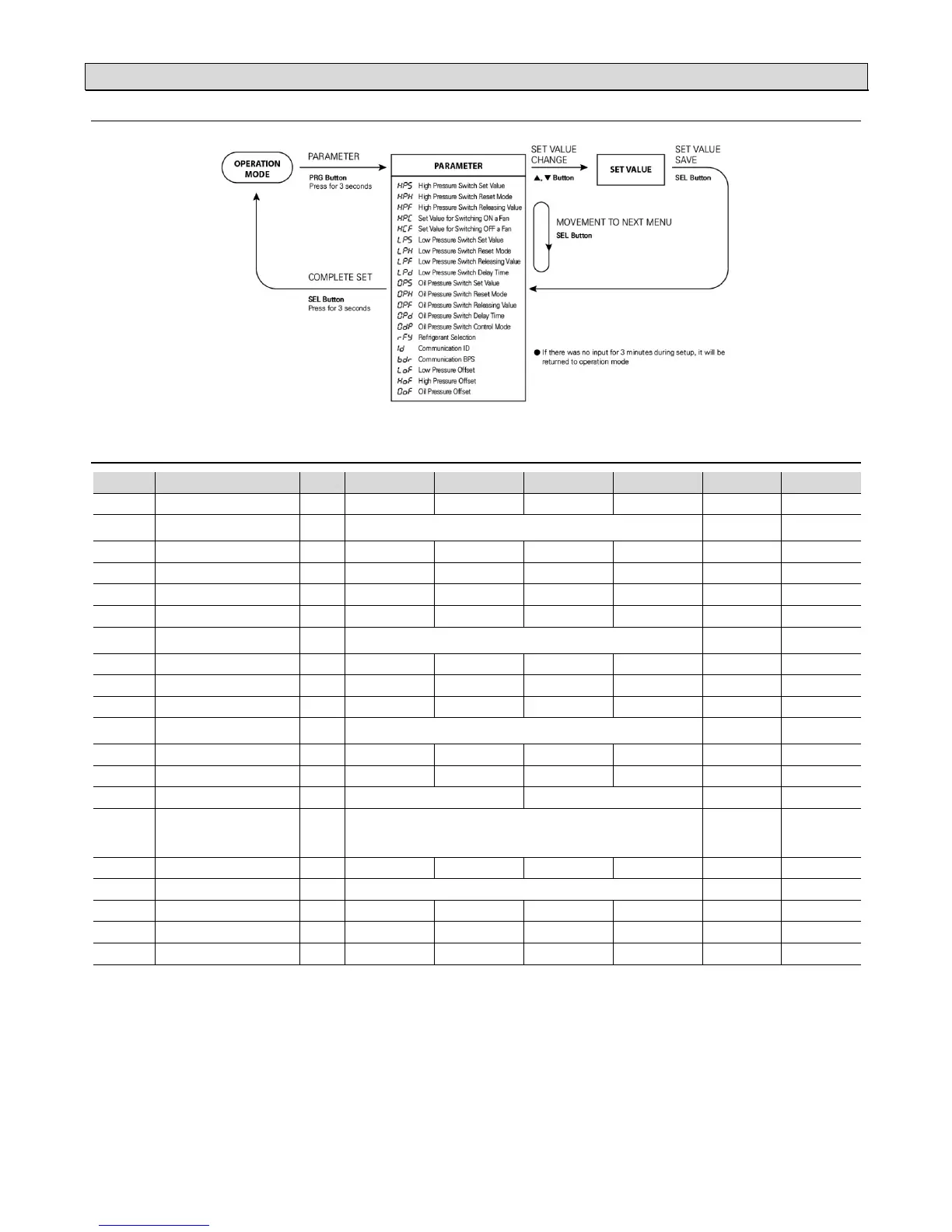
: PARAMETER CHANGE
.
: PARAMETER TABLE
No Menu Code Unit Step Min Max Default CustomSetup
4 0031
High Pressure Switch Set Value
HPS MPa 0.01
-0.1 0 5.00
2.60
4 0032
High Pressure Switch Reset Mode (※1)
(Manual / Automatic Reset)
HPH A (0)= Automatic Reset H (1)= Manual Reset H (1)
4 0033
High Pressure Switch Releasing Value
HPF MPa 0.01
-0.1 0 HPS- 0.01
2.50
4 0041
Set Value for Switching ON a Fan
HPC MPa 0.01
-0.1 0 5.00
1.50
4 0043
Set Value for Switching OFF a Fan
HCF MPa 0.01
-0.1 0 HPC- 0.01
1.40
4 0051
Low Pressure Switch Set Value
LPS MPa 0.01
-0.10 5.00
0.25
4 0052
Low Pressure Switch Reset Mode (※1)
(Manual / Automatic Reset)
LPH A (0)= Automatic Reset H (1)= Manual Reset A (0)
4 0053
Low Pressure Switch Releasing Value
LPF MPa 0.01
LPS+ 0.01 5.00
0.35
4 0055
Low Pressure Switch Delay Time (※2)
LPD sec 1
0 999
0
4 0065
Oil Pressure Switch Set Value (※3)
0PS MPa 0.01
-0.00 5.00
0.10
4 0066
Oil Pressure Switch Reset Mode (※1)
(Manual / Automatic Reset)
0PH A (0)= Automatic Reset H (1)= Manual Reset A (0)
4 0067
Oil Pressure Switch Releasing Value (※3)
0PF MPa 0.01
OPS + 0.01 5.10
0.20
4 0068
Oil Pressure Switch Delay Time (※4)
0PD sec 1
0 999
0
4 0069
Oil Pressure Switch Control Mode (※5)
0DP 0-L (0)=OP - LP H-0(1)= HP - OP 0-L(0)
4 0061
Refrigerant Selection (※6)
RFY
R22 (0)= R22
R23 (1)= R23
123 (2)= R-123
124 (3)= R-124
134 (4)= R-134a
404 (5)= R-404a
407 (6)= R-407c
410 (7)= R-410a
507 (8)= R-507
R22 (0)
4 0063
Communication ID
ID - 1
1 255 1
4 0064
Communication BPS
BDR
48 (0)= 4800 96 (1)= 9600 192 (2)= 19200 384 (3)= 38400
96 (1)
4 0071
Low Pressure Offset (※7)
LOF MPa 0.01
-1.99 1.99 0.00
4 0072
High Pressure Offset (※7)
HOF MPa 0.01
-1.99 1.99 0.00
4 0073
Oil Pressure Offset (※7)
0OF MPa 0.01
-1.99 1.99 0.00
(※1) Reset mode:
Automatic Reset (A ): It will be reset automatically when reaching releasing pressure value.
Manual reset (H ): It will not be reset when reaching release pressure value unless users press RST button twice consecutively.
(※2) Low pressure switch delay time :
If output is activated, it maintenances ON status during minimum ON time even under the OFF condition.
(※3) Oil Pressure Switch Set Value :
Differential pressure = Oil pressure – Low pressur
It becomes an ON condition for output if differential pressure valve (DP) is less than oil switch pressure switch set value (OPS). Output is de-activated if
differential pressure value (DP) is higher than oil pressure switch releasing value (OPF) after output is activated.
(※4) Oil Pressure Switch Delay Time :
Output will be activated after maintaining delay time which is set even though it is under the ON condition.
LED lamp will be turned on a light simultaneously with output after flickering during delay time.
(※5)
Oil Pressure Switch Control Mode
Control mode for oil pressure switch: In case of using control mode for oil pressure switch as 0-L (OP – LP),
it can be come to a output state of OPS due to pressure equalizing at the status of compressor stop.
(※6) Refrigerant selection :
Display saturation temperature in accordance with selected refrigerant.
(※7) Offset :
Offset the differential for pressure sensor.
e.g) If displayed pressure value: 0.20MPa and actual pressure value: 0.22MPa It is offset by inputting +0.02MPa.


 To Next Page
 Loading...