EasyManua.ls Logo

Douglas Lighting Controls WRS-2224 - User Manual

Douglas Lighting Controls WRS-2224
20 pages
Print Icon
To Next Page IconTo Next Page
Loading...
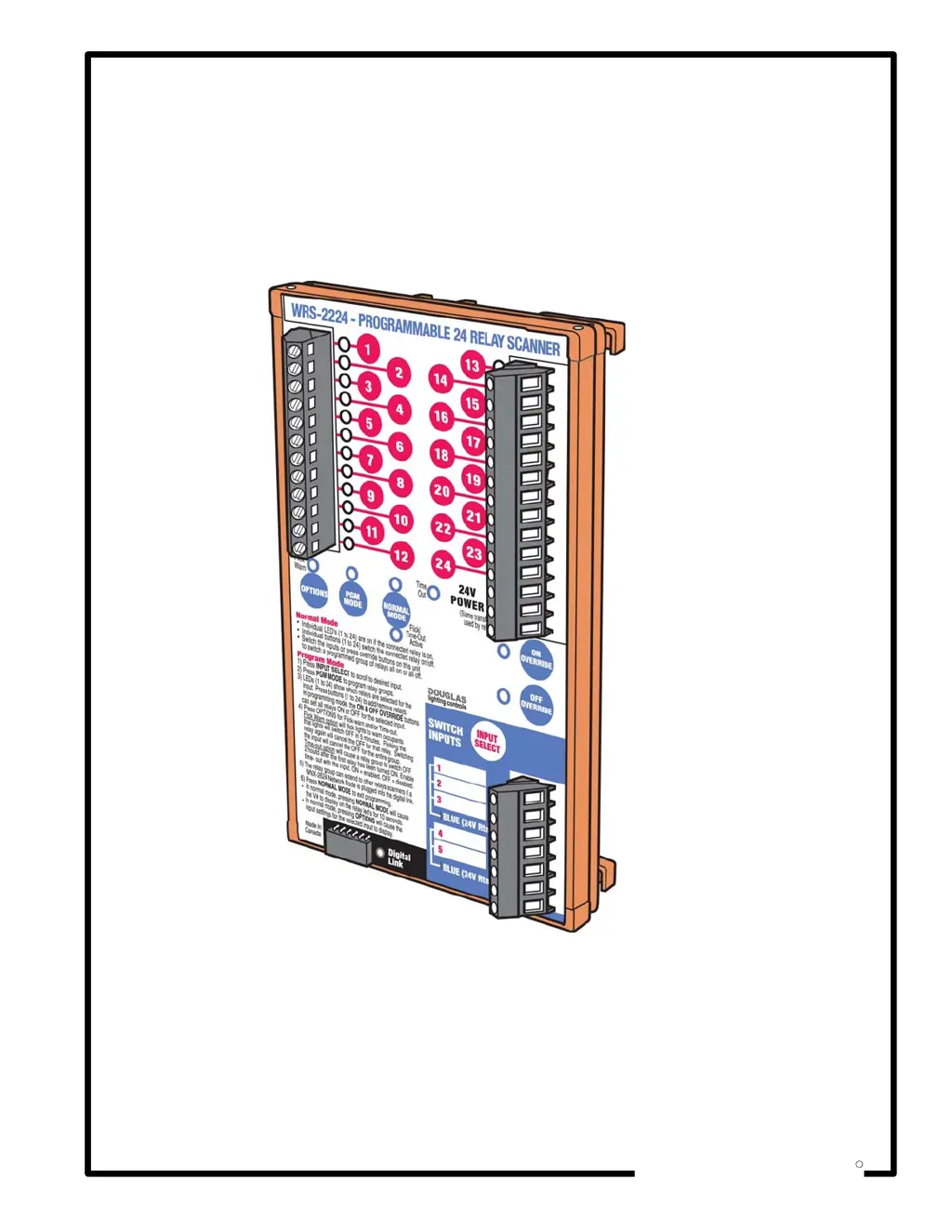
WRS-2224
Programmable Relay Scanner
Instruction Manual
DOUGLAS
lighting controls
R

Questions and Answers

Summary

Introduction

WRS-2224 Programmable Relay Scanner

Overview of the product's capabilities and purpose.

Relay Output Connections

Details the 24 output terminals available for relay control.

Digital Link Connection

Explains the port for network communication modules.

Group Input Connections

Describes the 5 inputs for controlling relay groups.

Parts & Dimensions

Relay Outputs

Describes the 24 output terminals for individual relay control.

Scanner Controls & Indicators

Groups buttons, LEDs, and mode selectors for operation.

Input & Connection Ports

Groups the input select button, group inputs, and digital link socket.

Physical Dimensions

Provides the physical size and mounting information of the scanner.

Specifications

General Specifications

Covers power, master switches, and digital link details.

Programming Specifications

Details how programming is done and retained.

Environmental Specifications

Outlines operating environment and temperature limits.

Output Specifications

Details the 24 relay outputs and their characteristics.

Installation

Installation Instructions

Step-by-step guide for mounting and initial setup of the scanner.

Switch Input Configurations

Explains how to connect different types of switches to inputs.

Douglas Relay Switch Compatibility

Describes compatibility with Douglas relay switches.

Douglas Timer Automation Compatibility

Describes compatibility with Douglas timer devices.

Basics: Normal Mode

Normal Mode Operation

Explains how to use the scanner in normal operating mode.

LED Status Indicators

Describes the meaning of flashing LEDs in normal mode.

Basics: Version Number

Version Number Display

Explains how to view scanner and network node version numbers.

Binary Code Explanation

Clarifies the binary code system used for version number display.

Setup: Input Configure Mode

Input Configuration Overview

Introduces specifying switch hardware types for each input.

Configuration Procedure

Details the steps to configure input switch types.

Setup: Program Mode

Program Mode Description

Explains how to group output relays by input.

Programming Procedure

Details the steps for assigning relays to input groups.

Programming Notes

Provides important notes regarding inactivity and returning to normal mode.

Setup: Flick Warn Option

Flick Warn Functionality

Describes the feature that warns occupants of impending light shut-off.

Assigning Flick Warn

Details the procedure for enabling the Flick Warn feature.

De-Assigning Flick Warn

Explains how to disable the Flick Warn feature.

Flick Warn Notes

Provides important considerations, like not using with HID lighting.

Setup: Time Out Option

Time Out Functionality

Describes the feature that automatically switches off relays after a set time.

Assigning Time Out

Details the procedure for enabling the Time Out feature.

De-Assigning Time Out

Explains how to disable the Time Out feature.

Time Out Notes

Provides critical notes, like only one group can have Time Out.

Connections: Stand Alone Panels - Diagrams

Office Floor Plan

Illustrates the office layout and zones for relay control.

Relay Panel Wiring Diagram

Shows the physical wiring of the relay panel components.

Group Switch Station Wiring

Illustrates the wiring for the group switch station.

Connections: Stand Alone Panels - Configuration

Simple Stand Alone Panel Configuration

Explains grouping, override, Time Out, and Flick Warn for stand-alone setups.

Connections: Multiple Panels

Multiple Relay Panel Interconnection

Describes wiring multiple panels using a multi-conductor bus.

Panel Wiring Diagrams

Shows wiring configurations for main and remote relay panels.

Inter-Connected Panels Bus

Details the 10-conductor bus for master switch controls across panels.

Connections: Multiple Panels - Networking

Relay Scanner Networking

Explains using the WNX-2624 Network Node for scanner interconnections.

Networked Panel Diagrams

Illustrates networked WRS-2224 scanners and WNX-2624 nodes.

Troubleshooting

Troubleshooting Guide

Provides general guidelines and a table for problem resolution.

General Troubleshooting Guidelines

Lists essential checks before troubleshooting specific issues.

Appendix A - Input;Output Log

Input;Output Log Form

Provides a form for documenting input switch and output relay configurations.

General Notes

Additional Notes

Warranty Information

Warranty Terms

Outlines the product warranty period and exclusions.

Company Contact Information

Provides contact details for the manufacturer.

Douglas Lighting Controls WRS-2224 Specifications

General IconGeneral
BrandDouglas Lighting Controls
ModelWRS-2224
CategoryScanner
LanguageEnglish