How to Play Music on MAC
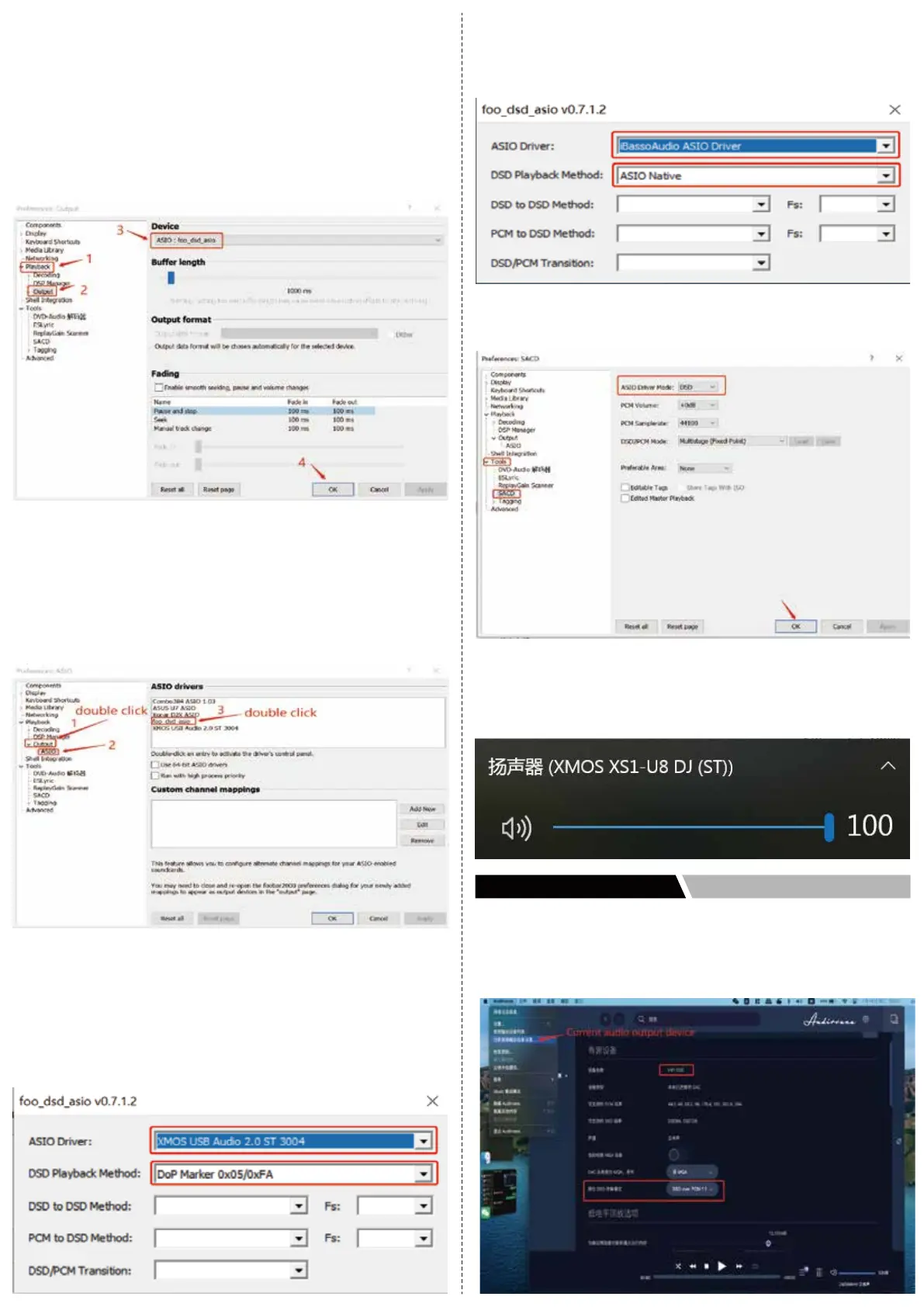
1. Please click Audirvana on the upper left corner of menu, click
current audio output device and you will see HIFI DSD device,
then select DSD mode to DSD over PCM1.1
● Playback settings
Select “File”‐‐>"Perferences" in the menu bar of foobar, and the setting
box will appear, please select “Play back-->Output”, then the options
of Device on the right please select ASIO:foo_dsd_asio, then click
“OK”, as the following picture
shows:
● Plug-in Settings
1. Double click“Output”you will see ASIO below, click foo_dsd_asio
option of ASIO drivers on the right, as the following picture shows
2. Double click foo_dsd_asio then the following menu will appear,
please select the options as the picture shows, then click the“×”
on the upper right coner to close and exit.
Note:if you want to play DSD256, please install driver: iBassoAudio
_USB-DAC_driver_v3.26.0(the installation process is the same as
the above), and DSD Playback Method please select “ASIO Native”
3. Click “SACD” below “Tools”, and set “ASIO drivermode” as “DSD”,
then click“OK”:
4. Please set the volume to 100 to play DSD music,click the speaker
on the lower right corner and click XMOS XS1-U8 DJ and turn the
volume up to 100:


 To Next Page
 Loading...