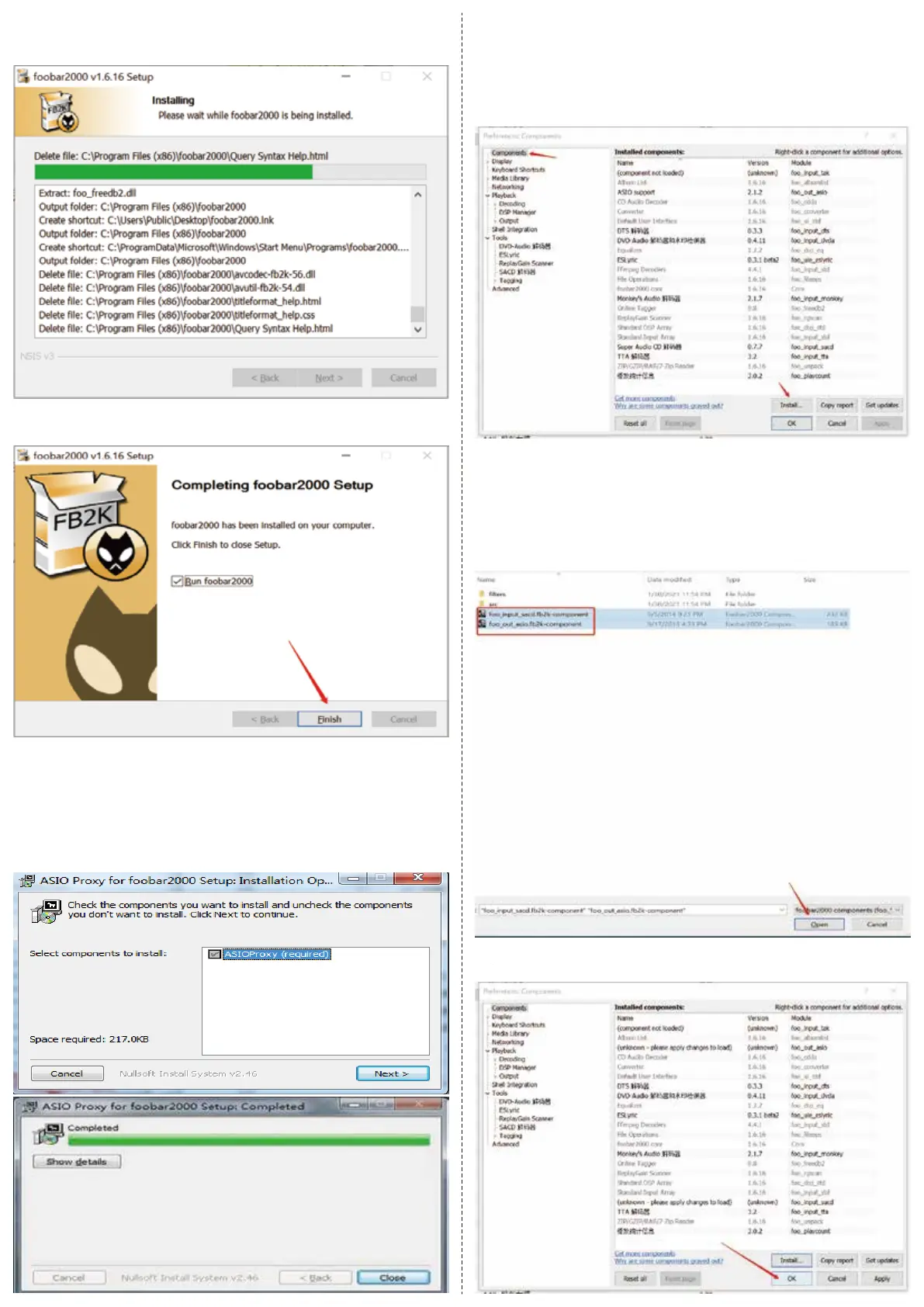
7. The installation is in the process,please wait, as the following
picture shows:
8. The installation is done, click “Finish” as the following picture shows:
● Install asioproxy plug-in
Find ASIOProxyInstall‐0.7.1.2.exe in the foobar comment file in the
U-disk, and double click it and then click “Next”, when the progress
bar is finished, please click “Close” .
● Install ASIO plug-in
1. Select “File”‐‐>"Perferences" in the Menu bar of Foobar, the setting
box will appear and please select“Components”on the left, as the
following picture shows:
2. Select “Install” on the lower right corner, and the setting box will
appear, please select“foo_input_sacd.fb2k‐component”and “foo_
out_asio.fb2k‐component” in the foobar comment in the U-disk,
click “Open” , as the following picture shows:
Click“OK”,and then restart foobar, as the following picture shows:


 To Next Page
 Loading...