Need help?
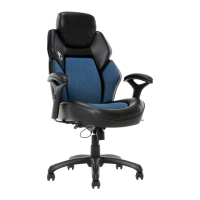
Do you have a question about the DPS 3D Insight 51822-BLU and is the answer not in the manual?
General guidance for product usage and maintenance.
Important safety warnings and cleaning advice for the chair.
Attaching casters to the base and inserting the gas lift.
Securing the seat plate to the seat cushion using screws.
Connecting the seat plate levers to the cushion receivers.
Mounting the left and right armrests to the seat cushion.
Aligning and attaching the back cushion via the support plate.
Orienting the chair and connecting the gas lift to the seat plate.
Securing the headrest to the top of the back cushion.
How to raise or lower the chair to the desired seating height.
Controlling the chair's reclining and locking mechanism.
Modifying the resistance for rocking and reclining the chair.
Understanding and utilizing the dynamic lumbar support feature.
Changing the height of the headrest for optimal comfort.
Modifying the armrests to the preferred height.
Details on warranty coverage, exclusions, and how to submit a claim.
 General
| Brand | DPS |
|---|---|
| Model | 3D Insight 51822-BLU |
| Category | Indoor Furnishing |
| Language | English |

 To Next Page