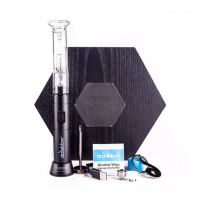
Custom Hold Times:
Need more heat for longer? Set your own hold time that works best for you!
Self Cleaning Mode:
A high energy heat cycle that burns away any remaining residue in the Ceramic Induction Cups.
Self Cleaning Cycle (https://www.youtube.com/watch?v=vfak6D-tsQc)
Standby Lighting:
25 LED Light Show Options
Stealth Mode (No Top Lights)
Standby Light Options (https://www.youtube.com/watch?v=uZcAHcNHEMM)
Glass Percolator Attachment:
50mm Ground Glass Fitting
Beautiful Hourglass Profile
Heavy Duty Borosilicate
Stylish Design:
Quality Tactile Satin Finish
Solid Foundation
Simple & Intuitive Interface
Technical Specs:
Output Power up to 120 watts
Battery Capacity of 33.3 watt-hours
64kb memory
LiFePO4 non-volatile battery cells built into battery pack (non-explosive batteries, one of the safest on the market)
Pass through charging
Over-voltage, over-current, under-voltage, over-temperature, short-circuit, and reverse-polarity protection built into
the unit
How to use your Switch
User Guide (https://www.youtube.com/watch?v=GXzhWHiy0rI&t=31s)
1. Fill glass attachment with water and place on Switch unit.
2. Load induction cup and place inside heating chamber with included tweezers.


 To Next Page