
 Need help?
Do you have a question about the Dr. J HI-04 and is the answer not in the manual?
Covers ventilation, fire/shock prevention, water exposure, and eye safety warnings.
Email address for assistance with projector issues.
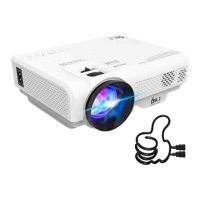
Description of the portable home projector and its best use cases.
Identification of all buttons, inputs, and outputs on the device.
Highlights resolution, projection size, keystone adjustment, and lamp life.
Explains front, rear, front ceiling, and rear ceiling projection modes.
Guidance on mounting, non-mounted setup, and connecting the power cable.
Instructions for connecting via HDMI, including potential adaptors and audio settings.
Steps for connecting mobile devices and USB storage for playback.
Methods for connecting various devices using HDMI, VGA, or USB.
How to use adjustment wheels to sharpen the image and correct distortion.
Details on preset and custom picture modes for image output.
Explanation of preset and custom sound modes for optimal audio.
Solutions for color issues, blurriness, and fuzzy text.
Troubleshooting no/low sound and noisy projector fan.
The Dr. J HI-04 Mini Home Projector is a portable device designed for home entertainment. It allows users to project images from various sources onto a screen or wall, making it suitable for activities like streaming sports games indoors or hosting outdoor movie nights. This projector is considered a budget model and is primarily intended for casual home use rather than professional settings.
The core function of the Dr. J HI-04 is to project visual content from connected devices. It supports a variety of input sources, including phones, tablets, computers (both Windows and Mac), gaming consoles (such as Xbox), DVD players, Amazon Firesticks, and USB drives. The projector features a 1280x720 resolution, which helps in producing crisp images for an enhanced viewing experience.
For connecting to computers, users can utilize an HDMI cable by plugging it into the computer's HDMI port and then into the projector's HDMI port. If a computer lacks an HDMI port, an adapter can be used. For devices that do not support audio via VGA cables, a 3.5mm audio cable can be used to connect the device's audio output to the projector. When connecting to phones or tablets, an HDMI to lightning cable or USB-C adapter (not included) is required. Gaming consoles can also be connected via an HDMI cable. For Xbox users, specific audio settings (Digital Audio Output set to PCM) are recommended to ensure proper sound. USB drives and memory cards can be connected directly to the projector's USB port, or via an adapter for memory cards, allowing users to view content stored on them. The projector offers an "Input Source Button" to select the desired input, such as HDMI or DMP (for USB/Memory Card).
The projection size is adjustable, ranging from 32 to 170 inches, providing flexibility for different viewing environments. The projector also includes a +/- 15-degree keystone adjustment function, which helps correct distorted images when the projector is not positioned perfectly straight on.
The Dr. J HI-04 offers several usage features to enhance the viewing experience:
The projector can be set up in various ways. For non-mounted use, it should be placed on a flat, stable surface, pointing directly at the screen or wall. Mounting the projector to the ceiling or a tripod is optional and requires a separate mount. There are four projection settings based on positioning:
The projector provides a menu for adjusting image and sound settings:
The manual provides guidance for common issues:
The manual emphasizes several important maintenance and safety guidelines:
The projector has ventilation openings to exhaust hot air. It is crucial not to place anything flammable near these openings or cover them. The projector should always be in a well-ventilated area, and confined spaces should be avoided to prevent overheating.
Users are warned not to look directly into the projector lens when it is on, as the bright light can cause eye damage.
To prevent electric shock, users should not open the projector unit body, as there are no user-serviceable parts inside. The projector should not be exposed to rain or water to prevent fire or shock. If used outdoors, it should be stored in a dry area and not left unattended for prolonged periods.
The projector boasts a lamp life of 50,000 hours, indicating a long operational lifespan for the light source under normal usage conditions.
For any support needs or issues that cannot be resolved through troubleshooting, users are encouraged to contact drjprofessional@163.com.
 General
| Weight | 2.5 kg |
|---|---|
| Lamp Life | 50, 000 Hours |
| Connectivity | HDMI, USB, VGA, AV |
| Aspect Ratio | 16:9 |
| Keystone Correction | ±15° |
| Speaker | 5W |

 To Next Page