EasyManua.ls Logo

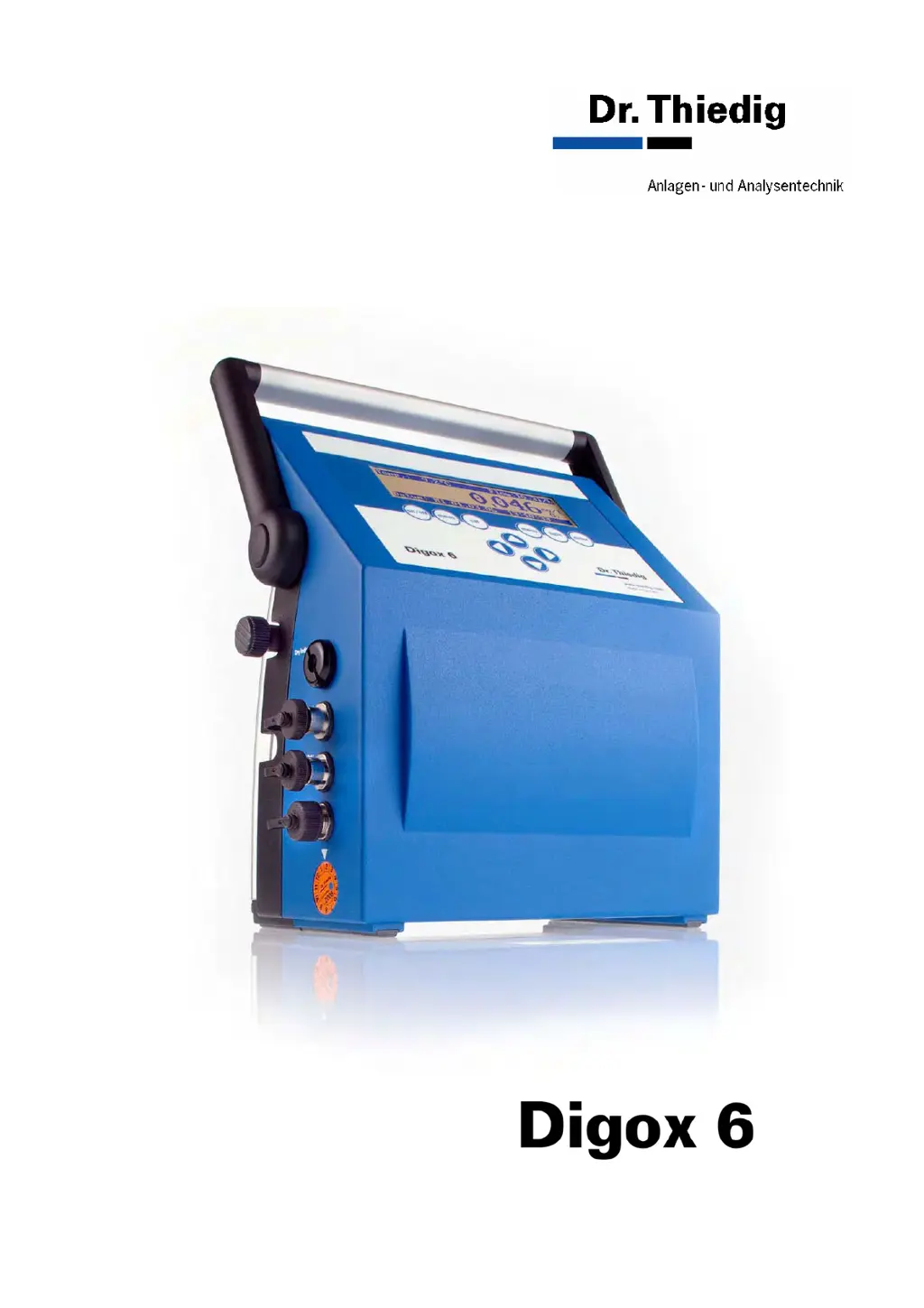
Dr.Thiedig Digox 6 - User Manual

Dr.Thiedig Digox 6
62 pages
Print Icon
To Next Page IconTo Next Page
Loading...
Operating Manual
Oxygen Analyser

Table of Contents

Questions and Answers

Summary

1 Introduction

1.1 Conventional use

Describes the reliable, precise, and quick measurement of oxygen content in various liquids.

1.2 Unit description

Details the components of the Digox 6 analyser, including its display, connections, and power features.

1.3 Measuring principle

Explains the potentiostatic 3-electrode system used for oxygen analysis.

1.4 Processing measuring data

Covers the use of the DigoxWin software for displaying, saving, and evaluating measurement data.

2 Menu overview

2.1 The Measuring screen

Details the default screen displayed after the unit is switched on, showing key parameters.

2.2 Calibration menu

Presents the different calibration modes available, such as active and reference calibration.

2.3 Main menu

Outlines the primary navigation structure, listing options like Sample, Datalogger, Status, and Measuring range.

2.4 Menu level 2

Explains access to advanced functions via a four-digit code for enhanced security.

3 Taking the unit into service

3.1 Filling the reference electrode with KCI solution

Provides instructions for preparing the reference electrode with KCI solution prior to operation.

3.3 Taking the unit into service

Covers the initial power-on procedure, system check, and readiness for measurement.

4 Calibration of the Digox 6

4.1 Introduction

Explains why and when electrode calibration is necessary to maintain accuracy over time.

4.2 Variables influencing calibration

Details factors like flow and temperature that affect calibration accuracy and measurement.

4.3 Calibrating of the flowmeter

Procedure for calibrating the flowmeter and determining the Kf factor.

4.4 Thiedig active calibration

Procedure for Thiedig active calibration to determine the Ks factor, ensuring electrode sensitivity.

4.5 Short calibration

Procedure for short calibration, suitable for limited time conditions and quick checks.

4.6 Reference calibration

Determines Ref min and Ref max points to establish the calibration function for accurate readings.

5 Measuring

5.1 Conditions of the sample and practical hints

Specifies sample parameters like conductivity, flow, pressure, and temperature for accurate measurements.

5.2 The Digox 6 data logger

Describes the continuous and measuring point data loggers for saving and retrieving measurement values.

5.3 How to operate DigoxWin

Overview of DigoxWin features for data display, saving, and evaluation on a PC.

5.3.2 Installing DigoxWin

Step-by-step guide for installing DigoxWin software on a Windows operating system.

5.3.4 Processing measuring data on the PC

Methods for processing and saving data on the PC, including online logging and Excel export.

6 Maintenance

6.1 Cleaning the electrodes

General hints and specific steps for cleaning the measuring and calibration electrodes.

6.2 Exchanging diaphragm and sealing rings

Recommends annual replacement of diaphragm and sealing rings for optimal performance.

6.2.2 Means required

Lists the necessary tools and materials for dismantling the analyser block for maintenance.

6.4 Hints regarding the handling of rechargeable battery

Provides guidelines for optimizing battery service life and proper handling of the rechargeable battery.

7 Fault messages and troubleshooting

Troubleshooting Flow and Temperature Issues

Addresses flashing flow/temperature indicators and potential causes like incorrect settings or faulty sensors.

Troubleshooting Communication and System Errors

Covers issues related to PC connection failures and internal EEPROM faults.

Troubleshooting Calibration Errors

Details specific calibration errors (A-E) and provides remedies for each.

8 Special functions

8.1 Status display

Shows device status including Ks/Kf factors, zero current, medium, and measuring range settings.

8.2 Selecting recorder measuring ranges and output currents

Guides on setting appropriate measuring ranges and output currents for recorder connections.

8.3 Menu level 2 functions

Explains access to advanced system settings via a four-digit code for enhanced security.

8.3.2 Setting the interface

Procedure for selecting the device interface and its associated transfer rate (baud rate).

8.3.5 Enabling options

Details on enabling extended data logger memory by entering a specific code.

9 Technical data Digox 6

10 Appendix

10.1 Definition of terms

Provides definitions for technical terms and concepts used throughout the manual.

10.2 Scope of supply with accessories kit

Lists the items included in the standard accessories kit provided with the analyser.

10.3 Spare parts

Details various spare parts, including analyser block components and related items.

10.4 Digox 6 EC unit extension and accessories

Lists service kits, adapters, and system accessories for extending unit functionality.

10.6 Terminal assignment

Details the pin assignments for various connectors and sockets on the device.

Summary

1 Introduction

1.1 Conventional use

Describes the reliable, precise, and quick measurement of oxygen content in various liquids.

1.2 Unit description

Details the components of the Digox 6 analyser, including its display, connections, and power features.

1.3 Measuring principle

Explains the potentiostatic 3-electrode system used for oxygen analysis.

1.4 Processing measuring data

Covers the use of the DigoxWin software for displaying, saving, and evaluating measurement data.

2 Menu overview

2.1 The Measuring screen

Details the default screen displayed after the unit is switched on, showing key parameters.

2.2 Calibration menu

Presents the different calibration modes available, such as active and reference calibration.

2.3 Main menu

Outlines the primary navigation structure, listing options like Sample, Datalogger, Status, and Measuring range.

2.4 Menu level 2

Explains access to advanced functions via a four-digit code for enhanced security.

3 Taking the unit into service

3.1 Filling the reference electrode with KCI solution

Provides instructions for preparing the reference electrode with KCI solution prior to operation.

3.3 Taking the unit into service

Covers the initial power-on procedure, system check, and readiness for measurement.

4 Calibration of the Digox 6

4.1 Introduction

Explains why and when electrode calibration is necessary to maintain accuracy over time.

4.2 Variables influencing calibration

Details factors like flow and temperature that affect calibration accuracy and measurement.

4.3 Calibrating of the flowmeter

Procedure for calibrating the flowmeter and determining the Kf factor.

4.4 Thiedig active calibration

Procedure for Thiedig active calibration to determine the Ks factor, ensuring electrode sensitivity.

4.5 Short calibration

Procedure for short calibration, suitable for limited time conditions and quick checks.

4.6 Reference calibration

Determines Ref min and Ref max points to establish the calibration function for accurate readings.

5 Measuring

5.1 Conditions of the sample and practical hints

Specifies sample parameters like conductivity, flow, pressure, and temperature for accurate measurements.

5.2 The Digox 6 data logger

Describes the continuous and measuring point data loggers for saving and retrieving measurement values.

5.3 How to operate DigoxWin

Overview of DigoxWin features for data display, saving, and evaluation on a PC.

5.3.2 Installing DigoxWin

Step-by-step guide for installing DigoxWin software on a Windows operating system.

5.3.4 Processing measuring data on the PC

Methods for processing and saving data on the PC, including online logging and Excel export.

6 Maintenance

6.1 Cleaning the electrodes

General hints and specific steps for cleaning the measuring and calibration electrodes.

6.2 Exchanging diaphragm and sealing rings

Recommends annual replacement of diaphragm and sealing rings for optimal performance.

6.2.2 Means required

Lists the necessary tools and materials for dismantling the analyser block for maintenance.

6.4 Hints regarding the handling of rechargeable battery

Provides guidelines for optimizing battery service life and proper handling of the rechargeable battery.

7 Fault messages and troubleshooting

Troubleshooting Flow and Temperature Issues

Addresses flashing flow/temperature indicators and potential causes like incorrect settings or faulty sensors.

Troubleshooting Communication and System Errors

Covers issues related to PC connection failures and internal EEPROM faults.

Troubleshooting Calibration Errors

Details specific calibration errors (A-E) and provides remedies for each.

8 Special functions

8.1 Status display

Shows device status including Ks/Kf factors, zero current, medium, and measuring range settings.

8.2 Selecting recorder measuring ranges and output currents

Guides on setting appropriate measuring ranges and output currents for recorder connections.

8.3 Menu level 2 functions

Explains access to advanced system settings via a four-digit code for enhanced security.

8.3.2 Setting the interface

Procedure for selecting the device interface and its associated transfer rate (baud rate).

8.3.5 Enabling options

Details on enabling extended data logger memory by entering a specific code.

9 Technical data Digox 6

10 Appendix

10.1 Definition of terms

Provides definitions for technical terms and concepts used throughout the manual.

10.2 Scope of supply with accessories kit

Lists the items included in the standard accessories kit provided with the analyser.

10.3 Spare parts

Details various spare parts, including analyser block components and related items.

10.4 Digox 6 EC unit extension and accessories

Lists service kits, adapters, and system accessories for extending unit functionality.

10.6 Terminal assignment

Details the pin assignments for various connectors and sockets on the device.

Dr.Thiedig Digox 6 Specifications

General IconGeneral
BrandDr.Thiedig
ModelDigox 6
CategoryAnalytical Instruments
LanguageEnglish