EasyManua.ls Logo

DRAGON BREATH EA-5502 - User Manual

DRAGON BREATH EA-5502
19 pages
Go to English
Print Icon
To Next Page IconTo Next Page
Loading...
INSTRUKCJA OBSŁUGI
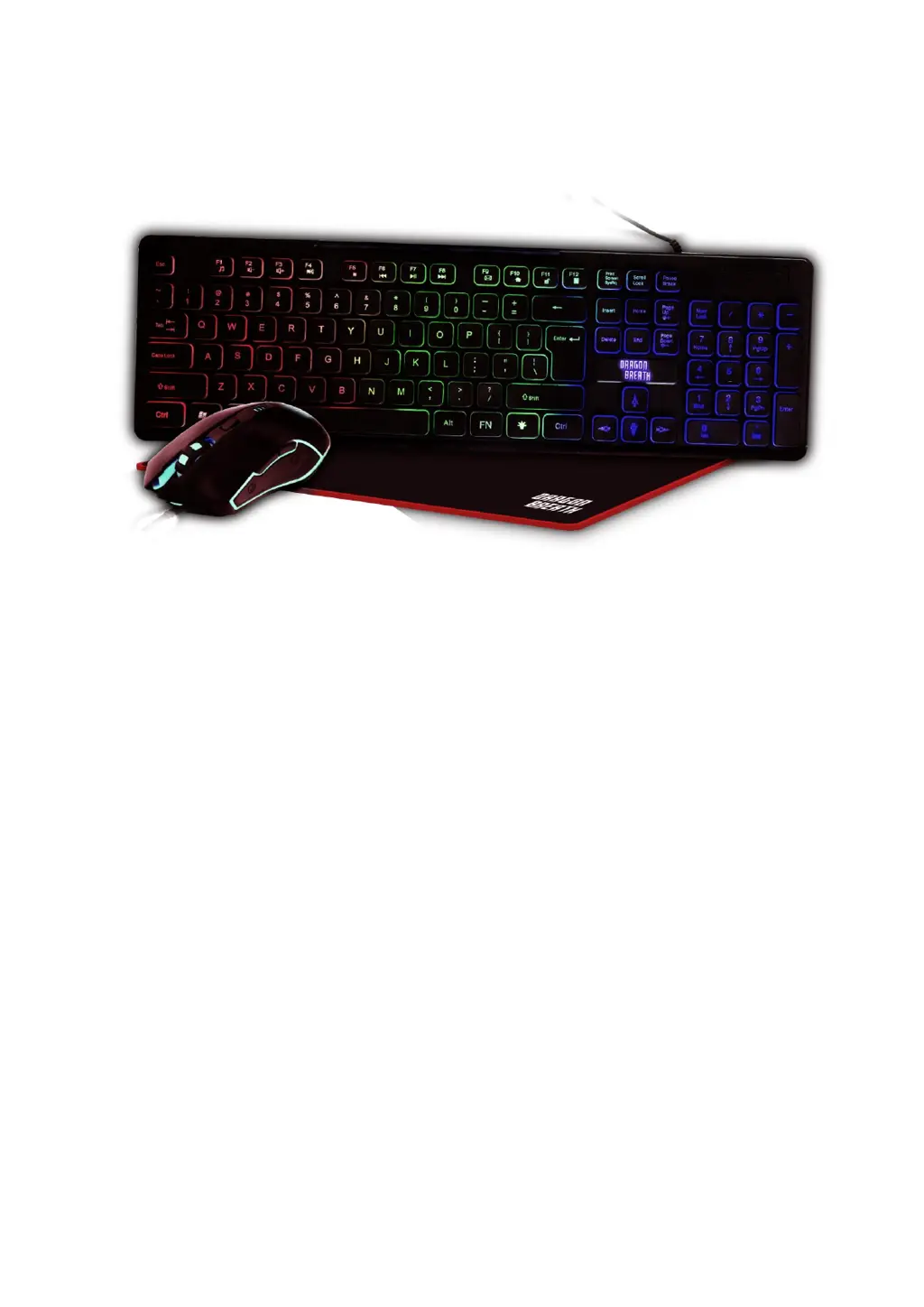
Zestaw dla gracza 3 w 1
Nr partii: 202106
Dziękujemy za wybranie produktu marki Dragon Breath. Został on zaprojektowany
z myślą o Tobie, dlatego robimy wszystko, aby korzystanie z niego sprawiało Ci
przyjemność. W trosce o Twoje bezpieczeństwo zalecamy uważne przeczytanie poniższej
instrukcji obsługi.
Biuro obsługi klienta
mPTech Sp. z o.o.
ul. Krakowska 119
50-428 Wrocław
Polska
Infolinia: (+48 71) 71 77 400
E-mail: pomoc@mptech.eu
Zaprojektowane w Polsce
Dane producenta
mPTech Sp. z o.o.
ul. Nowogrodzka 31
00-511 Warszawa
Polska
Strona www: myphone.pl
Wyprodukowane w Chinach

Questions and Answers

  • J
    Jeremiah HernandezAug 5, 2025
    How to fix a DRAGON BREATH EA-5502 Video Gaming Accessories keyboard that is not working?
    • Z
      Zachary DavisAug 5, 2025
      If your DRAGON BREATH keyboard isn't working, try the following: * Ensure the drivers are correctly installed on your system. * Verify the keyboard cable is securely connected to the computer. * Inspect the plug and power cord for any signs of damage. * Check if the USB port on your computer is damaged. * If using a USB HUB, confirm it's not damaged and provides sufficient power.
  • M
    Melissa KingAug 9, 2025
    What to do if my DRAGON BREATH Video Gaming Accessories mouse cursor doesn't move?
    • C
      Chad BeardAug 9, 2025
      If your DRAGON BREATH mouse cursor isn't moving, check these things: * Make sure the cable is properly connected to your computer or laptop. * Confirm that the operating system has recognized the device and installed the drivers. * Check if the USB socket on your computer or laptop is damaged. * Inspect the mouse cable for any damage.
  • T
    thomasbaileyAug 14, 2025
    How to adjust the speed of the DRAGON BREATH EA-5502 Video Gaming Accessories mouse cursor?
    • C
      Charles JonesAug 15, 2025
      If your DRAGON BREATH mouse cursor is moving too fast or slow, check the mouse resolution setting. You can usually switch it with the DPI button.
  • A
    Ashley PerkinsAug 20, 2025
    Why is the backlight not working on my DRAGON BREATH EA-5502?
    • R
      Rodney RobertsAug 20, 2025
      If the backlight on your DRAGON BREATH device isn't working, make sure the backlight brightness isn't set to the minimum level.
  • S
    samuel05Aug 25, 2025
    What to do if the scroll button does not work on DRAGON BREATH EA-5502?
    • P
      Pamela JenkinsAug 25, 2025
      If the scroll button on your DRAGON BREATH device isn't working, check if the operating system has correctly recognized the device and installed the drivers.
  • F
    fitzpatrickmichelleAug 30, 2025
    How to fit the DRAGON BREATH Video Gaming Accessories plug into the socket?
    • B
      Brad SmithAug 30, 2025
      If you cannot fit the DRAGON BREATH plug into the socket: * Ensure the plug faces the socket in the correct way. * Make sure it’s not upside down. * If it is, turn the cable plug by 180 degrees and see if it fits the USB socket, but do not force it.

Summary

Safety of Use

Technical Specifications

Technical Data

Summary of product specifications including model, durability, and compatibility.

Package Contents

List of all items included in the product package.

Keyboard Operation Guide

Keyboard Overview

Identification of keyboard components and features.

Connecting the Keyboard

Step-by-step guide for connecting the keyboard to a computer.

Backlight Control

Instructions for managing keyboard backlight modes and intensity.

Multimedia Key Functions

Key combinations for controlling media playback and system functions.

Anti-ghosting Feature

Explanation of the keyboard's anti-ghosting capability for gaming.

Mouse Operation Guide

Mouse Overview

Identification of the mouse's buttons and features.

Connecting the Mouse

Step-by-step guide for connecting the mouse to a computer.

Adjusting Mouse Resolution

How to change the mouse's DPI settings for sensitivity.

Disconnecting the Mouse

Simple instructions for safely unplugging the mouse.

Troubleshooting and Maintenance

Keyboard and Mouse Troubleshooting

Solutions for common problems with keyboard and mouse functionality.

Device Maintenance

Guidelines for prolonging the device's lifespan and proper care.

End of Manual Information

Correct Disposal of Equipment

Instructions for environmentally friendly disposal of the product.

Manual Usage Policy

Information regarding the copyright and usage of the manual.

Product Warranty

Details about the product's warranty coverage and claims.

Declaration of Conformity

Statement of compliance with European Union directives.

DRAGON BREATH EA-5502 Specifications

General IconGeneral
Product TypeGaming Headset
CompatibilityPC, PS4, Xbox One, Mobile
Speaker Diameter50mm
Frequency Response20Hz - 20kHz
Connection TypeWired
MicrophoneYes
Impedance32 Ohms
Noise CancellationYes
ColorBlack
MaterialPlastic