INSTALLATION
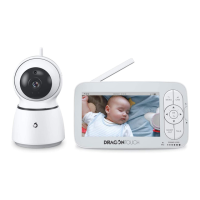
• Place the camera unit on a table at an appropriate height and ensure that the
camera unit is no less than 3 feet away from your baby’s crib. Adjust the camera
as needed; or
• Secure the camera unit by using a tripod bracket with a strong grip. Adjust the
camera as needed.
MONITOR MAINTENANCE
• Keeping the lens clean can help you monitor the clearest picture. Gently wipe the
lens and LCD screen with a dry and soft gauze to remove fingerprints and dust.
• Wipe the surface of the unit with a clean, dry cloth. Don't use a rough cloth, which
will scratch the outer surface of the unit.
• To reduce the risk of electric shock, do not disassemble the unit or fix it by yourself.
• Keep the unit dry. Do not use the unit in a wet or high-humidity environment.
Otherwise, it may cause a malfunction.
Note: The design and specifications of this product are subject to change without
prior notice.
15
EN


 To Next Page