EasyManua.ls Logo

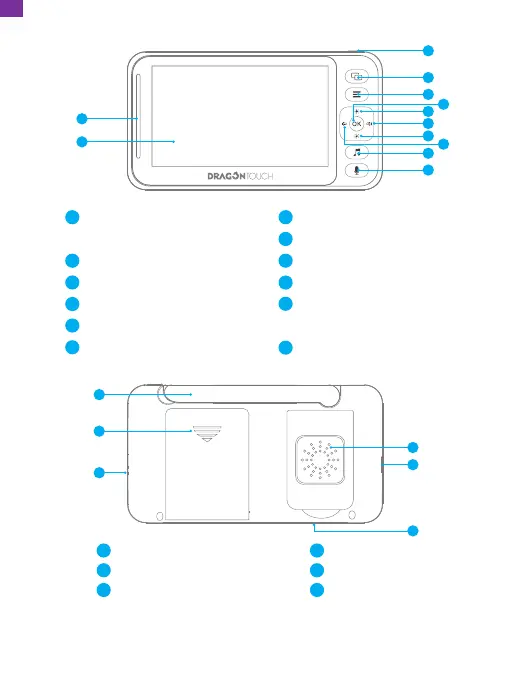
Dragon Touch E40 - Monitor Overview

Dragon Touch E40
36 pages
Print Icon
To Next Page IconTo Next Page
To Previous Page IconTo Previous Page
Loading...
MIC
RESET
Speaker
Micro USB Port
Microphone
16
17
18
Antenna
Battery Compartment Cover
Reset Button
13
14
15
14
15
13
16
17
18
Note: The charging LED indicator is red while charging. When the red light turns off
or turns blue, it indicates that the battery is fully charged.
2. Monitor Overview
2
1
3
9
Brightness +/Up Button
Volume +/Right Button
Brightness -/Down Button
Volume -/Left Button
Lullaby Button/Press twice
to skip to the next lullaby
Two Way Talk Button
7
8
9
10
11
12
Volume Level LED/
Charging LED Indicator
LCD Screen
Power/Sleep Button
Camera Switching Button
Menu Button
OK Button
1
2
3
4
5
6
4
5
11
12
7
8
6
10
04
EN

Related product manuals