SETTING & MANAGEMENT
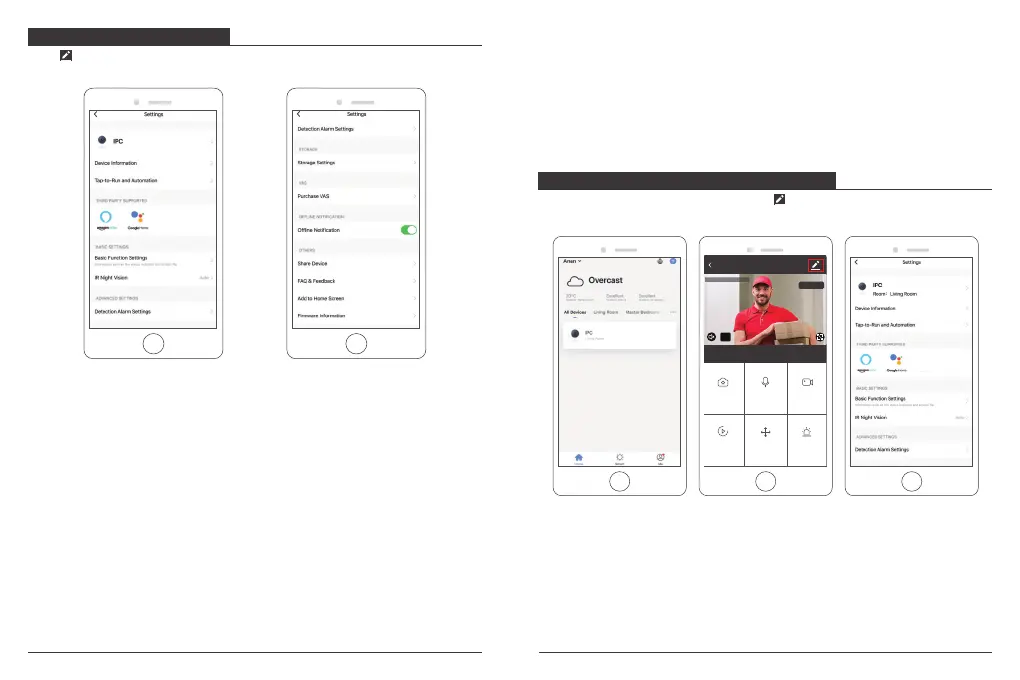
Click " " in the upper right corner of the control page for the management and setting
of the device.
USE THIRD PARTY DEVICES TO CONTROL
Choose the camera you want to control, click ” ” on the top right corner to enter into
the more settings.
Device Name - Can modify the device name and device location.
Device Information - To view: Owner, Virtual ID, Wi-Fi signal strength, IP address,
Device time zone.
Third Party Supported - Click the icon to view its instruction.
Basic Function Settings - Information such as time watermark flip screen.
IR Night Vision - Select IR night vision auto/on/off.
Detection Alarm Settings - a. can set the motion detection alarm on/off and motion
detection alarm sensitivity.
b. You could set motion tracking on/off and Alarm schedule
Storage settings - Please make sure you insert the microSD card. You could set the
recording mode Non-Stop(7*24h) or Event Recording.
Value-added Service Purchase - Video cloud storage service (optional)
Offline Notification - You could set on/off to notice you once the device offline.
Share Device - Can share this device to other people, enter the people's mobile phone
number; (Note: the entered mobile phone number should be registered with a smart life
App account).
FAQ & Feedback - Here you could found the questions and answers, if not in, you could
contact us through the bottom button. We will reply you in 24 hours.
Firmware Information - Support OTA Remote Upgrade (Do not disconnect during upgrading).
IPC
Direction
Screenshot
Alarm
Speak
Playback
HD
2020-02-07 13:51:48
Record
Signal: 91%
15 16


 To Next Page
 Loading...