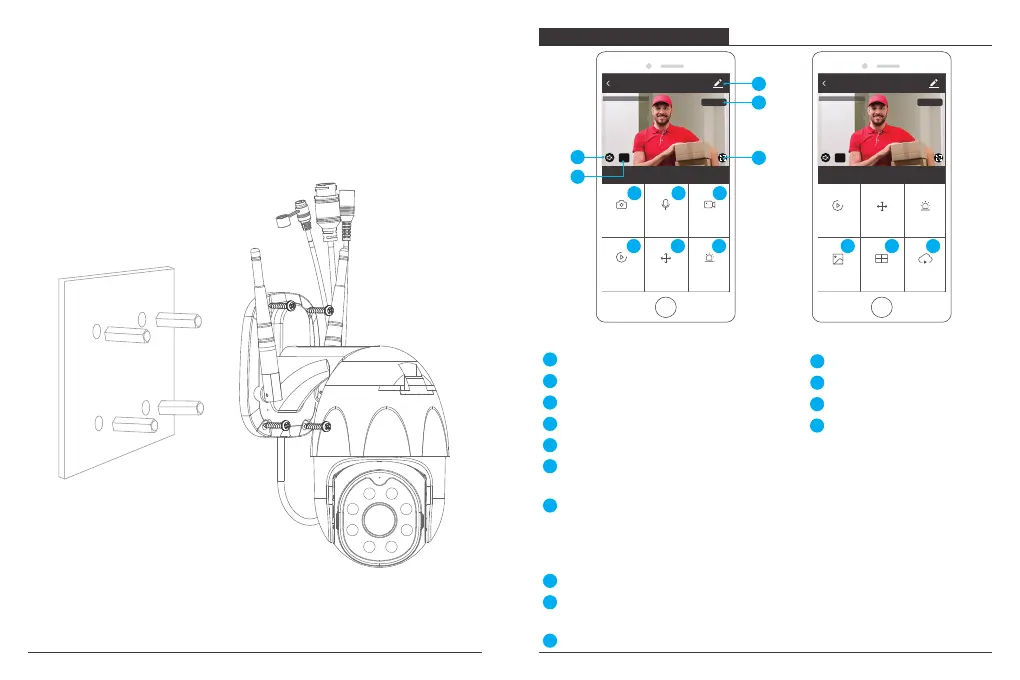
② Place the camera in a fixed position first and mark the screw hole with a marker. Use a
tool to drill holes in the marked screw holes.
③ After screwing four holes, insert the expansion bolt into the screw hole.
④ Align the screw hole on the bottom of the camera bracket with the hole on the wall.
Screw to fix the camera with the screws.
IPC
Direction
Screenshot
Alarm
Speak
Playback
HD
2020-02-07 13:51:48
Record
Signal: 91%
Setting & Management
PTZ Control (The camera can be arbitrarily rotated to give you a different perspective.
You can move it up and down, capture any corner you want to view.)
Wi-Fi Signal Strength
Sound Switch
SD/HD
Playback of Video
Record Video
1
2
Full Screen
3
4
5
8
9
10
Motion detection alarm (Abnormal report notification through intelligent detection of
anomaly in home. You can go out to work and play confidently. To set the alarm level
according to the camera's filed of view can make the alarm more accurate. Also you
set alarm timer as you want.)
11
Photo Album: You could view the Screenshot and recording videos.
12
Multi-View, if you have installed several Dragon Touch Cameras, you could click
multi-view to select the cameras which you want to show on the same screen.
13
Cloud storage, you need to purchase the cloud storage if you want.
14
1
2
5
3
4
6
7
8
9
10
11
IPC
Multi-View
Cloud storagePhoto album
HD
2020-02-07 13:51:48
Direction
AlarmPlayback
Signal: 91%
12
13
14
Real-time preview interface
Voice Chat
Screenshot
6
7
FUNCTION DESCRIPTION
13 14


 To Next Page
 Loading...