Note:
• Email address should be valid.
• The length of password must be within 6-20 characters, no special characters included.
• Please choose the same country in register and login.
• If you forgot the password, click “Forget Password” to reset it.
3. Add Your Camera
A. Configure through Wi-Fi (Recommended)
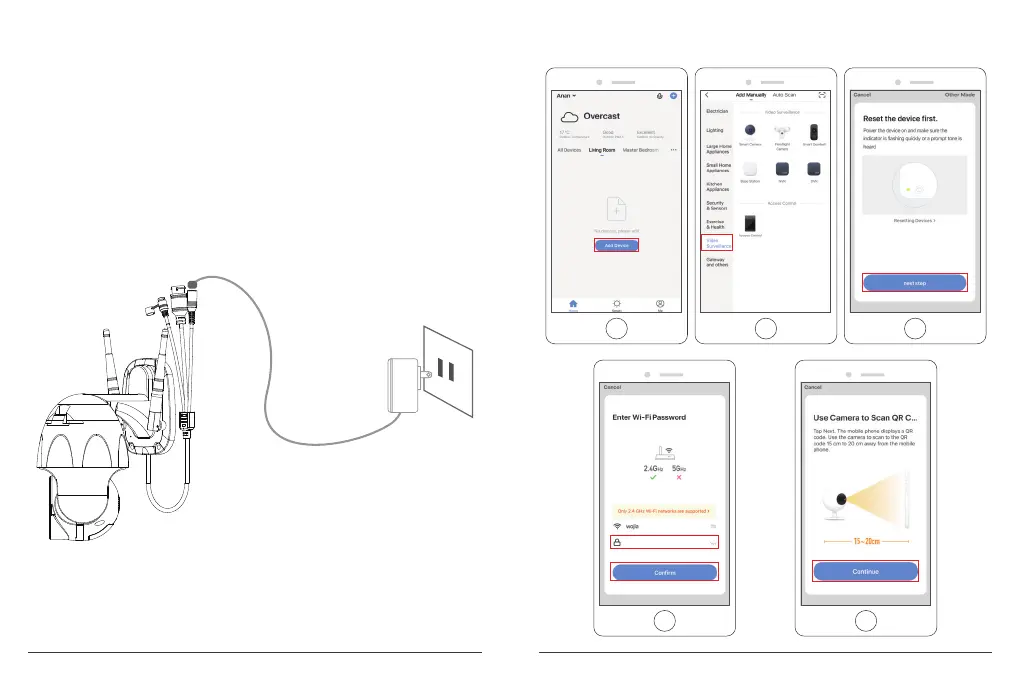
① Power on the Camera
If you want to plug in the microSD Card, please do it before installing camera on the wall.
Plug the power adapter into the outlet. The camera will rotate to complete self-test.
After that, you will hear the sound "wait for Wi-Fi config".
Note: If you don't hear any sound, please reset it on again.
② Choose Room, click “Add Device → Video Surveillance → Smart Camera → next step
→ Enter Wi-Fi Password → Confirm → Continue”.
5 6


 To Next Page