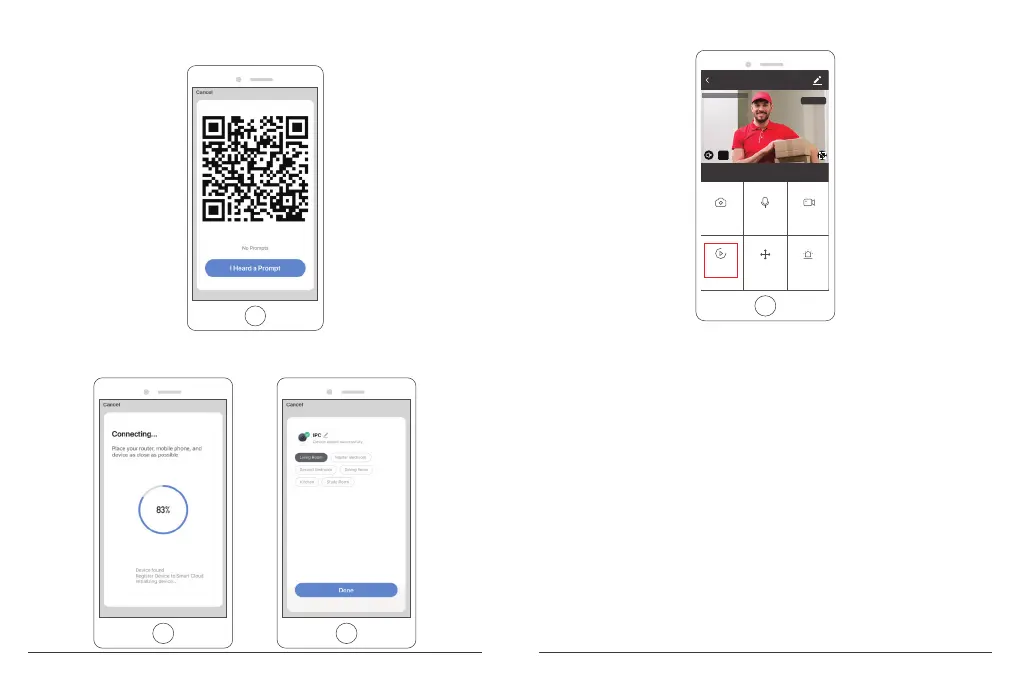
③ A QR code will be shown, just face the phone to the camera, after you hear the
sound “connect the router”, then click “I heard a Prompt”, see below picture.
④ Wait for the connection for about 30s, the device will be added successfully. Name
your camera and click the room where it is, click “Done”.
⑤ Click camera icon to preview camera live video.
⑥ Please install the camera on the wall or ceiling and adjust the antenna to make sure the
Wi-Fi signal strength more than 60%.
IPC
Direction
Screenshot
Alarm
Speak
Playback
HD
2020-02-07 13:51:48
Record
Signal: 91%
7 8


 To Next Page