
 Need help?
Do you have a question about the DragonTouch Talkiecam and is the answer not in the manual?
Instructions for powering the device on/off and charging its battery.
Guidance on inserting and formatting the microSD card before use.
How to operate the flashlight and understand auto power-off functions.
Instructions for taking photos, recording videos, and applying filters.
How to play music/stories, pause, and adjust volume.
How to view, play, and delete saved media files.
Instructions for selecting and playing games.
Details on range, transmit, and receive functions.
Guide to formatting the microSD card for optimal performance.
How to check the system information of the camera.
Instructions for resetting the camera to factory default settings.
Options for selecting the device's display language.
Information about the airplane mode and its impact on functions.
Available resolutions for taking photos.
Available resolutions for recording videos.
How to adjust the key tone volume.
Setting the device's date and time.
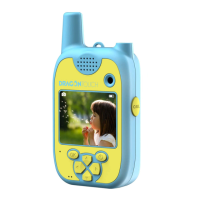
This document describes the Dragon Touch Talkiecam Kids Camera, a device designed for children that combines a camera with walkie-talkie functionality. It allows kids to take photos and videos, listen to music and stories, play games, and communicate with others using the walkie-talkie feature.
The Dragon Touch Talkiecam serves multiple functions, primarily as a digital camera and a walkie-talkie. As a camera, it enables users to capture still images and record videos. It features both a front and a rear lens, allowing for versatile shooting. The device supports various photo modes, photo frames, filters, and special effects to enhance creativity. It also includes a digital zoom function for both photos and videos.
Beyond its camera capabilities, the Talkiecam integrates a walkie-talkie function, allowing for two-way communication. Users can transmit messages by pressing and holding the Push-to-talk (PTT) button and release it to stop talking and transmit. The device automatically receives messages when the PTT button is not pressed and the "Flight Mode" is turned off. The effective communication range varies depending on the environment, being greater in open spaces and reduced in residential areas with obstacles.
The device also offers entertainment features, including a music mode where users can listen to MP3 files and audio stories. It supports playback of these audio files from a microSD card, with options to switch songs/stories, pause/continue playback, and adjust volume. Additionally, it includes a game mode with various pre-installed games for entertainment.
To get started, the camera needs to be powered on by pressing and holding the power button for 3 seconds. If it doesn't power on, it's recommended to charge it for at least 30 minutes, preferably while powered off.
For photo and video capture, a microSD card must be inserted into the dedicated slot. The manual advises formatting the microSD card on the camera before first use and restarting the camera afterward. This also applies to regular reformatting to prevent data corruption.
In Photo Mode, pressing the "OK" button takes a photo. Users can navigate through different photo modes, frames, filters, and effects using the left/previous and right/next buttons. The up/light on and down buttons control the digital zoom.
For Video Mode, pressing "OK" starts recording, and pressing it again stops the recording. Filters can be selected using the left/previous and right/next buttons.
The Music Mode allows users to select between MP3 and Story folders using the navigation buttons and confirm with "OK." During playback, the left/previous and right/next buttons switch songs or stories, "OK" pauses/continues, and the up/light on and down buttons adjust the volume. The device automatically creates MP3 and Story folders on the microSD card upon insertion, where users can upload their music and stories.
Playback Mode is used to view saved photos and videos. The left/previous and right/next buttons navigate through the media. Pressing "OK" plays/pauses videos. To delete media, users can press and hold "OK" to bring up the delete interface, then press "OK" again to confirm.
Game Mode is accessed by navigating to the desired game using the left/previous and right/next buttons and confirming with "OK."
The walkie-talkie function requires "Flight Mode" to be turned off in the settings. To transmit, the Push-to-talk (PTT) button is pressed and held while speaking. Releasing it stops transmission. The device automatically receives messages when the PTT button is not pressed.
The device also features a flashlight, which can be turned on or off by pressing the up/light on button.
The Talkiecam includes several settings for maintenance and customization. The "Settings" menu, accessible via the arrow and "OK" buttons, allows users to manage various aspects of the device.
One crucial maintenance feature is the "Format SD card" option. It is highly recommended to format the microSD card before initial use and regularly thereafter to prevent data corruption. Users are advised to download all photos and videos before reformatting, as this action erases all content.
The "Camera Version" setting allows users to check the system information of their camera. "Default Setting" provides an option to reset the camera to its factory default settings.
Language selection is available, with options including English, Deutsch, Français, Italiano, Español, and 日本語.
The "Airplane Mode" setting is important for managing the walkie-talkie function. If "Airplane Mode" is turned on, the walkie-talkie function cannot be used.
Other adjustable settings include "Camera Resolution" (8MP/5MP/1.3MP), "Video Resolution" (1080P/720P), and "Volume" for adjusting key tone volume. The "Date/Time" setting allows users to set the correct date and time for the device.
The camera also has an "Auto Power Off" feature to conserve energy. The display will automatically turn off after 3 minutes of inactivity, and the camera will power off entirely after 5 minutes of inactivity.
Charging is done via a Micro-USB port. The device has indicator lights: a blue light for working status and a red light for charging status.
 General
| Connectivity | USB |
|---|---|
| Photo Sensor Technology | CMOS |
| Special Features | Voice Recording, Video Recording |
| Resolution | 5.0 Megapixels |
| Storage | MicroSD card (up to 32GB) |

 To Next Page