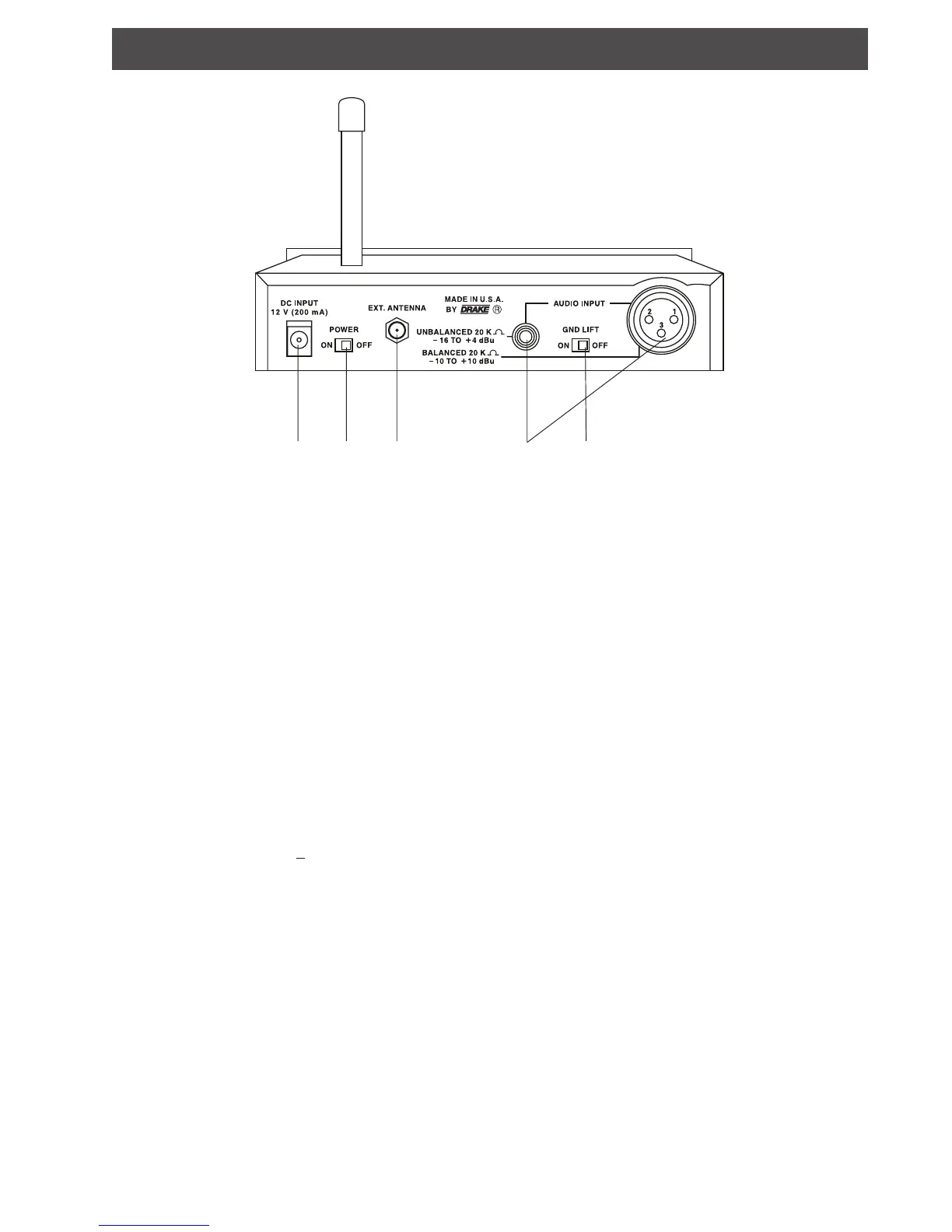
Rear Panel Controls and Connections 3
1 2 3 4 5
1. DC INPUT - Connect the supplied AC adapter to this
connector. Plug the AC Adapter into a source of
nominal 120 VAC, 60 Hz power
2. POWER ON/OFF - Set this switch to the "ON"
position to operate the ALT 72.
3. EXTERNAL ANTENNA - Connect the optional
magnet mount antenna here. This connector permits
fitting only the R. L. Drake Company supplied remote
magnet mount antenna.
4. AUDIO INPUT - Connect audio to the appropriate
input. The unbalanced phono style input and the XLR
balanced input are each always active, so audio will be
fed from whichever input is being used. Do not
attempt to use both inputs at once. All inputs can be
considered high impedance ( > 20K Ohm).
5. GROUND LIFT - When switched "ON" this switch
lifts or isolates the shield connection (pin 1) of the XLR
connector. In some installations where excessive
ground currents are present on the balanced line shield,
turning the ground lift "ON" may help. For other
conditions it should be set to the "OFF" position. This
switch does not affect the unbalanced input.


 To Next Page