899262c.doc01‐26‐17 3
Update Firmware, con
t
inued
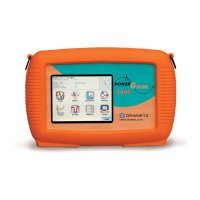
The procedure below details how to install the latest firmware update to the HDPQ.
Action... Result...
STEP 1:
From the Home Screen,
press Setup Instrument
located at the lower right corner
of the screen.
Pressing the setup
instrument icon will bring
you to the next screen, to
begin the update firmware
process.
STEP 2: From the Instrument
Settings menu, press Update
Firmware.
The update firmware
configuration screen prompts
whether or not you want to
proceed with a firmware update.
• If YES, make sure to insert
the USB containing the
firmware update file into the
USB connector on the right
side of the instrument, prior
to pressing YES. The
instrument will automatically
reboot and the firmware update
procedure will commence.
Proceed to Step 3.
• If NO, the screen returns to the
Instrument Settings menu
without making changes.
HDP
Q-5
14
Continued on next
page


 To Next Page
 Loading...